How to solve Toner Cartridge communication or detection error on Dell Laser Printers
Summary: This Article provides Information about Toner Error 093-940/941/942/943 Toner CRUM communication error and how to solve it.
This article applies to
This article does not apply to
This article is not tied to any specific product.
Not all product versions are identified in this article.
Symptoms
Table of Contents
Error description
One of the following errors is shown on the Printer display. This error can be caused by a defective Toner-Cartridge or Printer and when using non Dell-Toner-Cartridges.
| Code | Code description |
|---|---|
| 093-940 / 093-941 / 093-942 / 093-943 | Toner Cartridge Comm Fail Cause: 093-940: Toner CRUM (Y) communication error is detected. 093-941: Toner CRUM (M) communication error is detected. 093-942: Toner CRUM (C) communication error is detected. 093-943: Toner CRUM (K) communication error is detected. |
| 093-970 / 093-971 / 093-972 / 093-973 | Toner Cartridge Detached Cause: 093-970: The Toner Cartridge (Y) is not installed in the printer. 093-971: The Toner Cartridge (M) is not installed in the printer. 093-972: The Toner Cartridge (C) is not installed in the printer. 093-973: The Toner Cartridge (K) is not installed in the printer. |
Cause
Not Applicable
Resolution
Solution
For the above error codes, proceed with the following troubleshooting steps:
- Locate the TONER CARTRIDGE Connectors
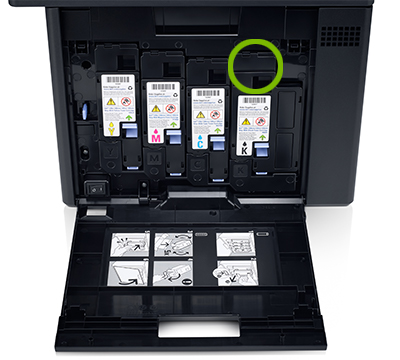
Figure 1: Location of the Cartridge Connectors - Check the installation of the TONER CARTRIDGE and check the behavior of the connectors:
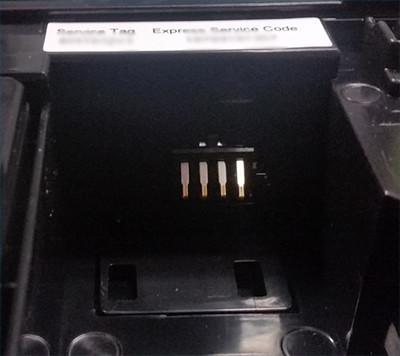
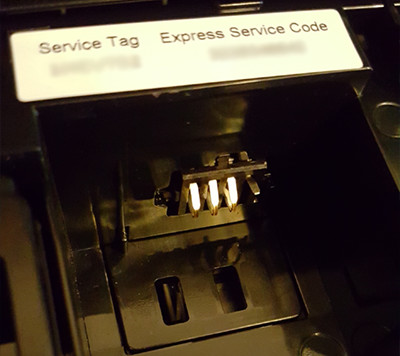
Figure 2: Normal Connector Figure 3: Damaged Connector Note: Damaged Toner-Connector is not covered in standard warranty and cannot be repaired within warranty.
- Reseat the TONER CARTRIDGE and make sure it is properly installed.
- If after the above step the error is still present, REPLACE the TONER CARTRIDGE.
Note: Use only Dell branded Toner. If third-party Toner is used, Dell cannot ensure the proper function of your Dell Printer.
- If after a POWER OFF/POWER ON cycle the error code is still present, contact the Dell technical Support.
.
Affected Products
Legacy PrintersArticle Properties
Article Number: 000136175
Article Type: Solution
Last Modified: 21 Oct 2025
Version: 6
Find answers to your questions from other Dell users
Support Services
Check if your device is covered by Support Services.