SC Storage Customer Notification: Applying host best practice settings via Dell Storage Manager Client
Summary: Briefly describes using Dell Storage Manager to ensure that the hosts are using the Best Practice settings for performance and failover.
This article applies to
This article does not apply to
This article is not tied to any specific product.
Not all product versions are identified in this article.
Symptoms
This alert pertains to Dell Storage Manager Client and host server settings. It contains specific information related to system features and/or functionality.
Alert:
To ensure connectivity during failover and provide optimal IO processing, certain host server settings may need to be adjusted. The Dell Storage Manager Client has the ability to automatically adjust these settings to ensure the host is in line with Best Practices for Storage Center. It is highly recommended that the Dell Storage Manager Client is installed on each Linux or Windows host and then use the wizard to configure the host to apply Best Practice settings. VMware hosts can be configured remotely from the Dell Storage Manager Client running on a Windows or Linux host. After the settings are applied, the Dell Storage Manager Client may be uninstalled if desired.
The host setup wizards can be launched by right-clicking "Servers" from the Storage tab within Dell Storage Manager Client and choosing Create Server from localhost or Create Server from VMware vSphere or vCenter (see Figure 1) or from the welcome screen when Dell Storage Manager Client is launched (see Figure 2).
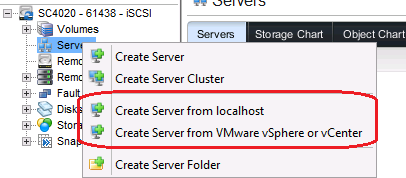
Figure 1.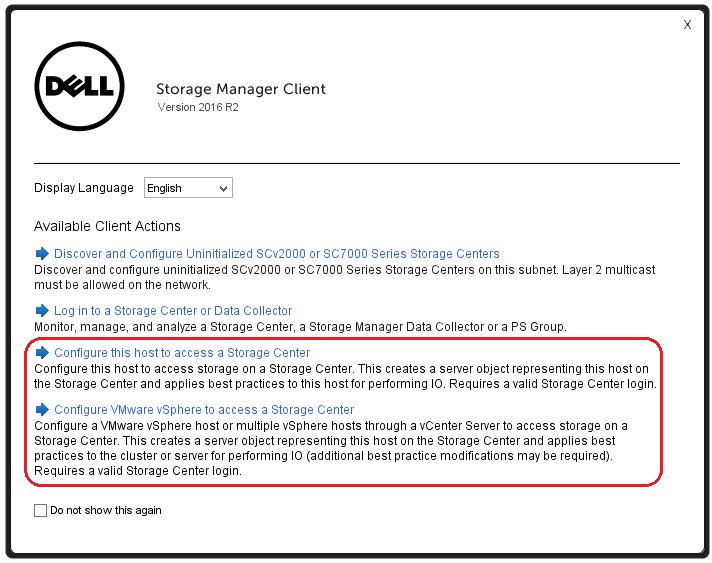
Figure 2.
Best Practices that are applied include the following:
Windows:
Best Practice: MPIO PDORemovePeriod
Description: This setting controls the amount of time (in seconds) that the multipath pseudo-LUN will continue to remain in system memory, even after losing all paths to the device.
Best Practice: MPIO PathVerifyEnabled
Description: This flag enables path verification by MPIO on all paths every N seconds (where N depends on the value set in PathVerificationPeriod).
Best Practice: MPIO PathVerificationPeriod
Description: This setting is used to indicate the periodicity (in seconds) with which MPIO has been requested to perform path verification.
Best Practice: MPIO RetryCount
Description: This setting specifies the number of times a failed IO if the DSM determines that a failing request must be retried.
Best Practice: MPIO RetryInterval
Description: This setting specifies the interval of time (in seconds) after which a failed request is retried (after the DSM has decided so, and assuming that the IO has been retried a fewer number of times than RetryCount).
Best Practice: MPIO PathRecoveryInterval
Description: Represents the period after which PathRecovery is attempted. This setting is only used if it is not set to 0 and UseCustomPathRecoveryInterval is set to 1.
Best Practice: MPIO UseCustomPathRecoveryInterval
Description: If this key exists and is set to 1, it allows the use of PathRecoveryInterval.
Best Practice: DiskTimeOutValue
Description: This setting controls how long Windows waits for an IO request before aborting.
Best Practice: MaxRequestHoldTime
Description: Maximum time (in seconds) for which requests will be queued if connection to the target is lost and the connection is being retried.
Best Practice: EnableNOPOut
Description: If set to non-zero value, the initiator will send NOP OUT PDUs to target if there is no activity for 2 minutes.
Best Practice: LinkDownTime
Description: This value determines how long requests will be held in the device queue and retried if the connection to the target is lost. If MPIO is installed this value is used. If MPIO is not installed MaxRequestHoldTime is used instead.
Best Practice: DiskPathCheckEnabled
Description: If the DiskPathCheckEnabled key is set to a nonzero value, the MPIO component creates a path recovery worker.
Best Practice: DiskPathCheckDisabled
Description: If the DiskPathCheckDisabled key is set to zero, the MPIO component creates a path recovery worker.
Best Practice: DiskPathCheckInterval
Description: If the DiskPathCheckInterval key is set to 0, or if the key does not exist, the MPIO component uses a default time interval.
Linux:
Best Practice: node.conn.timeo.noop_out_interval
Description: iSCSI layer will send a NOP-Out request to each target every interval value seconds.
Best Practice: node.conn.timeo.noop_out_timeout
Description: This sets the iSCSI layer to timeout a NOP-Out request after timeout value seconds.
ESX:
Best Practice: Storage_IO_Control
Description: SIOC is a means of ensuring that the excessing storage I/O demands of a particular VMDK does not negatively impact the storage I/O of other VMDKs on the same datastore. SIOC is changed to disabled as Storage Center implements congestion management methods.
Best Practice: Delay ACK
Description: This setting specifies to disable Delay ACK for TCP
Best Practice: StorageDRS
Description: Storage DRS load balances VMs within a datastore cluster based on capacity and/or performance. This setting is changed to disabled for performance portion and remains enabled for capacity to best integrate with Storage Center.
Best Practice: iSCSI Login Timeout
Description: Large number of iSCSI can occur after network failure, switch reboot or controller failover. Increasing Login Timeout to better manage Login attempts.
For a step by step illustration of setting up a host server using the automated wizard, see article How to apply host server Best Practice settings using the Dell Storage Manager client.
Resolution:
The host setup wizard is available in:
Enterprise Manager 2015 R1 and greater
Dell Storage Manager 2016 R1 and greater
Affected Products
Compellent (SC, SCv & FS Series), Dell Compellent SC4020, Dell Storage SC8000, Dell Compellent Series 40, Dell Storage SCv2020, Dell Storage SCv2080, Dell Storage SC5020, Dell Storage SC5020F, Dell Storage SC7020, Dell Storage SC7020F
, Dell Storage SC9000, Dell Storage SCv3000, Dell Storage SCv3020
...
Article Properties
Article Number: 000138132
Article Type: Solution
Last Modified: 10 Apr 2021
Version: 4
Find answers to your questions from other Dell users
Support Services
Check if your device is covered by Support Services.