Isilon OneFS: 공유 경로 대/소문자 구분을 변경한 후 WebUI에서 공유 권한을 수정할 수 없음
Summary: 공유 경로의 대소문자 구분을 변경한 후 경로가 없으면 WebUI에서 공유를 수정할 수 없습니다.
This article applies to
This article does not apply to
This article is not tied to any specific product.
Not all product versions are identified in this article.
Symptoms
공유 경로의 대/소문자 구분을 변경한 후 공유 권한을 수정하려고 하면 공유 권한이 업데이트되지 않습니다. 이는 경로가 파일 시스템에 존재하지 않기 때문입니다.
Path '/ifs/data/TesT' not found: No such file or directory
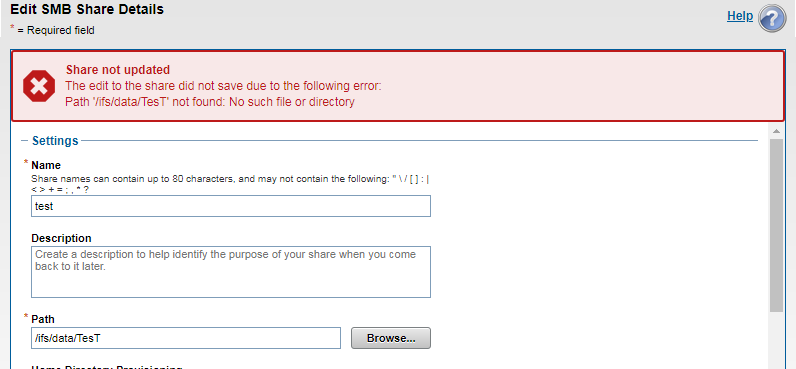
다음은 공유 보기입니다.
12freight-1# isi smb shares view test
                                     Share Name: test
                                           Path: /ifs/data/TesT
                                    Description:
                     Client-side Caching Policy: manual
Automatically expand user names or domain names: False
Automatically create home directories for users: False
                                      Browsable: True
Permissions:
Account  Account Type  Run as Root  Permission Type  Permission
----------------------------------------------------------------
Everyone wellknown     False        allow            read
nobody   user          False        allow            change
----------------------------------------------------------------
Total: 2
공유 경로가 있지만 대/소문자 구분이 일치하지 않으면 완전히 별개의 경로로 처리됩니다.
12freight-1# ls -al /ifs/data/TesT
ls: /ifs/data/TesT: No such file or directory
freight-1#

12freight-1# ls -al /ifs/data/test
total 39
drwxr-xr-x +   2 root  wheel   51 Mar 28 05:58 .
drwxrwxrwx    10 root  wheel  267 Mar 30 03:26 ..
-rw-r--r--     1 root  wheel    0 Mar 28 05:58 out.out
-rw-r--r--     1 root  wheel    0 Mar 28 05:58 test.txt
freight-1#
Cause
공유 경로의 대/소문자 구분이 변경되면 Windows 클라이언트에서 여전히 액세스할 수 있는 공유가 표시되더라도 Isilon(unix)은 이를 다른 경로로 취급합니다.
Resolution
Isilon은 대/소문자를 구분하므로 Isilon 측의 공유 경로와 파일 경로가 정확히 일치해야 합니다.
참고: 공유 이름, 경로 또는 사용 권한을 변경하면 작업이 중단될 수 있습니다. 프로덕션에서 변경 사항을 구현하기 전에 구성 변경 사항을 테스트하는 것이 좋습니다.
Affected Products
PowerScale OneFSProducts
Isilon, PowerScale OneFS, Isilon X400Article Properties
Article Number: 000168147
Article Type: Solution
Last Modified: 30 Oct 2025
Version: 4
Find answers to your questions from other Dell users
Support Services
Check if your device is covered by Support Services.