NVP-vProxy: FLR restore fails with "An error occurred during host configuration"
Summary: NetWorker VMware Protection (NVP) vProxy FLR fails with "ServerFaultCode: An error occurred during host configuration" when the Data Domain export path is defined in NetWorker.
This article applies to
This article does not apply to
This article is not tied to any specific product.
Not all product versions are identified in this article.
Symptoms
The NetWorker VMware Protection (NVP) solution is configured with the vProxy appliance.
The File Level Restore (FLR) operation for a virtual machine fails with:
159373:nsrvproxy_flr: vProxy Log: YYYY-MM-DDTHH:mm:SSZ ERROR:  [@(#) Build number: 33] Unable to clone 'ddve01.amer.lan:nsr/VMBackupDevice02/09/86/1308f5d4-00000006-e292a91c-6892a91c-001f5000-ade5be56' to 'networker/FLR-xxx-vProxy01-xxxxxxxx-xxxx-xxxx-xxxx-xxxxxxxxxxxx'
159373:nsrvproxy_flr: vProxy Log: YYYY-MM-DDTHH:mm:SSZ INFO:   [@(#) Build number: 33] Unmounting after mount failure: Unable to clone 'ddve01.amer.lan:nsr/VMBackupDevice02/09/86/1308f5d4-00000006-e292a91c-6892a91c-001f5000-ade5be56' to 'networker/FLR-xxx-vProxy01-xxxxxxxx-xxxx-xxxx-xxxx-xxxxxxxxxxxx':  [5004] nothing matched
Or:
159373:nsrvproxy_flr: vProxy Log:  ERROR: [233] _ddp_rmdir_rf_start_internal() failed, Path /networker/FLR-xxx-vProxy01-xxxxxxxx-xxxx-xxxx-xxxx-xxxxxxxxxxxx, Err: 5004-nfs lookup failed (nfs: No such file or directory)
..
..
159373:nsrvproxy_flr: vProxy Log:  TRACE: [233] Unmount complete
159373:nsrvproxy_flr: vProxy Log:  INFO: [233] Disconnected from session on vCenter 'vcenter.xxx.xxx'.
159373:nsrvproxy_flr: vProxy Log:  ERROR: [233] Unable to create datastore 'EMC-FLR-xxx-vProxy01-xxxxxxxxx' using 'ddve01.amer.lan:/data/col1/networker/FLR-xxx-vProxy01-xxxxxxxx-xxxx-xxxx-xxxx-xxxxxxxxxxxx': ServerFaultCode: An error occurred during host configuration.
The error observed can differ depending on the Data Domain and vProxy versions used.
Cause
The Data Domain is configured with an invalid entry for the "Export Path" attribute. 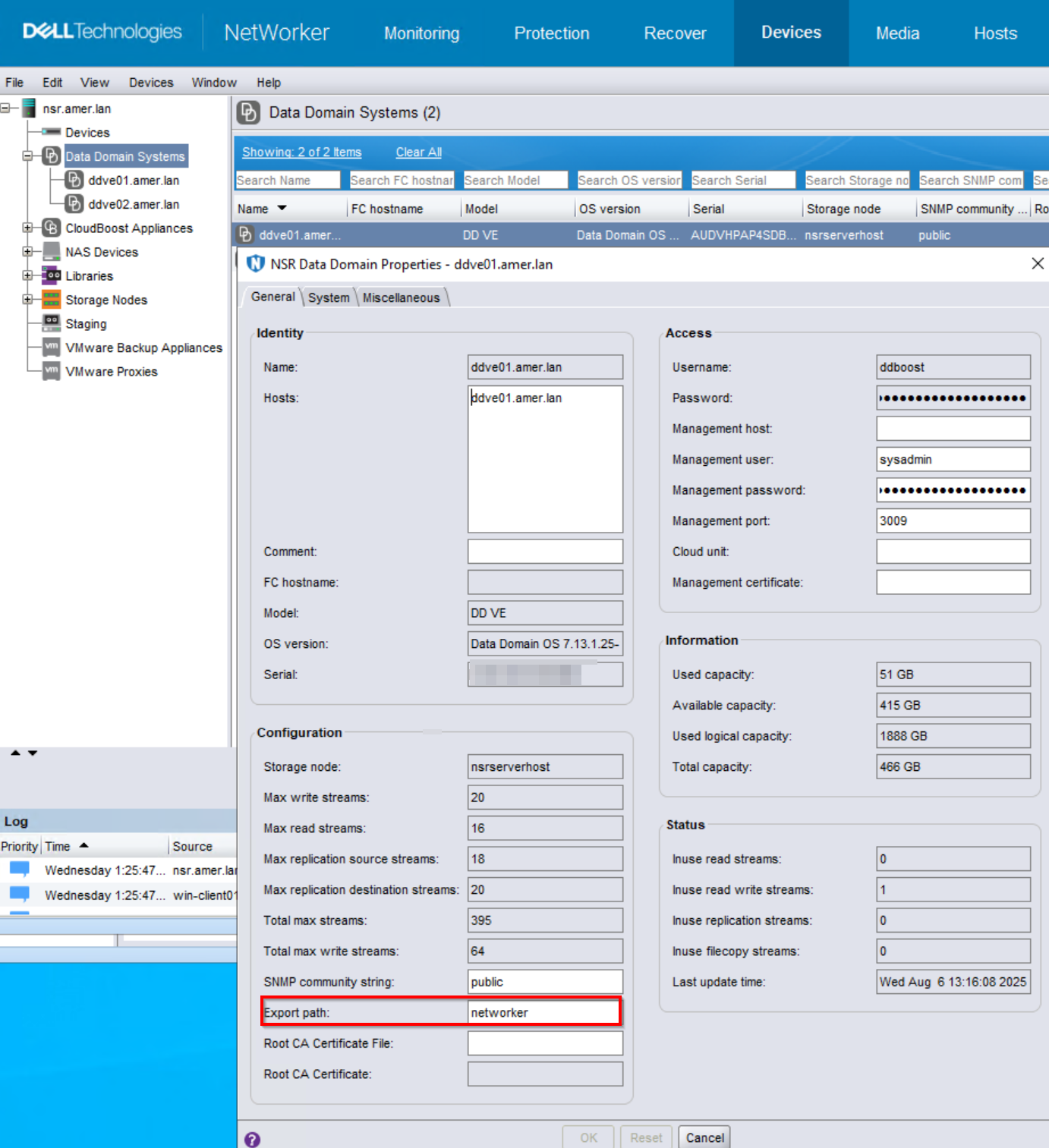
The FLR mount session expects to use the NetWorker server's mtree. The "Export Path" overrides this functionality, causing the FLR to use the "Export Path" defined in the Data Domain properties. This can be seen in the FLR log:
Unable to clone 'ddve01.amer.lan:nsr/VMBackupDevice02/09/86/1308f5d4-00000006-e292a91c-6892a91c-001f5000-ade5be56' to 'networker/FLR-xxx-vProxy01-xxxxxxxx-xxxx-xxxx-xxxx-xxxxxxxxxxxx' In this scenario, the "Export Path" defined does not exist. This causes the FLR mount to fail with Data Domain error 5004 (nothing matched)
The Network File System (NFS) mount cannot be created if the export path does not exist on the Data Domain file system.
NOTE: The "Export Path" attribute is case-sensitive. Data Domain returns error 5004 ('nothing matched') as a general system error. This KB explains a case caused by an incorrectly set Export Path in NetWorker. If the Export Path is not defined, investigate other potential causes. See the Additional Info section.
Resolution
It is recommended to leave the Export path blank, which sets the export path to the default mtree path. The short name of the NetWorker server in lower case is the default path. If using a different Export path, ensure that the mtree path exists on the Data Domain file system.
Additional Information
vProxy FLR restore fails with similar error for different issues. Below knowledge articles can be referred.
vProxy: FLR is failing for all clients with the error "Unable to create datastore"
NVP-vProxy: FLR Mount Failing With 'Unmounting after mount failure: Unable to create datastore'
NVP-vProxy: FLR failing because ESXi fails to mount the NFS export from Data Domain
Affected Products
NetWorkerProducts
NetWorker SeriesArticle Properties
Article Number: 000168620
Article Type: Solution
Last Modified: 06 Aug 2025
Version: 4
Find answers to your questions from other Dell users
Support Services
Check if your device is covered by Support Services.