PowerEdge:匯入伺服器組態設定檔後,iDRAC IPMI over LAN 連線失敗
Summary: 本 Dell EMC 文章提供逐步指導,說明當 iDRAC 在啟用「密碼雜湊值」功能的情況下匯入 iDRAC 使用者屬性後,iDRAC 停止接受遠端 IPMI 命令時的問題。
This article applies to
This article does not apply to
This article is not tied to any specific product.
Not all product versions are identified in this article.
Symptoms
說明
在匯入 iDRAC 使用者屬性並啟用「密碼雜湊值」功能後,iDRAC 可能會停止接受遠端 IPMI 命令。
ipmitool -I lanplus -H 192.168.10.3 -U root -P calvin sdr elist

    Error: Unable to establish IPMI v2 / RMCP+ session

    Device not present (No Response)
Dell EMC iDRAC 新增了透過 HASH 和 Salt 值配對匯入 iDRAC 使用者密碼的支援。此功能可在匯入 iDRAC 使用者帳戶時增加額外的安全層。有幾種常見的方法可用於匯出和匯入具有雜湊密碼的 iDRAC 使用者密碼,可能會導致此行為:
- 伺服器組態設定檔匯出/匯入 (選用)
- 使用 HASH 密碼建立 RACADM CLI iDRAC 使用者 (選用)
- 使用 HASH 密碼建立 Redfish CLI iDRAC 使用者 (選用)
- 更換系統主機板後的簡易還原功能 (選用)
Cause
Dell EMC iDRAC9 在產品初次推出時,即推出了可遮蔽明文使用者密碼的新功能。使用 iDRAC 使用者密碼的加鹽雜湊值時,需要 Dell OEM IPMITOOL 來剖析散列密碼值。
Resolution
解決方案
「密碼雜湊值」功能需要受支援的 Dell EMC IPMI 工具版本,才能正確處理加密的 HASH 密碼。如需 HASH 密碼加密的支援,請至少使用下列 BMC 工具集中隨附的 Dell EMC IPMITOOL 版本:
Windows | ipmitool version 1.8.14.dell47| Dell EMC OpenManage BMC Utility,v9.1.0Linux | ipmitool version 1.8.14.dell51| 適用於 Linux 的 Dell EMC iDRAC 工具,v9.3.0
Dell EMC 對 IPMItool 所做的變更已提交至開放原始碼社群。某些 Linux 版本可能會利用尚不支援此變更的較新版本 IPMItool。
復原:
如果 HASH 密碼意外套用至 iDRAC 使用者帳戶,使用明文覆寫使用者密碼可讓第三方 IPMI 工具重新連線。
- iDRAC GUI >> iDRAC 設定>>使用者>>編輯
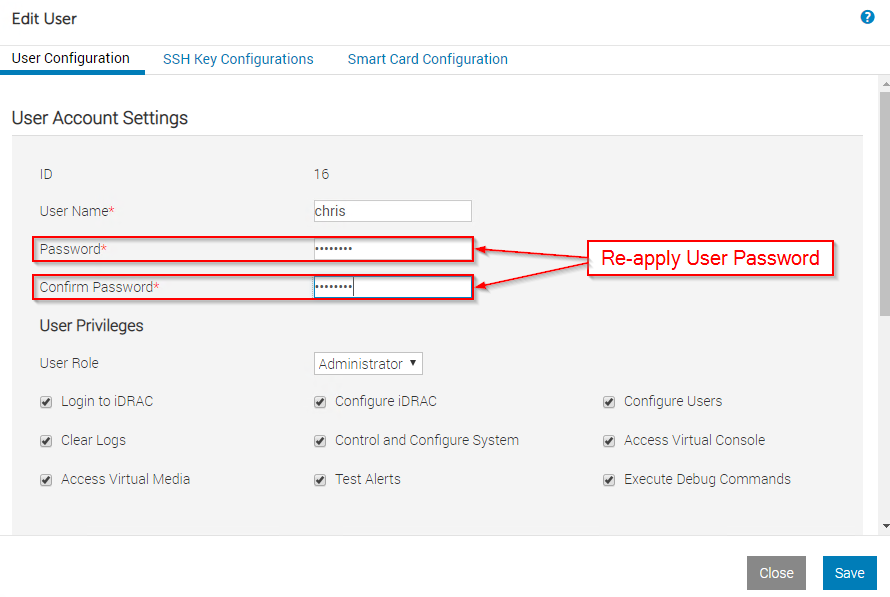
racadm set iDRAC.Users.X.Passowrd xxxxxxxxxxx/admin1-> racadm set iDRAC.Users.16.Password Dell1234
[Key=iDRAC.Embedded.1#Users.16]
Object value modified successfully
/admin1->
Affected Products
iDRAC9Products
PowerEdge R240, PowerEdge R250, PowerEdge R260, PowerEdge R340, PowerEdge R350, PowerEdge R360, PowerEdge R440, PowerEdge R450, PowerEdge R540, PowerEdge R550, PowerEdge R640, PowerEdge R6415, PowerEdge R650, PowerEdge R650xs, PowerEdge R6515
, PowerEdge R6525, PowerEdge R660, PowerEdge R660xs, PowerEdge R6615, PowerEdge R6625, PowerEdge R740, PowerEdge R740XD, PowerEdge R740XD2, PowerEdge R7415, PowerEdge R7425, PowerEdge R750, PowerEdge R750XA, PowerEdge R750xs, PowerEdge R7515, PowerEdge R7525, PowerEdge R760, PowerEdge R760XA, PowerEdge R760xd2, PowerEdge R760xs, PowerEdge R7615, PowerEdge R7625, PowerEdge R840, PowerEdge R860, PowerEdge R940, PowerEdge R940xa, PowerEdge R960, PowerEdge T140, PowerEdge T150, PowerEdge T160, PowerEdge T340, PowerEdge T350, PowerEdge T360, PowerEdge T440, PowerEdge T550, PowerEdge T560, PowerEdge T640
...
Article Properties
Article Number: 000178105
Article Type: Solution
Last Modified: 05 Dec 2024
Version: 6
Find answers to your questions from other Dell users
Support Services
Check if your device is covered by Support Services.