Windows 10 Enterprise Security: Credential Guard and Device Guard
Summary: Explanation of Device and Credential Guard for Windows 10 Enterprise, education, edition on Latitude, OptiPlex, Precision computers with SkyLake, KabyLake with VT-x and VT-d processors
This article applies to
This article does not apply to
This article is not tied to any specific product.
Not all product versions are identified in this article.
Symptoms
Summary: "Overview of two new Windows 10 Enterprise Ready Security features: Credential Guard and Device Guard."
What is Device Guard and Credential Guard?
Device Guard and Credential Guard are Virtualization-based security (VBS). With Local Security Authority (LSA) functions using Hypervisor Code Integrity (HVCI) drivers and a compliant BIOS with the Windows 10 Enterprise/Education Edition operating system. It is only available to computers covered by a Microsoft Volume License Agreement (VLA).
Credential Guard uses virtualization-based security to isolate secrets (credentials) so that only privileged system software can access them. Unauthorized access to these secrets can lead to credential theft attacks. Credential Guard prevents these attacks by protecting NT LAN Manager protocol (NTLM) password hashes and Kerberos Ticket Granting Tickets. Credential Guard uses virtualization-based security to isolate secrets so that only privileged system software can access them. Credential Guard is not dependent on Device Guard.
Device Guard is a combination of enterprise-related hardware and software security features. When they are configured together, they lock a device down so that it can only run trusted applications. If it is not a trusted application, it cannot run. You can configure it to lock a device down. So that the device can only run trusted applications that are defined in your code integrity policies. Device Guard depends on Virtualization based security (VBS).
How do they work?
Virtualization-Based Security features of Windows 10 Enterprise/Education leverage a range of security elements like UEFI, Secure Boot, Trusted Platform Module (TPM) 2.0. Dell has verified select Precision, Latitude, and OptiPlex computers that must have updated BIOS and HVCI-compliant drivers.
UEFI firmware version 2.3.1 or higher: UEFI is locked down, so that the settings in UEFI cannot be changed to compromise Device Guard security. (Boot order, Boot entries, Secure Boot, Virtualization extensions, IOMMU, Microsoft UEFI CA.)
Credential Guard.
- Hardware security: Credential Guard increases the security of derived domain credentials by taking advantage of platform security features including, Secure Boot and virtualization.
- Better protection against advanced persistent threats: Securing derived domain credentials using the virtualization-based security blocks the credential theft attack techniques and tools that are used in many targeted attacks.
- Virtualization-based security protects your secrets against Malware running in the operating system with administrative privileges.
- Manageability: You can manage Credential Guard by using Group Policy, WMI, from a command prompt, and Windows PowerShell.
Protect derived domain credentials with Credential Guard
Device Guard.
- Using traditional methods like anti-virus solutions provides an inadequate defense against new attacks. (Signature-based detection to fight against malware.) Especially with thousands of new malicious files created every day.
- Device Guard on Windows 10 Enterprise changes from a mode where apps are trusted unless blocked by an anti-virus or other security solution. It changes to a mode where the operating system trusts only authorized apps set by your enterprise. You designate these trusted apps by creating code integrity policies.
Four ways to manage Device Guard
- Group Policy: Windows 10 provides an administrative template to configure and deploy the configurable code integrity policies for your organization. This template also allows you to specify which hardware-based security features you would like to enable and deploy. You can manage these settings along with your existing Group Policy Objects (GPOs), which makes it simpler to implement Device Guard features.
- Microsoft System Center Configuration Manager: You can use System Center Configuration Manager to simplify deployment and management of catalog files. Including code integrity policies, and hardware-based security features, it also provides version control.
- Windows PowerShell
- Microsoft Intune
Cause
Not Applicable.
Resolution
Frequently Asked Questions.
What is Windows 10 Enterprise SKU?
Windows 10 Enterprise SKU is a different Windows OS version that is only available for Microsoft volume license customers. Those who purchase computers with the Windows 10 Professional license, and then upgrade to Windows 10 Enterprise to obtain incremental features. Windows 10 Enterprise includes two security features that are not available on Professional or Home SKUs: Credential Guard and Device Guard.
What is Device Guard and Credential Guard?
Device Guard and Credential Guard are the new security features that are only available on Windows 10 Enterprise today. Device Guard is a combination of enterprise-related hardware and software security features. When they are configured together, they lock a device down so that it can only run trusted applications. If it is not a trusted application, it cannot run. Credential Guard uses virtualization-based security to isolate secrets (credentials) so that only privileged system software can access them. Unauthorized access to these secrets can lead to credential theft attacks. Credential Guard prevents these attacks by protecting NTLM password hashes and Kerberos Ticket Granting Tickets.
What is virtualization based security (VBS)?
This is protection that uses the hypervisor to help protect the kernel and other parts of the OS. With VBS default kernel-mode code integrity policy or the code integrity policy that you configure and deploy becomes more robust.
How do I verify that Virtualization Based Protection of Code Integrity is enabled?
The simplest mechanism is to run the System Information app (msinfo32). Look for the following line: "Device Guard Security Services Running." It should report: "Hypervisor enforced Code Integrity." There is also a Windows Management Instrumentation (WMI) interface for review using management tools.
If a computer is not Win10 Enterprise Ready, can that computer still run on Win10 Enterprise?
Yes, as long as a computer is purchased with Win10 Pro. Volume license customers can always upgrade that computer to Win10 Enterprise. All the Enterprise incremental features work fine EXCEPT Device Guard and Credential Guard. This is because these two security features require BIOS, driver, and processor features to be compliant with Microsoft requirements.
What are the requirements to enable Device Guard and Credential Guard on my Dell computers?
Customers who intend to upgrade their computers to enable Device Guard and Credential Guard require the following three criteria:
- Latitude/OptiPlex/Precision/Venue devices must be Win10 Enterprise Ready. Ensure that the BIOS and drivers are updated to the version that are Enterprise Ready capable. See platform list for detail BIOS/HVCI drivers readiness per platform.
- Configuration must use DG/CG capable processors. Processors that are DG/CG capable means they are supporting Intel VT-x and VT-d features. These features are mandatory requirements to support Device Guard and Credential Guard on Windows 10. To check if your processor supports Intel VT-x and VT-d. See this link to: Intel® Product Specifications
- Customers must have a Microsoft Volume License; Win10 Enterprise is not an OEM SKU. Customers can only get Win10 Enterprise bits from Microsoft directly.
Detailed requirements:
| Requirement | Required for Credential Guard | Required for Device Guard |
|---|---|---|
| Hardware: 64-bit CPU | X | X |
| Hardware: Virtualization extensions - Intel VT-x, AMD-V, and extended page tables | X | X |
| Hardware: VT-D or AMD Vi Input/output memory management unit (IOMMU) | X | |
| Hardware: Trusted Platform Module (TPM) version | X | |
| Firmware: UEFI 2.3.1.c or higher firmware along with Secure Boot | X | X |
| Firmware: Secure firmware update process | X | X |
| Firmware: Securing boot configuration and management | X | X |
| Firmware: Secure MOR implementation | X | |
| Software: Windows edition | X | X |
| Software: HVCI compatible drivers | X |
More Requirements for Windows 10 1607
| Requirement | Required for Credential Guard | Required for Device Guard |
|---|---|---|
| Firmware: Hardware rooted trust platform Secure Boot (HSTI) | X | X |
| Firmware: Firmware updated through Windows Update | X | X |
| Firmware: DB config |
You must have a Microsoft Volume License for Win10 Enterprise procured directly from Microsoft (including customers upgrading from a Windows 10 Pro SKU that Dell ships). Dell does not provide Windows 10 Enterprise as an OEM SKU.
If you want to deploy Device Guard, see: Windows Defender Device Guard deployment guide 
What are the BIOS settings that need to be set for Device Guard and Credential Guard?
These options should be enabled. Ensure you have the latest BIOS that is listed in the supported BIOS list.
How to validate Device Guard and Credential Guard?
You can use the Device Guard and Credential Guard validation tool
- Check if the computer is capable to run Device Guard or Credential Guard
- Disable and Enable Device Guard or Credential Guard
Before you run the tool, ensure that you have enabled the correct execution policy in PowerShell. (See Figure 1. Below)
Set-ExecutionPolicy -ExecutionPolicy RemoteSigned
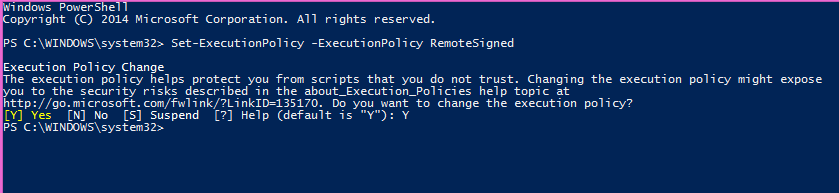
Figure 1. - Execution policy in PowerShell example.
To Validate: DG_Readiness.ps1 –Capable -[DG/CG/HVCI] -AutoReboot
To Enable: DG_Readiness.ps1 –Enable -[DG/CG] –AutoReboot
To Disable: DG_Readiness.ps1 –Disable -[DG/CG] -AutoReboot
Is my computer pre-configured with Device Guard or Credential Guard?
No, Dell is ensuring the computers that are verified are fully verified from a BIOS firmware and HVCI driver compliance perspective. This is all that you need to enable the computers for the Device or Credential Guard. You would have to enable the features based on the enable switch above or the step-by-step procedure in the deployment guide (See the resources section).
What is HVCI Driver Readiness and how do I know I have the right drivers?
HVCI is Hypervisor Code Integrity. The HVCI service in Windows 10 determines whether code running in kernel mode is securely designed and trustworthy. It offers Zero Day, and vulnerability exploit protection capabilities. It ensures that all software runs in kernel mode, including drivers, securely allocates memory and operates as they are intended.
Use the DGReadiness Tool:
To Validate: DG_Readiness.ps1 –Capable –HVCI -AutoReboot
NOTE: Dell has verified the driver readiness on the Dell supported drivers. If you install any other third-party drivers on the computer, you need to ensure that they are HVCI-compliant. Driver compatibility with Device Guard in Windows 10
Which Dell computers support Device Guard and Credential Guard?
To enable Device Guard and Credential Guard, Dell SkyLake and KabyLake generation computers require both a compatible BIOS and Hypervisor Code integrity (HVCI) compliant drivers.
Here are all the computers that Dell supports this feature set on. The table below list the driver versions and the BIOS versions for each platform.
NOTE: The computers are Device Guard ready. This means they are verified to run Device Guard and Credential Guard. They are NOT pre-configured. You must configure Device Guard and Credential Guard on the computers using the configuration steps in the deployment guide or DGReadiness script.
| System Name | BIOS Version | Audio | Touchpad | PCIe Card RDR | PCIe Serial Card | USB Reader | Secure Hub | Fingerprint RDR | Camera | Graphics | |||
|---|---|---|---|---|---|---|---|---|---|---|---|---|---|
| AMD | NVidia | UMA | ISV | ||||||||||
| Latitude E7270 | 1.13.4 | 6.0.1.6111 | 10.1207.101.113 | 10.0.14393.21292 | N/A | N/A | 4.5.17.305 | N/A | N/A | N/A | N/A | 20.19.15.4531 | N/A |
| Latitude E7470 | 1.13.4 | 6.0.1.6111 | 10.1207.101.113 | 10.0.14393.21292 | N/A | N/A | 4.5.17.305 | N/A | N/A | N/A | N/A | 20.19.15.4531 | N/A |
| Latitude 7370 | 1.10.6 | 6.0.1.6111 | 10.1207.101.113 | 10.0.14393.21292 | N/A | N/A | 4.5.17.305 | N/A | N/A | N/A | N/A | 20.19.15.4531 | N/A |
| Latitude 3470 | 1.6.2 | 6.0.1.6111 | N/A | N/A | N/A | 10.0.14393.31228 | N/A | 13.27.21.154 | 10.0.10586.11188 | N/A | 10.18.13.5354 | 20.19.15.4531 | N/A |
| Latitude 3570 | 1.6.2 | 6.0.1.6111 | N/A | N/A | N/A | 10.0.14393.31228 | N/A | 13.27.21.154 | 10.0.10586.11188 | N/A | 10.18.13.5354 | 20.19.15.4531 | N/A |
| Latitude E5270 | 1.12.6 | 6.0.1.6111 | 10.1207.101.113 | 10.0.14393.21292 | N/A | N/A | 4.5.17.305 | N/A | N/A | N/A | N/A | 20.19.15.4531 | N/A |
| Latitude E5470 | 1.12.6 | 6.0.1.6111 | 10.1207.101.113 | 10.0.14393.21292 | N/A | N/A | 4.5.17.305 | N/A | N/A | 16.400.2301 | N/A | 20.19.15.4531 | N/A |
| Latitude E5570 | 1.12.6 | 6.0.1.6111 | 10.1207.101.113 | 10.0.14393.21292 | N/A | N/A | 4.5.17.305 | N/A | N/A | 16.400.2301 | N/A | 20.19.15.4531 | N/A |
| OptiPlex 7440 AIO | 1.7.16 | 6.0.1.6111 | N/A | 10.0.14393.21292 | N/A | N/A | N/A | N/A | N/A | 16.400.2002 | N/A | 20.19.15.4531 | N/A |
| OptiPlex 3240 AIO | 1.5.12 | 6.0.1.6111 | N/A | 10.0.14393.21292 | N/A | N/A | N/A | N/A | N/A | 16.400.2002 | N/A | 20.19.15.4531 | N/A |
| OptiPlex 7040 MT.SFF.Micro | 1.5.7 | 6.0.1.6111 | N/A | 10.0.10586.21289 | N/A | N/A | N/A | N/A | N/A | 16.400.3101 | 10.18.13.5382 | 20.19.15.4531 | N/A |
| OptiPlex 5040 MT.SFF.Micro | 1.5.7 | 6.0.1.6111 | N/A | 10.0.10586.21289 | N/A | N/A | N/A | N/A | N/A | 16.400.3101 | N/A | 20.19.15.4531 | N/A |
| OptiPlex 3040 MT.SFF.Micro | 1.4.11 | 6.0.1.6111 | N/A | 10.0.10586.21289 | N/A | N/A | N/A | N/A | N/A | 16.400.3101 | N/A | 20.19.15.4531 | N/A |
| Precision 5510 | 1.2.19 | 6.0.1.7917 | N/A | 10.0.10586.21289 | N/A | N/A | N/A | N/A | N/A | N/A | 21.21.13.6942 | 20.19.15.4531 | N/A |
| Precision 7510 | 1.10.7 | 6.0.1.6111 | 10.1207.101.113 | 10.0.14393.21292 | N/A | N/A | 4.5.17.305 | N/A | N/A | 16.400.2802 | 21.21.13.6942 | 20.19.15.4531 | N/A |
| Precision 7710 | 1.10.7 | 6.0.1.6111 | 10.1207.101.113 | 10.0.14393.21292 | N/A | N/A | 4.5.17.305 | N/A | N/A | 16.400.2802 | 21.21.13.6942 | 20.19.15.4531 | N/A |
| Precision 3510 | 1.12.6 | 6.0.1.6111 | 10.1207.101.113 | 10.0.14393.21292 | N/A | N/A | 4.5.17.305 | N/A | N/A | 16.400.2301 | N/A | 20.19.15.4531 | N/A |
| Latitude 5175; Enterprise Skylake | 1.0.19 | 6.0.1.6114 | N/A | 10.0.14393.21292 | N/A | N/A | N/A | N/A | 30.14393.9656.3064 | N/A | N/A | 20.19.15.4531 | N/A |
| Latitude 5179 Ent Secure Skylake | 1.0.19 | 6.0.1.6114 | N/A | 10.0.14393.21292 | N/A | N/A | N/A | N/A | 30.14393.9656.3064 | N/A | N/A | 20.19.15.4531 | N/A |
| Precision 3620 | 2.1.9 | 6.0.1.6111 | N/A | N/A | N/A | N/A | N/A | N/A | N/A | 16.400.2802 | 21.21.13.6939 | 20.19.15.4531 | N/A |
| Precision 3420 | 2.1.9 | 6.0.1.6111 | N/A | 10.0.14393.21292 | 1.02.0613.2016 | N/A | N/A | N/A | N/A | 16.400.2802 | 21.21.13.6939 | 20.19.15.4531 | N/A |
| Latitude 7275 2-in-1 | 1.1.27 | 6.0.1.6114 | N/A | 10.0.14393.21292 | N/A | N/A | N/A | N/A | 30.14393.9656.3064 | N/A | N/A | 20.19.15.4531 | N/A |
| Latitude 12 Rugged Extreme 7214 | 1.9.0 | 6.0.1.6105 | Inbox | N/A | N/A | 10.0.10586.31222 | 4.5.17.305 | N/A | 10.0.10240.11155 | N/A | N/A | 20.19.15.4531 | N/A |
| Latitude 14 Rugged Extreme 7414 | 1.9.0 | 6.0.1.6105 | Inbox | N/A | N/A | 10.0.10586.31222 | 4.5.17.305 | N/A | N/A | 16.300.2301 | N/A | 20.19.15.4531 | N/A |
| Latitude 14 Rugged 5414 | 1.9.0 | 6.0.1.6105 | 10.1207.101.113 | N/A | N/A | 10.0.10586.31222 | 4.5.17.305 | N/A | N/A | 16.300.2301 | N/A | 20.19.15.4531 | N/A |
| XPS 13 9350 Ultrabook Skylake | 1.4.12 | 6.0.1.7917 | N/A | 10.0.10586.21289 | N/A | N/A | N/A | N/A | N/A | N/A | N/A | 20.19.15.4531 | N/A |
| XPS 13 9360 Ultrabook Skylake | 1.2.3 | 6.0.1.7989 | N/A | 10.0.14393.21292 | N/A | N/A | N/A | 5.1.3214.26 | N/A | N/A | N/A | 21.20.16.4526 | N/A |
| XPS 15 NB 9550 Skylake | 1.2.19 | 6.0.1.7917 | N/A | 10.0.10586.21289 | N/A | N/A | N/A | N/A | N/A | N/A | 21.21.13.6942 | 20.19.15.4531 | N/A |
| XPS 27, 7760 AIO | 1.0.3 | 6.0.1.8000 | N/A | 10.0.10586.21287 | N/A | N/A | N/A | N/A | 10.0.10586.11188 | 21.19.136.256 | N/A | 21.20.16.4542 | N/A |
| System Name | Intel 8260/7265 3165/7260 Bluetooth Driver | Intel 8260/7265/7260 3165/17265 WiFi Driver | Intel 8260/7265 7260/3165 WiDi Utility | INTEL 8260/7265 WAPI Application | Dell Wireless 1820 WiFi/Bluetooth Driver | Dell Wireless 1820A Bluetooth Driver | Dell Wireless 1820A WiFi Driver | Dell Wireless 1830 WiFi Driver | Dell Wireless 1830 Bluetooth Application | Intel PROSet/Wireless Bluetooth LEGUI Driver | Intel 17265/18260 WiGig Application | Dell Wireless 1802 WiFi/Bluetooth Driver | Realtek PCI-E Gigabit Ethernet Cont Dvr |
|---|---|---|---|---|---|---|---|---|---|---|---|---|---|
| Latitude E7270 | 18.1.1611.3223 | 18.40.0.9 | N/A | N/A | 12.0.0.242 | 12.0.1.731 | 1.558.56.0 | N/A | N/A | N/A | 1.0.0.16 | N/A | N/A |
| Latitude E7470 | 18.1.1611.3223 | 18.40.0.9 | N/A | N/A | 12.0.0.242 | 12.0.1.731 | 1.558.56.0 | N/A | N/A | N/A | 1.0.0.16 | N/A | N/A |
| Latitude 7370 | 18.1.1611.3223 | 18.40.0.9 | N/A | N/A | N/A | N/A | 1.558.56.0 | N/A | N/A | N/A | 1.0.0.16 | N/A | N/A |
| Latitude 3470 | 18.1.1611.3223 | 18.40.0.9 | N/A | N/A | 12.0.0.242 | N/A | N/A | N/A | N/A | N/A | N/A | 10.0.0.341 | 10.0.0.341 |
| Latitude 3570 | 18.1.1611.3223 | 18.40.0.9 | N/A | N/A | N/A | N/A | N/A | N/A | N/A | N/A | N/A | 10.0.0.341 | 10.0.0.341 |
| Latitude E5270 | 18.1.1611.3223 | 18.40.0.9 | N/A | N/A | 12.0.0.242 | 12.0.1.731 | 1.558.56.0 | N/A | N/A | N/A | 1.0.0.16 | N/A | N/A |
| Latitude E5470 | 18.1.1611.3223 | 18.40.0.9 | N/A | N/A | 12.0.0.242 | 12.0.1.731 | 1.558.56.0 | N/A | N/A | N/A | 1.0.0.16 | N/A | N/A |
| Latitude E5570 | 18.1.1611.3223 | 18.40.0.9 | N/A | N/A | 12.0.0.242 | 12.0.1.731 | 1.558.56.0 | N/A | N/A | N/A | 1.0.0.16 | N/A | N/A |
| OptiPlex 7440 AIO | 19.1.1627.3533 | 19.2.0.1 | 6.0.66.0 | N/A | N/A | N/A | N/A | N/A | N/A | N/A | N/A | N/A | N/A |
| OptiPlex 3240 AIO | 19.1.1627.3533 | 19.2.0.1 | 6.0.66.0 | N/A | N/A | N/A | N/A | N/A | N/A | N/A | N/A | N/A | N/A |
| OptiPlex 7040 MT.SFF.Micro | 19.1.1627.3533 | 19.2.0.1 | N/A | N/A | N/A | N/A | N/A | N/A | N/A | N/A | N/A | N/A | N/A |
| OptiPlex 5040 MT.SFF.Micro | 19.1.1627.3533 | 19.2.0.1 | N/A | N/A | N/A | N/A | N/A | N/A | N/A | N/A | N/A | N/A | N/A |
| OptiPlex 3040 MT.SFF.Micro | 19.1.1627.3533 | 19.2.0.1 | N/A | N/A | N/A | N/A | N/A | N/A | N/A | N/A | N/A | N/A | N/A |
| Precision 5510 | 18.1.1546.2762 | 19.1.0.3 | 6.0.52.0 | N/A | 12.0.0.260 | N/A | N/A | N/A | N/A | N/A | N/A | N/A | N/A |
| Precision 7510 | 18.1.1611.3223 | 18.40.0.9 | N/A | N/A | 12.0.0.242 | 12.0.1.731 | 1.558.56.0 | N/A | N/A | N/A | N/A | N/A | N/A |
| Precision 7710 | 18.1.1611.3223 | 18.40.0.9 | N/A | N/A | 12.0.0.242 | 12.0.1.731 | 1.558.56.0 | N/A | N/A | N/A | N/A | N/A | N/A |
| Precision 3510 | 18.1.1611.3223 | 18.40.0.9 | N/A | N/A | 12.0.0.242 | 12.0.1.731 | 1.558.56.0 | N/A | N/A | N/A | N/A | N/A | N/A |
| Latitude 5175; Enterprise Skylake | 18.1.1611.3223 | 19.2.0.1 | N/A | 1.9.0.1 | N/A | N/A | N/A | N/A | N/A | N/A | N/A | N/A | N/A |
| Latitude 5179 Ent Secure Skylake | 18.1.1611.3223 | 19.2.0.1 | N/A | 1.9.0.1 | N/A | N/A | N/A | N/A | N/A | N/A | N/A | N/A | N/A |
| Precision 3620 | N/A | 19.2.0.1 | N/A | N/A | N/A | N/A | N/A | N/A | N/A | N/A | N/A | N/A | N/A |
| Precision 3420 | N/A | 19.2.0.1 | N/A | N/A | N/A | N/A | N/A | N/A | N/A | N/A | N/A | N/A | N/A |
| Latitude 7275 2-in-1 | 18.1.1611.3223 | 19.2.0.1 | N/A | 1.9.0.1 | N/A | N/A | N/A | N/A | N/A | N/A | N/A | N/A | N/A |
| Latitude 12 Rugged Extreme 7214 | 18.1.1611.3223 | 18.40.0.9 | N/A | N/A | N/A | N/A | N/A | N/A | N/A | N/A | N/A | N/A | N/A |
| Latitude 14 Rugged Extreme 7414 | 18.1.1611.3223 | 18.40.0.9 | N/A | N/A | N/A | N/A | N/A | N/A | N/A | N/A | N/A | N/A | N/A |
| Latitude 14 Rugged 5414 | 18.1.1611.3223 | 18.40.0.9 | N/A | N/A | 12.0.0.242 | N/A | N/A | N/A | N/A | N/A | N/A | 10.0.0.341 | N/A |
| XPS 13 9350 Ultrabook Skylake | 18.1.1546.2762 | 19.1.0.3 | N/A | N/A | N/A | 12.0.1.750 | 1.566.0.0 | N/A | N/A | N/A | N/A | N/A | N/A |
| XPS 13 9360 Ultrabook Skylake | 19.1.1627.3533 | 19.10.0.9 | N/A | N/A | N/A | 10.0.0.279 | 1.1.64.1312 | N/A | N/A | N/A | N/A | N/A | N/A |
| XPS 15 NB 9550 Skylake | 18.1.1546.2762 | 19.1.0.3 | 6.0.52.0 | N/A | N/A | 12.0.1.750 | 1.566.0.0 | 1.566.0.0 | 12.0.1.750 | N/A | N/A | N/A | N/A |
| XPS 27, 7760 AIO | 19.1.1627.3533 | 19.2.0.1 | N/A | N/A | 12.0.0.289 | N/A | N/A | N/A | N/A | N/A | N/A | N/A | N/A |
| System Name | Intel Device Manager Diagnostics (DMIX) | Broadcom 57XX/BACS Combined Package Driver | Intel I2xx/825xx Gigabit Ethernet Network Controller Drivers | Dell Airplane Mode Switch Driver | Realtek USB GBE Ethernet Controller Driver | Dell WLAN Radio Switch Driver | Dell Wireless 5811e LTE Mobile Broadband Driver and GPS Driver | DW5814E LTE Mobile Broadband Driver | Intel/NXP Near Field Communications Driver | Intel HID Event Filter Driver | Sunix Serial/Parallel Card Driver | Intel Rapid Storage Technology Driver and Management Console | Intel Rapid Storage Technology F6 Driver |
|---|---|---|---|---|---|---|---|---|---|---|---|---|---|
| Latitude E7270 | 20.3.300.1 | N/A | 20.4.0.0 | 1.4.4 | N/A | 1.0.0.7 | 7.24.4518.504 | N/A | N/A | N/A | N/A | 15.2.2.1030 | 15.2.2.1030 |
| Latitude E7470 | 20.3.300.1 | N/A | 20.4.0.0 | 1.4.4 | N/A | 1.0.0.7 | 7.24.4518.504 | N/A | N/A | N/A | N/A | 15.2.2.1030 | 15.2.2.1030 |
| Latitude 7370 | N/A | N/A | N/A | 1.4.4 | 2.43.2016.1026 | N/A | 7.24.4518.504 | 6.1.2.2 | N/A | N/A | N/A | 15.2.2.1030 | 15.2.2.1030 |
| Latitude 3470 | N/A | N/A | N/A | 1.4.4 | N/A | 1.0.0.7 | N/A | N/A | N/A | N/A | N/A | 15.2.2.1030 | 15.2.2.1030 |
| Latitude 3570 | N/A | N/A | N/A | 1.4.4 | N/A | 1.0.0.7 | N/A | N/A | N/A | N/A | N/A | 15.2.2.1030 | 15.2.2.1030 |
| Latitude E5270 | N/A | N/A | 20.4.0.0 | 1.4.4 | N/A | 1.0.0.7 | 7.24.4518.504 | N/A | N/A | N/A | N/A | 15.2.2.1030 | 15.2.2.1030 |
| Latitude E5470 | 20.3.300.1 | N/A | 20.4.0.0 | 1.4.4 | N/A | 1.0.0.7 | 7.24.4518.504 | N/A | N/A | N/A | N/A | 15.2.2.1030 | 15.2.2.1030 |
| Latitude E5570 | 20.3.300.1 | N/A | 20.4.0.0 | 1.4.4 | 2.43.2016.1026 | 1.0.0.7 | 7.24.4518.504 | N/A | N/A | N/A | N/A | 15.2.2.1030 | 15.2.2.1030 |
| OptiPlex 7440 AIO | 20.3.300.1 | N/A | 20.4.0.0 | N/A | N/A | N/A | N/A | N/A | N/A | N/A | N/A | 15.2.5.1035 | 15.2.5.1035 |
| OptiPlex 3240 AIO | N/A | N/A | N/A | N/A | N/A | N/A | N/A | N/A | N/A | N/A | N/A | 15.2.5.1035 | 15.2.5.1035 |
| OptiPlex 7040 MT.SFF.Micro | 20.3.300.1 | Inbox driver | 20.4.0.0 | N/A | N/A | N/A | N/A | N/A | N/A | N/A | 8.2.2.0 | 15.2.0.1020 | N/A |
| OptiPlex 5040 MT.SFF.Micro | 20.3.300.1 | N/A | 20.4.0.0 | N/A | N/A | N/A | N/A | N/A | N/A | N/A | 8.2.2.0 | 15.2.0.1020 | N/A |
| OptiPlex 3040 MT.SFF.Micro | N/A | N/A | N/A | N/A | N/A | N/A | N/A | N/A | N/A | N/A | 8.2.2.0 | 15.2.0.1020 | N/A |
| Precision 5510 | N/A | N/A | N/A | N/A | 2.43.2016.1026 | N/A | N/A | N/A | N/A | 1.1.0.313 | N/A | 15.2.2.1030 | 15.2.2.1030 |
| Precision 7510 | 20.3.300.1 | N/A | 20.4.0.0 | 1.4.4 | 2.43.2016.1026 | N/A | 7.24.4518.504 | N/A | N/A | N/A | N/A | 15.2.2.1030 | 15.2.2.1030 |
| Precision 7710 | 20.3.300.1 | N/A | 20.4.0.0 | 1.4.4 | 2.43.2016.1026 | N/A | 7.24.4518.504 | N/A | N/A | N/A | N/A | 15.2.2.1030 | 15.2.2.1030 |
| Precision 3510 | 20.3.300.1 | N/A | 20.4.0.0 | 1.4.4 | 2.43.2016.1026 | N/A | 7.24.4518.504 | N/A | N/A | N/A | N/A | 15.2.2.1030 | 15.2.2.1030 |
| Latitude 5175; Enterprise Skylake | N/A | N/A | N/A | N/A | 2.43.2016.1026 | N/A | 7.24.4518.504 | 6.2.2.2 | 10.0.6.0 | 1.1.0.313 | N/A | 15.2.2.1030 | N/A |
| Latitude 5179 Ent Secure Skylake | N/A | N/A | N/A | N/A | 2.43.2016.1026 | N/A | 7.24.4518.504 | 6.2.2.2 | N/A | 1.1.0.313 | N/A | 15.2.2.1030 | N/A |
| Precision 3620 | N/A | N/A | 21.1.30.0 | N/A | N/A | N/A | N/A | N/A | N/A | N/A | 8.2.2.0 | 15.2.2.1030 | N/A |
| Precision 3420 | N/A | N/A | 21.1.30.0 | N/A | N/A | N/A | N/A | N/A | N/A | N/A | 8.2.2.0 | 15.2.2.1030 | N/A |
| Latitude 7275 2-in-1 | N/A | N/A | N/A | N/A | 2.43.2016.1026 | N/A | 7.24.4518.504 | 6.2.3.2 | N/A | 1.1.0.313 | N/A | 15.2.2.1030 | N/A |
| Latitude 12 Rugged Extreme 7214 | 20.3.300.1 | N/A | 20.4.0.0 | N/A | 2.43.2015.1225 | N/A | N/A | 6.2.2.2 | N/A | N/A | N/A | 15.2.2.1030 | N/A |
| Latitude 14 Rugged Extreme 7414 | 20.3.300.1 | N/A | 20.4.0.0 | N/A | 2.43.2015.1225 | N/A | N/A | 6.2.2.2 | N/A | N/A | N/A | 15.2.2.1030 | N/A |
| Latitude 14 Rugged 5414 | 20.3.300.1 | N/A | 20.4.0.0 | N/A | 2.43.2015.1225 | N/A | N/A | 6.2.2.2 | N/A | N/A | N/A | 15.2.2.1030 | N/A |
| XPS 13 9350 Ultrabook Skylake | N/A | N/A | N/A | N/A | 2.43.2016.1026 | N/A | N/A | N/A | N/A | 1.1.0.313 | N/A | 15.2.0.1020 | N/A |
| XPS 13 9360 Ultrabook Skylake | N/A | N/A | N/A | N/A | 2.43.2016.1026 | N/A | N/A | N/A | N/A | 1.1.0.317 | N/A | 15.2.2.1030 | N/A |
| XPS 15 NB 9550 Skylake | N/A | N/A | N/A | N/A | 2.43.2016.1026 | N/A | N/A | N/A | N/A | 1.1.0.313 | N/A | 15.2.2.1030 | N/A |
| XPS 27, 7760 AIO | N/A | N/A | 21.1.30.0 | N/A | N/A | N/A | N/A | N/A | N/A | N/A | N/A | 15.2.2.1030 | N/A |
| System Name | Dell USB Smartcard Keyboard Input Driver | Intel(R) Thunderbolt(TM) Controller Input Driver | Dell PCIe Serial Card Input Driver for Windows | Intel(R) Management Engine Components Installer Chipset Driver | Intel Ready Mode Chipset driver | Intel Chipset Device Software | Intel 100 Series Chipset Driver | Intel HID Event Filter Chipset Driver | Intel Integrated Sensor Solution Chipset | Intel Dynamic Platform and Thermal Framework Chipset Driver | Intel Serial I/O Chipset Driver | ST Microelectronics Chipset Driver for Free Fall Data Protection | Intel(R) Thunderbolt(TM) Controller Chipset Driver |
|---|---|---|---|---|---|---|---|---|---|---|---|---|---|
| Latitude E7270 | N/A | N/A | N/A | 11.5.0.1020 | N/A | 10.1.1.9 | N/A | N/A | N/A | 8.2.10900.330 | N/A | N/A | N/A |
| Latitude E7470 | N/A | N/A | N/A | 11.5.0.1020 | N/A | 10.1.1.9 | N/A | N/A | N/A | 8.2.10900.330 | N/A | N/A | N/A |
| Latitude 7370 | N/A | N/A | N/A | 11.5.0.1020 | N/A | 10.1.1.9 | N/A | N/A | N/A | 8.2.10900.330 | N/A | N/A | 16.1.47.275 |
| Latitude 3470 | N/A | N/A | N/A | 11.5.0.1020 | N/A | 10.1.1.9 | N/A | N/A | N/A | N/A | 30.100.1633.3 | 4.10.79 | N/A |
| Latitude 3570 | N/A | N/A | N/A | 11.5.0.1020 | N/A | 10.1.1.9 | N/A | N/A | N/A | N/A | 30.100.1633.3 | 4.10.79 | N/A |
| Latitude E5270 | N/A | N/A | N/A | 11.5.0.1020 | N/A | 10.1.1.9 | N/A | N/A | N/A | 8.2.10900.330 | N/A | 4.10.79 | N/A |
| Latitude E5470 | N/A | N/A | N/A | 11.5.0.1020 | N/A | 10.1.1.9 | N/A | N/A | N/A | 8.2.10900.330 | N/A | 4.10.79 | N/A |
| Latitude E5570 | N/A | N/A | N/A | 11.5.0.1020 | N/A | 10.1.1.9 | N/A | N/A | N/A | 8.2.10900.330 | N/A | 4.10.79 | 16.1.47.275 |
| OptiPlex 7440 AIO | N/A | N/A | N/A | 11.5.0.1020 | 1.1.70.528 | 10.1.1.13 | N/A | N/A | N/A | N/A | N/A | N/A | N/A |
| OptiPlex 3240 AIO | 4.1.4.1 | N/A | N/A | 11.5.0.1020 | 1.1.70.528 | 10.1.1.13 | N/A | N/A | N/A | N/A | N/A | N/A | N/A |
| OptiPlex 7040 MT.SFF.Micro | 4.1.4.1 | N/A | N/A | 11.5.0.1020 | 1.1.70.528 | 10.1.1.9 | N/A | N/A | N/A | N/A | N/A | N/A | N/A |
| OptiPlex 5040 MT.SFF.Micro | 4.1.4.1 | N/A | N/A | 11.5.0.1020 | 1.1.70.528 | 10.1.1.9 | N/A | N/A | N/A | N/A | N/A | N/A | N/A |
| OptiPlex 3040 MT.SFF.Micro | 4.1.4.1 | N/A | N/A | 11.5.0.1020 | 1.1.70.528 | 10.1.1.9 | N/A | N/A | N/A | N/A | N/A | N/A | N/A |
| Precision 5510 | N/A | 16.2.55.275 | N/A | 11.5.0.1020 | N/A | N/A | 10.1.1.13 | 1.1.0.313 | N/A | 8.2.10900.330 | 30.100.1633.3 | 4.10.79 | 16.1.47.275 |
| Precision 7510 | 4.1.4.1 | N/A | N/A | 11.5.0.1020 | N/A | 10.1.1.9 | N/A | N/A | N/A | 8.2.10900.330 | N/A | 4.10.79 | 16.1.47.275 |
| Precision 7710 | 4.1.4.1 | N/A | N/A | 11.5.0.1020 | N/A | 10.1.1.9 | N/A | N/A | N/A | 8.2.10900.330 | N/A | 4.10.79 | 16.1.47.275 |
| Precision 3510 | 4.1.4.1 | N/A | N/A | 11.5.0.1020 | N/A | 10.1.1.9 | N/A | N/A | N/A | 8.2.10900.330 | N/A | 4.10.79 | 16.1.47.275 |
| Latitude 5175; Enterprise Skylake | N/A | N/A | N/A | 11.5.0.1020 | N/A | 10.1.1.13 | N/A | 1.1.0.313 | 3.0.30.1076 | 8.2.10900.330 | 30.100.1633.3 | N/A | N/A |
| Latitude 5179 Ent Secure Skylake | N/A | N/A | N/A | 11.5.0.1020 | N/A | 10.1.1.13 | N/A | 1.1.0.313 | 3.0.30.1076 | 8.2.10900.330 | 30.100.1633.3 | N/A | N/A |
| Precision 3620 | 4.1.4.1 | N/A | N/A | 11.6.0.1030 | 1.1.70.528 | 10.1.1.38 | N/A | N/A | N/A | N/A | N/A | N/A | N/A |
| Precision 3420 | 4.1.4.1 | N/A | 1.2.802.2016 | 11.6.0.1030 | 1.1.70.528 | 10.1.1.38 | N/A | N/A | N/A | N/A | N/A | N/A | N/A |
| Latitude 7275 2-in-1 | N/A | N/A | N/A | 11.5.0.1020 | N/A | 10.1.1.13 | N/A | 1.1.0.313 | 3.0.30.1076 | 8.2.10900.330 | 30.100.1633.3 | N/A | 16.1.47.275 |
| Latitude 12 Rugged Extreme 7214 | N/A | N/A | N/A | 11.5.0.1020 | N/A | 10.1.1.13 | N/A | N/A | N/A | N/A | N/A | 4.10.79 | N/A |
| Latitude 14 Rugged Extreme 7414 | N/A | N/A | N/A | 11.5.0.1020 | N/A | 10.1.1.13 | N/A | N/A | N/A | N/A | N/A | 4.10.79 | N/A |
| Latitude 14 Rugged 5414 | N/A | N/A | N/A | 11.5.0.1020 | N/A | 10.1.1.13 | N/A | N/A | N/A | N/A | N/A | 4.10.79 | N/A |
| XPS 13 9350 Ultrabook Skylake | N/A | 16.1.47.275 | N/A | 11.5.0.1020 | N/A | N/A | 10.1.1.13 | N/A | N/A | 8.2.10900.330 | 30.100.1633.3 | N/A | N/A |
| XPS 13 9360 Ultrabook Skylake | N/A | 16.2.55.275 | N/A | 11.6.0.1025 | N/A | 10.1.1.35 | N/A | N/A | N/A | 8.2.11000.2996 | 30.100.1633.3 | N/A | N/A |
| XPS 15 NB 9550 Skylake | N/A | 16.1.47.275 | N/A | 11.5.0.1020 | N/A | N/A | 10.1.1.13 | N/A | N/A | 8.2.10900.330 | 30.100.1633.3 | N/A | 4.10.79 |
| XPS 27, 7760 AIO | N/A | N/A | N/A | 11.0.11.1193 | N/A | 10.1.1.18 | N/A | N/A | N/A | N/A | 30.63.1620.3 | N/A | 16.1.47.275 |
| System Name | Dell Watch Dog Timer Driver And Application | Intel HID Event Filter Driver Application | Intel Virtual Button Driver Application | Dell OSD Application | Supports 64-bit Processor |
Supports TPM (1.2 or 2.0) |
Secure MOR implementation |
|---|---|---|---|---|---|---|---|
| Latitude E7270 | N/A | N/A | N/A | N/A | Yes | 2.0 | Yes |
| Latitude E7470 | N/A | N/A | N/A | N/A | Yes | 2.0 | Yes |
| Latitude 7370 | N/A | N/A | N/A | N/A | Yes | 2.0 | Yes |
| Latitude 3470 | N/A | N/A | N/A | N/A | Yes | 2.0 | Yes |
| Latitude 3570 | N/A | N/A | N/A | N/A | Yes | 2.0 | Yes |
| Latitude E5270 | N/A | N/A | N/A | N/A | Yes | 2.0 | Yes |
| Latitude E5470 | N/A | N/A | N/A | N/A | Yes | 2.0 | Yes |
| Latitude E5570 | N/A | N/A | N/A | N/A | Yes | 2.0 | Yes |
| OptiPlex 7440 AIO | N/A | N/A | N/A | 1.0.0.0 | Yes | 1.2/2.0 | Yes |
| OptiPlex 3240 AIO | N/A | N/A | N/A | 1.0.0.0 | Yes | 1.2/2.0 | Yes |
| OptiPlex 7040 MT.SFF.Micro | 1.0.0.6 | N/A | N/A | N/A | Yes | 1.2/2.0 | Yes |
| OptiPlex 5040 MT.SFF.Micro | 1.0.0.6 | N/A | N/A | N/A | Yes | 1.2/2.0 | Yes |
| OptiPlex 3040 MT.SFF.Micro | 1.0.0.6 | N/A | N/A | N/A | Yes | 1.2/2.0 | Yes |
| Precision 5510 | N/A | 1.1.0.313 | N/A | N/A | Yes | 1.2 | Yes |
| Precision 7510 | N/A | N/A | N/A | N/A | Yes | 2.0 | Yes |
| Precision 7710 | N/A | N/A | N/A | N/A | Yes | 2.0 | Yes |
| Precision 3510 | N/A | N/A | N/A | N/A | Yes | 2.0 | Yes |
| Latitude 5175; Enterprise Skylake | N/A | 1.1.0.313 | 1.1.0.21 | N/A | Yes | 2.0 | Yes |
| Latitude 5179 Ent Secure Skylake | N/A | 1.1.0.313 | 1.1.0.21 | N/A | Yes | 2.0 | Yes |
| Precision 3620 | N/A | N/A | N/A | N/A | Yes | 1.2/2.0 | Yes |
| Precision 3420 | N/A | N/A | N/A | N/A | Yes | 1.2/2.0 | Yes |
| Latitude 7275 2-in-1 | N/A | 1.1.0.313 | 1.1.0.21 | N/A | Yes | 2.0 | Yes |
| Latitude 12 Rugged Extreme 7214 | N/A | N/A | 1.1.0.21 | N/A | Yes | 1.2/2.0 | Yes |
| Latitude 14 Rugged Extreme 7414 | N/A | N/A | N/A | N/A | Yes | 1.2/2.0 | Yes |
| Latitude 14 Rugged 5414 | N/A | N/A | N/A | N/A | Yes | 1.2/2.0 | Yes |
| XPS 13 9350 Ultrabook Skylake | N/A | 16.1.47.275 | N/A | N/A | Yes | 1.2 | Yes |
| XPS 13 9360 Ultrabook Skylake | N/A | 16.2.55.275 | 1.1.0.21 | N/A | Yes | 2.0 | Yes |
| XPS 15 NB 9550 Skylake | N/A | 16.1.47.275 | N/A | N/A | Yes | 1.2 | Yes |
| XPS 27, 7760 AIO | N/A | N/A | N/A | N/A | Yes | 1.2/2.0 | Yes |
If a processor is vPro, does that mean they are DG/CG capable?
Yes. In addition, some non-vPro processors are also DG/CG (VT-x/VT-d) capable. To check if your processor supports Intel VT-x and VT-d. See this link to: Intel® Product Specifications
Additional Information
Article Properties
Article Number: 000178346
Article Type: Solution
Last Modified: 21 Oct 2025
Version: 6
Find answers to your questions from other Dell users
Support Services
Check if your device is covered by Support Services.