PowerStore: LDAPS integration error "LDAP domain connection error! (0xE0906001000B)"
Summary: In PowerStoreOS 1.03 (SP3), PowerStore introduced the ability to integrate LDAP for PowerStore Manager (UI) access. The Secure LDAP functionality cannot be implemented successfully.
This article applies to
This article does not apply to
This article is not tied to any specific product.
Not all product versions are identified in this article.
Symptoms
LDAP is used to allow domain users access to the PowerStore Manager user interface (UI).
The PowerStore Security Configuration Guide describes how Secure LDAP can be configured.
Implementing without Secure LDAP is working properly, and verifying the connection using the verify button is successful.
Attempting to configure secure LDAP fails, and the administrator is unable to use the secure option.
The PowerStore Security Configuration Guide describes how Secure LDAP can be configured.
Implementing without Secure LDAP is working properly, and verifying the connection using the verify button is successful.
Attempting to configure secure LDAP fails, and the administrator is unable to use the secure option.
Cause
The problem is related to certificate integration.
In PowerStoreOS versions up to v2, the certificate uploads properly however there is no option to insert FQDN addresses.
Typically, the certificate is generated per FQDN name, hence without FQDN option, the certificate cannot properly establish secure communications with the LDAP server.
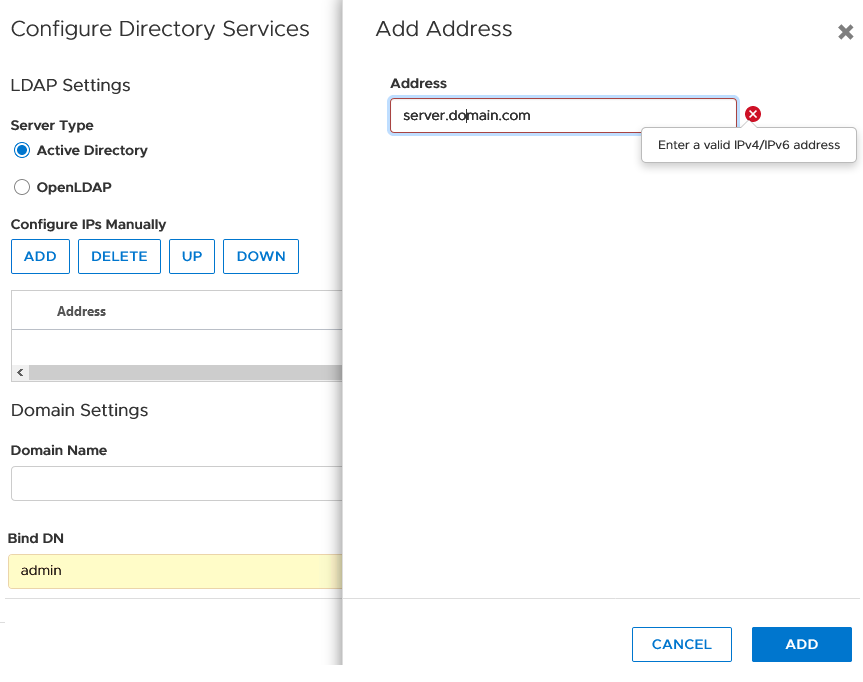
In PowerStoreOS versions up to v2, the certificate uploads properly however there is no option to insert FQDN addresses.
Typically, the certificate is generated per FQDN name, hence without FQDN option, the certificate cannot properly establish secure communications with the LDAP server.
Resolution
Fix
This issue is resolved in PowerStoreOS version 3.x.Workaround
Consider using as workaround:- IP base certificate if this can be created on the LDAP server.
- Work without LDAPs (none secure LDAP) as an interim solution.
- Remove LDAP and use local users instead until further notice.
Affected Products
PowerStoreArticle Properties
Article Number: 000181991
Article Type: Solution
Last Modified: 07 May 2026
Version: 9
Find answers to your questions from other Dell users
Support Services
Check if your device is covered by Support Services.