PowerStore:LDAPS GUI 集成错误“LDAP 域连接错误”!(0xE0906001000B)(Dell EMC 可纠正)
Summary: 在 PowerStoreOS 1.03 (SP3) 中,PowerStore 引入了集成 LDAP 以访问 PowerStore Manager (GUI) 的功能。安全 LDAP 功能无法成功实施。
This article applies to
This article does not apply to
This article is not tied to any specific product.
Not all product versions are identified in this article.
Symptoms
LDAP 用于允许域用户访问 PowerStore Manager (GUI):
PowerStore 安全配置指南介绍了如何设置安全 LDAP。
实施非安全 LDAP 可正常工作,并且使用验证按钮验证连接成功。
尝试配置安全 LDAP 失败,管理员无法使用安全选项。
PowerStore 安全配置指南介绍了如何设置安全 LDAP。
实施非安全 LDAP 可正常工作,并且使用验证按钮验证连接成功。
尝试配置安全 LDAP 失败,管理员无法使用安全选项。
Cause
此问题与证书集成有关。
在 PowerStoreOS 1.03 (SP3) 中,证书正确上传,但没有用于插入 FQDN 地址的选项。
通常情况下,证书根据 FQDN 名称生成,因此如果没有 FQDN 选项,证书将无法正确地与 LDAP 服务器建立安全通信。
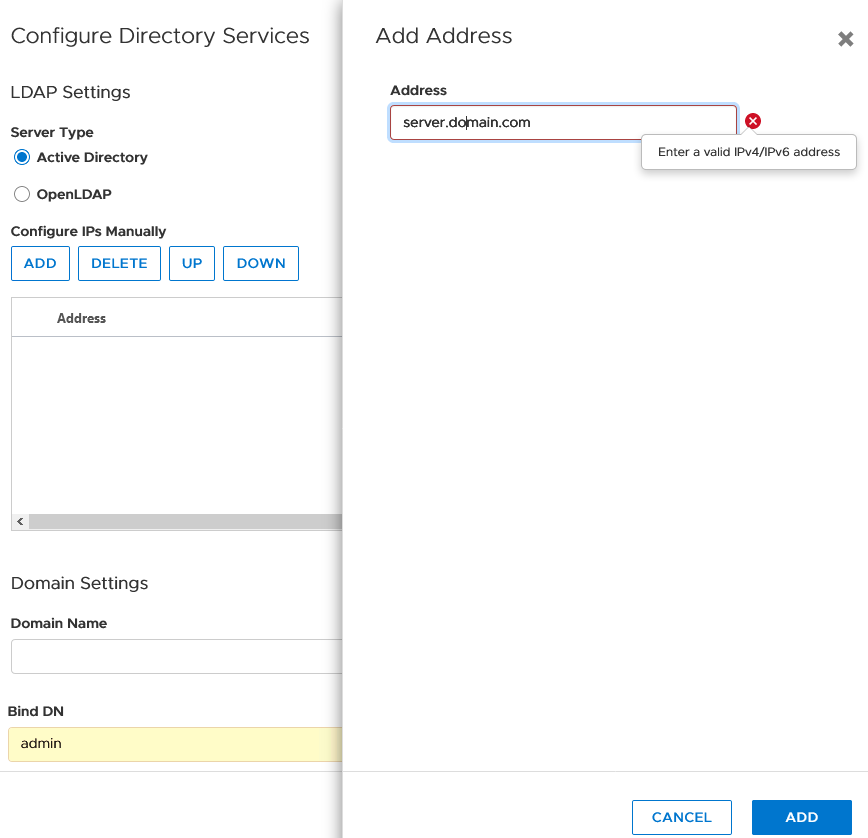
在 PowerStoreOS 1.03 (SP3) 中,证书正确上传,但没有用于插入 FQDN 地址的选项。
通常情况下,证书根据 FQDN 名称生成,因此如果没有 FQDN 选项,证书将无法正确地与 LDAP 服务器建立安全通信。
Resolution
请联系 Dell EMC 技术支持或您的授权服务代表,并引用此知识库文章 ID。
请考虑使用以下临时解决方法:
请考虑使用以下临时解决方法:
- IP 基本证书(如果可以在 LDAP 服务器上创建)。
- 不使用 LDAP(非安全 LDAP),作为临时解决方案。
- 删除 LDAP 并使用本地用户,直至有进一步通知。
Additional Information
日志中显示的日志指示:
Jan 13 20:02:34 xxxxxxx-A control-path[128569]: 2021-01-13 20:02:34.734 [] [ERROR] [com.emc.cyclone.contexts.security.ldap.services.LdapConfigurationAS|vert.x-worker-thread-0] [LdapConfigurationAS] Bind to LDAP server failed with bindUser: test@domain.com url:ldaps://XX.XX.XX.XX:636 error:java.security.cert.CertificateException: 未找到与 IP 地址 XX.XX.XX.XX 匹配的主题备用名称
Jan 13 20:02:34 xxxxxxx-A control-path[128569]: 2021-01-13 20:02:34.734 [] [ERROR] [com.emc.cyclone.contexts.security.ldap.services.LdapConfigurationAS|vert.x-worker-thread-0] [LdapConfigurationAS] Bind to LDAP server failed with bindUser: test@domain.com url:ldaps://XX.XX.XX.XX:636 error:java.security.cert.CertificateException: 未找到与 IP 地址 XX.XX.XX.XX 匹配的主题备用名称
Affected Products
PowerStoreArticle Properties
Article Number: 000181991
Article Type: Solution
Last Modified: 07 May 2026
Version: 9
Find answers to your questions from other Dell users
Support Services
Check if your device is covered by Support Services.