PowerStore: LDAPS GUI 통합 오류 "LDAP domain connection error! (0xE0906001000B) (Dell EMC 수정 가능)
Summary: PowerStore는 PowerStoreOS 1.03(SP3)에서 PowerStore Manager(GUI) 액세스를 위한 LDAP 통합 기능을 도입했습니다. 보안 LDAP 기능을 성공적으로 구현할 수 없습니다.
This article applies to
This article does not apply to
This article is not tied to any specific product.
Not all product versions are identified in this article.
Symptoms
LDAP는 도메인 사용자가 PowerStore Manager(GUI)에 액세스할 수 있도록 하기 위해 사용됩니다.
PowerStore 보안 구성 가이드에서는 보안 LDAP를 설정하는 방법에 대해 설명합니다.
비보안 LDAP가 제대로 작동하고 있으며 확인 버튼을 사용하여 연결을 성공적으로 확인합니다.
보안 LDAP를 구성하지 못했으며 관리자가 보안 옵션을 사용할 수 없습니다.
PowerStore 보안 구성 가이드에서는 보안 LDAP를 설정하는 방법에 대해 설명합니다.
비보안 LDAP가 제대로 작동하고 있으며 확인 버튼을 사용하여 연결을 성공적으로 확인합니다.
보안 LDAP를 구성하지 못했으며 관리자가 보안 옵션을 사용할 수 없습니다.
Cause
이 문제는 인증서 통합과 관련이 있습니다.
PowerStoreOS 1.03(SP3)에서는 인증서가 올바르게 업로드되지만 FQDN 주소를 삽입하는 옵션이 없습니다.
일반적으로 인증서는 FQDN 이름별로 생성되므로 FQDN 옵션이 없으면 인증서는 LDAP 서버와의 보안 통신을 제대로 설정할 수 없습니다.
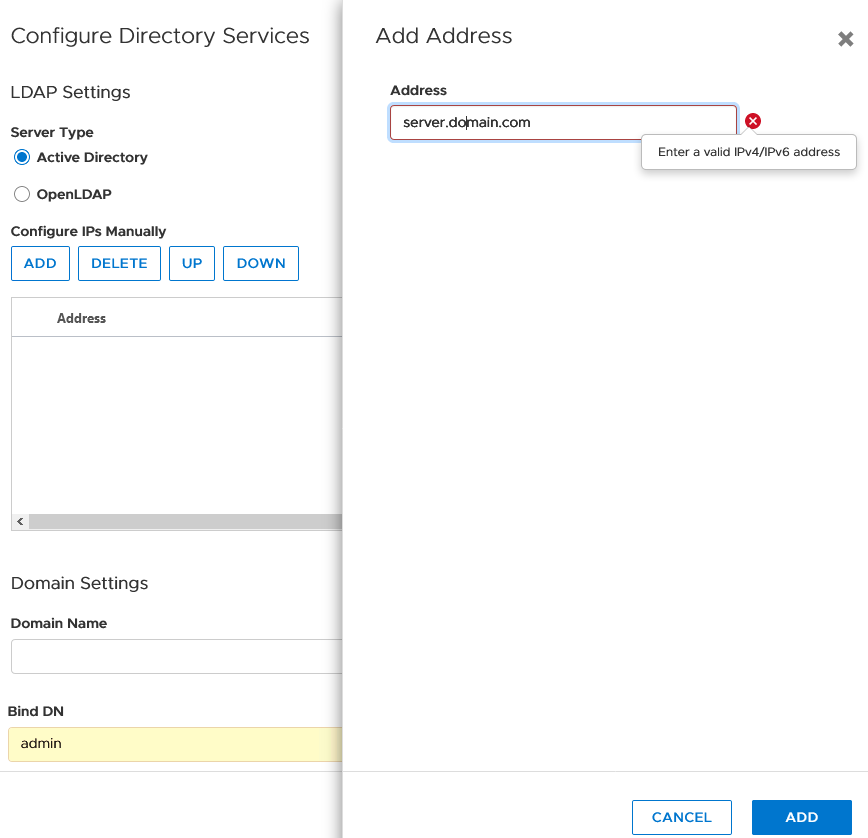
PowerStoreOS 1.03(SP3)에서는 인증서가 올바르게 업로드되지만 FQDN 주소를 삽입하는 옵션이 없습니다.
일반적으로 인증서는 FQDN 이름별로 생성되므로 FQDN 옵션이 없으면 인증서는 LDAP 서버와의 보안 통신을 제대로 설정할 수 없습니다.
Resolution
Dell EMC 기술 지원 또는 공인 서비스 담당자에게 문의하고 이 기술 자료 문서 ID를 인용하십시오.
해결 방법으로 다음을 사용하는 것을 고려하십시오.
해결 방법으로 다음을 사용하는 것을 고려하십시오.
- LDAP 서버에서 생성할 수 있는 경우 IP 기본 인증서를 사용합니다.
- 임시 솔루션으로 LDAPS(비보안 LDAP)를 사용하지 않고 작업합니다.
- LDAP를 제거하고 추가 통지가 있을 때까지 로컬 사용자를 사용하십시오.
Additional Information
저널에서 찾은 로그 표시:
Jan 13 20:02:34 xxxxxxx-A control-path[128569]: 2021-01-13 20:02:34.734 [] [ERROR] [com.emc.cyclone.contexts.security.ldap.services.LdapConfigurationAS|vert.x-worker-thread-0] [LdapConfigurationAS] Bind to LDAP server failed with bindUser: test@domain.com url:ldaps://XX.XX.XX.XX:636 error:java.security.cert.CertificateException: No subject alternative names matching IP address XX.XX.XX.XX found
Jan 13 20:02:34 xxxxxxx-A control-path[128569]: 2021-01-13 20:02:34.734 [] [ERROR] [com.emc.cyclone.contexts.security.ldap.services.LdapConfigurationAS|vert.x-worker-thread-0] [LdapConfigurationAS] Bind to LDAP server failed with bindUser: test@domain.com url:ldaps://XX.XX.XX.XX:636 error:java.security.cert.CertificateException: No subject alternative names matching IP address XX.XX.XX.XX found
Affected Products
PowerStoreArticle Properties
Article Number: 000181991
Article Type: Solution
Last Modified: 07 May 2026
Version: 9
Find answers to your questions from other Dell users
Support Services
Check if your device is covered by Support Services.