PowerStore:LDAPS GUI 整合錯誤「LDAP 網域連線錯誤!(0xE0906001000B) (Dell EMC 可修正)
Summary: 在 PowerStoreOS 1.03 (SP3) 中,PowerStore 推出了整合 PowerStore Manager (GUI) 存取 LDAP 的能力。無法成功執行 Secure LDAP 功能。
This article applies to
This article does not apply to
This article is not tied to any specific product.
Not all product versions are identified in this article.
Symptoms
使用 LDAP,讓網域使用者存取 PowerStore Manager (GUI):
PowerStore 安全性組態指南 說明如何設定安全 LDAP。
執行非安全 LDAP 運作正常,並成功使用確認按鈕確認連線。
嘗試設定安全 LDAP 失敗,且系統管理員無法使用安全選項。
PowerStore 安全性組態指南 說明如何設定安全 LDAP。
執行非安全 LDAP 運作正常,並成功使用確認按鈕確認連線。
嘗試設定安全 LDAP 失敗,且系統管理員無法使用安全選項。
Cause
此問題與憑證整合有關。
在 PowerStoreOS 1.03 (SP3) 中,憑證會正確上傳,但沒有任何選項可用於插入 FQDN 位址。
通常會依 FQDN 名稱產生憑證,因此若沒有 FQDN 選項,則憑證將無法與 LDAP 伺服器正確建立安全的通訊。
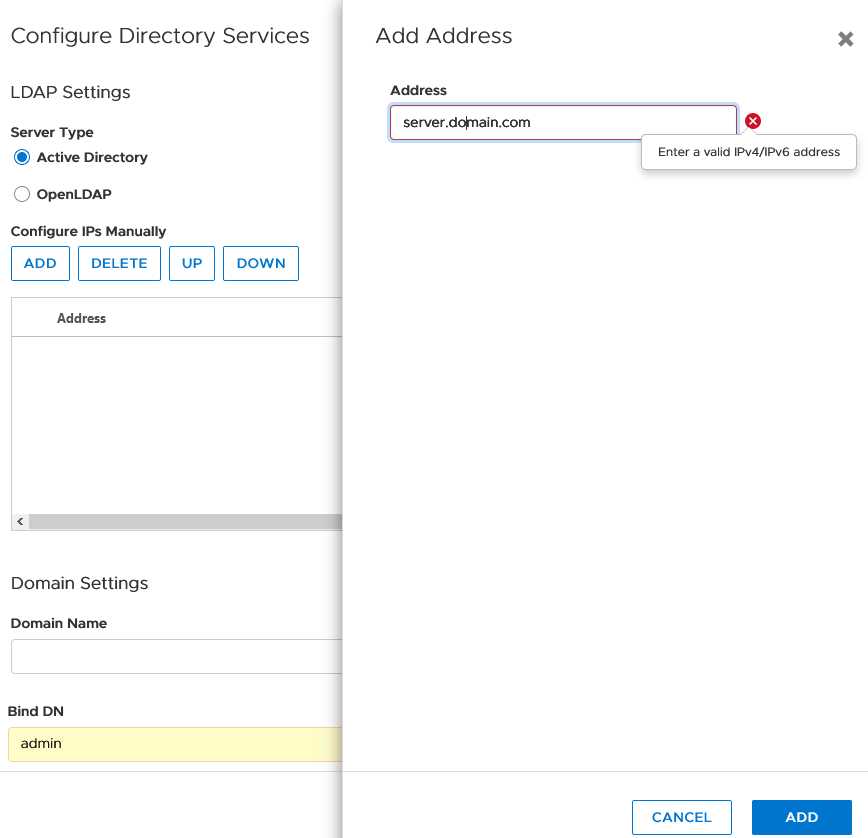
在 PowerStoreOS 1.03 (SP3) 中,憑證會正確上傳,但沒有任何選項可用於插入 FQDN 位址。
通常會依 FQDN 名稱產生憑證,因此若沒有 FQDN 選項,則憑證將無法與 LDAP 伺服器正確建立安全的通訊。
Resolution
聯絡 Dell EMC 技術支援部門或您的授權服務代表,並引用此知識文章 ID。
請考慮做為因應措施使用:
請考慮做為因應措施使用:
- 如果可在 LDAP 伺服器上建立,則是以 IP 為基礎的憑證。
- 工作時不使用 LDAP (非安全 LDAP) 做為臨時解決方案。
- 請移除 LDAP 並改為使用本機使用者,直到另行通知。
Additional Information
記錄在日誌中找到的指示:
Jan 13 20:02:34 xxxxxxx-A control-path[128569]: 2021-01-13 20:02:34.734 [] [錯誤] [com.emc.cyclone.contexts.security.ldap.services.LdapConfigurationAS|vert.x-worker-thread-0] [LdapConfigurationAS] bindUser 繫結至 LDAP 伺服器失敗: test@domain.com url:ldaps://XX.XX.XX.XX:636 error:java.security.cert.CertificateException: 找不到符合 IP 位址 XX.XX.XX.XX 的主旨替代名稱
Jan 13 20:02:34 xxxxxxx-A control-path[128569]: 2021-01-13 20:02:34.734 [] [錯誤] [com.emc.cyclone.contexts.security.ldap.services.LdapConfigurationAS|vert.x-worker-thread-0] [LdapConfigurationAS] bindUser 繫結至 LDAP 伺服器失敗: test@domain.com url:ldaps://XX.XX.XX.XX:636 error:java.security.cert.CertificateException: 找不到符合 IP 位址 XX.XX.XX.XX 的主旨替代名稱
Affected Products
PowerStoreArticle Properties
Article Number: 000181991
Article Type: Solution
Last Modified: 07 May 2026
Version: 9
Find answers to your questions from other Dell users
Support Services
Check if your device is covered by Support Services.