DLm8500 - The DLm Console's scrollable window has no place to request more lines of the original display
Summary: After signing onto the DLm and selecting the Command Interface from the list on the left, then selecting Virtuent Console VTE1 and putting in dates for a specific time there is no place to request additional lines of the original display. ...
This article applies to
This article does not apply to
This article is not tied to any specific product.
Not all product versions are identified in this article.
Symptoms
No place to request additional lines of the original display.
Cause
These are known 5.3.x version issues. We had them addressed in 5.4.0.0 only, where new Logs & Console pages were introduced.
Resolution
Upgrade to 5.4 when available.

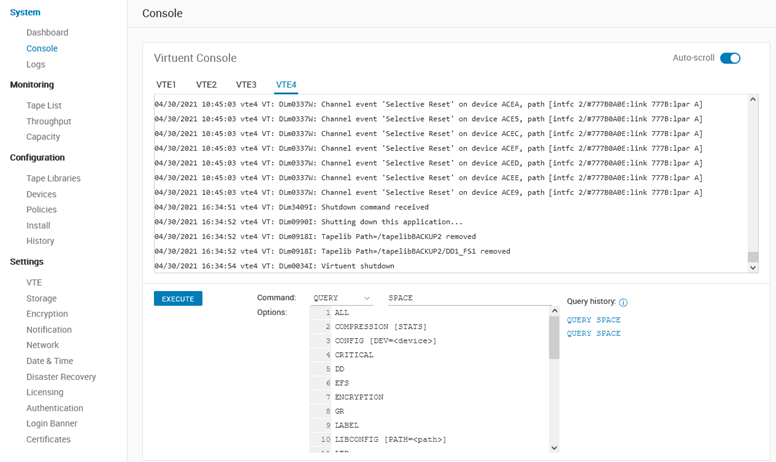
- Logs page allows to walk through the logs for each VTE with “next” and “prev” buttons and 10 000 lines step size + line search capabilities (mirrors the behavior of Logs button in webconsole):
- Console page allows to execute the VT commands (just like previous Command Interface page) and see last 1 500 lines of those commands output and tries to replicate the behavior of VTCON terminal utility with some new abilities, like – last 10 commands history, commands+options help, autoscrolling and etc. The mentioned problem with update should be fixed as well.
Affected Products
Disk Library for mainframe DLm8500Article Properties
Article Number: 000187560
Article Type: Solution
Last Modified: 06 Sep 2021
Version: 3
Find answers to your questions from other Dell users
Support Services
Check if your device is covered by Support Services.