Resizable Bar and Smart Access Memory Support for Alienware and XPS Desktop Computers
Summary: The following article describes the support for Nvidia’s Resizable BAR technology and AMD’s Smart Access Memory (SAM) technology on Alienware and XPS Desktop computers.
This article applies to
This article does not apply to
This article is not tied to any specific product.
Not all product versions are identified in this article.
Instructions
Table of Contents:
- Introduction
- What is Nvidia's Resizable Base Address Register (BAR)?
- What is AMD's Smart Access Memory (SAM)?
- Nvidia's Resizable Base Address Register (BAR) Requirements
- AMD's Smart Access Memory (SAM) Requirements
- How do you check that Nvidia's Resizable Base Address Register (BAR) and AMD's Smart Access Memory (SAM) is supported?
Introduction
Resizable Base Address Register (BAR) technology and AMD's Smart Access Memory (SAM) technology are available on Dell computers. The following sections of this article take you through:
- What is this new technology?
- How does this new technology work?
- How do you verify that this new technology is working on the computer?
What is Nvidia's Resizable Base Address Register (BAR)?
Definition of Resizable BAR
Resizable Base Address Register (BAR) is an optional PCI Express interface technology. One that Nvidia is using to boost Game performance using their RTX 30 series video cards.
As players move through a game, Graphics Processing Unit (GPU) memory (Video Random Access Memory (VRAM)) constantly transfers textures, shaders, and geometry. It does this through multiple Central Processing Unit (CPU) to GPU transfers. Modern game assets are ever-growing, and the size of data transfers are increasing. Resizable BAR allocates those assets as-needed and sent in full. Allowing the CPU to efficiently access the entire frame buffer. If multiple requests are made, the transfers occur concurrently, rather than queuing.
What is AMD's Smart Access Memory (SAM)?
Definition of Smart Access Memory (SAM)
Combine an AMD Ryzen 5000 Series or newer processor with the AMD Radeon RX 6000 Series graphics card or newer to boost your computer’s performance. Thanks to AMD's SAM technology. AMD Smart Access enables AMD Ryzen processors to harness the full potential of the graphics card memory. It provides increased performance with an all-AMD setup in your gaming computer for the ultimate gaming advantage.
The processors can only access a fraction of graphics memory (VRAM) at once, in conventional Windows based computers which limits the computers performance. With AMD Smart Access Memory, the data channel is expanded to harness the full potential of the GPUs memory. Utilizing the bandwidth of PCI Express to remove the bottlenecks and increase its performance.
Nvidia's Resizable Base Address Register (BAR) Requirements
This feature (which must be enabled in the computer BIOS) determines how much video graphics memory can be mapped for access by the CPU. (See Figure.1)

(Figure.1 BIOS Resizable BAR Screenshot in English Only.)
You require the following to support this feature:
- A Dell computer with Resizable BAR support:
- Alienware Aurora AMD R10 Gaming Desktop (Zen3 CPUs, 5000 series only.)
- Alienware Aurora R11 Gaming Desktop
- Alienware Aurora R12 Gaming Desktop
- Alienware Aurora R13 Gaming Desktop
- Alienware Aurora R14 AMD Gaming Desktop
- Alienware Aurora R15 Gaming Desktop
- Alienware Aurora R15 AMD Gaming Desktop
- Alienware Aurora R16 Gaming Desktop
- XPS 8940 Desktop
- XPS 8950 Desktop
- XPS 8960 Desktop
- A Video card that supports it (Nvidia RTX 30 Series or newer)
- A Video driver that supports it (Nvidia 27.21.14.6137 or newer)
- A Dell BIOS that supports it (February 2022 release or newer)
AMD's Smart Access Memory (SAM) Requirements
This feature (which must be enabled in the computer BIOS) determines how much video graphics memory can be mapped for access by the CPU. (See Figure.2)
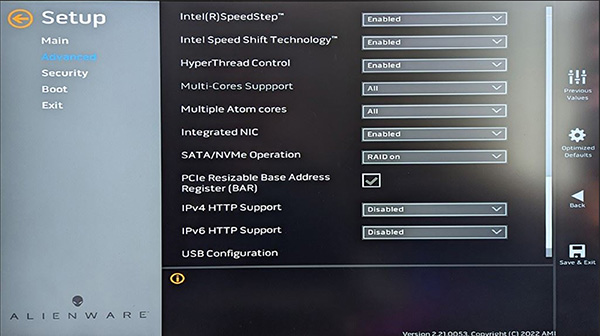
(Figure.2 BIOS Resizable BAR Screenshot in English Only.)
You require the following to support this feature:
- A Dell computer with AMD SAM support:
- Alienware Aurora AMD R10 Gaming Desktop (Zen3 CPUs, 5000 series only.)
- Alienware Aurora R14 AMD Gaming Desktop
- Alienware Aurora R15 AMD Gaming Desktop
- A Video card that supports it (AMD RX 6000 Series or newer)
- A Video driver that supports it (AMD Radeon Software Driver 20.11.2 or newer)
- A Dell BIOS that supports it (February 2022 release or newer)
How do you check that Nvidia's Resizable Base Address Register (BAR) and AMD's Smart Access Memory (SAM) is supported?
Nvidia Resizable BAR
Confirm that Resizable BAR is supported by using the following instructions:
-
Open the Nvidia Control Panel.
-
In Windows 11, you can quickly access this by right-clicking the desktop background and choosing show more options from the menu that appears.
-
-
Click System Information at the bottom left of the control panel window.
-
In the window that appears select the Display tab.
-
Scan down the detail's column for Resizable BAR.
-
It says either Yes or No to the right-hand side of Resizable BAR:
-
If it says No, you should go into your computers BIOS and confirm it is enabled. (See Figure.1)
-
If it says Yes, then it is running. (see Figure.3)
-
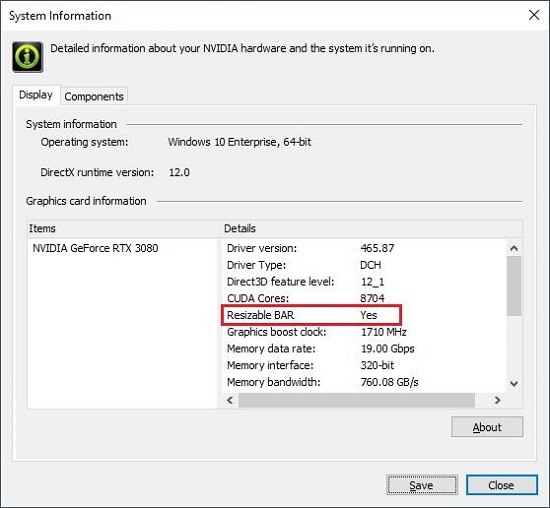
(Figure.3 Nvidia Control System Information Screenshot in English Only.)
AMD Smart Access Memory (SAM)
Confirm that AMD SAM is supported by using the following instructions:
-
Open the AMD Adrenaline software:
-
You can quickly access this by using the following keyboard shortcut. Press the Alt + R keys simultaneously and release together to open the Adrenaline edition software.
-
-
Select the performance tab.
-
In performance, select the Tuning tab.
-
Scroll down the page until the Smart Access Memory Toggle appears:
-
If it is grayed out, you should go into your computers BIOS and confirm if resizable BAR is enabled and that your computer meets the minimum requirements listed in the section above. (See Figure.1)
-
If it is not grayed out, then it is running.
(See Figure.4)
-

(Figure.4 AMD Adrenaline System Performance Screenshot in English Only.)
Affected Products
Alienware Aurora Ryzen Edition R10, Alienware Aurora R11, Alienware Aurora R12, Alienware Aurora R13, Alienware Aurora Ryzen Edition R14, Alienware Aurora R15 AMD, Alienware Aurora R15, Alienware Aurora R16, XPS 8940, XPS 8950, XPS 8960Article Properties
Article Number: 000189668
Article Type: How To
Last Modified: 11 Dec 2025
Version: 6
Find answers to your questions from other Dell users
Support Services
Check if your device is covered by Support Services.