Connectrix Brocade: Connecting to active CP results in continuous error messages "__ext4_get_inode_loc unable to read inode block"
Summary: This issue indicates that the file system of the Firmware Operating system on the switch is corrupted and occurs post a firmware upgrade.
This article applies to
This article does not apply to
This article is not tied to any specific product.
Not all product versions are identified in this article.
Symptoms
Below error message streams continuously flashing under the Errdump output not allowing the user to issue any further commands: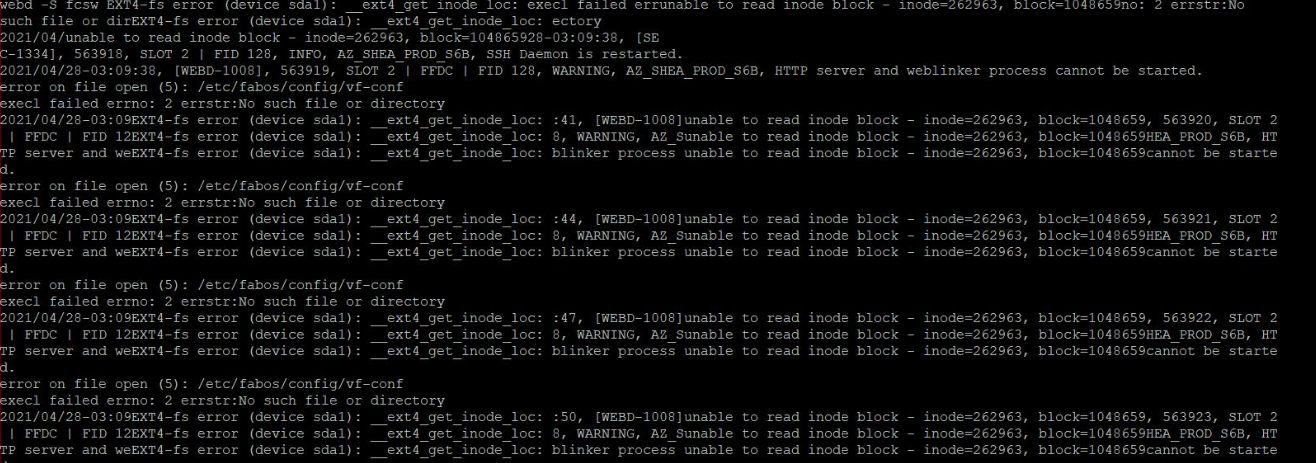
Cause
This issue is encountered when:
- Scenario 1: The switch is unreachable. Onsite engineer connects to management port to investigate the switch unreachable issues.
- Scenario 2: The switch undergoes a recent Firmware upgrade and is inaccessible.
Resolution
-
Perform a switchover using the command
#hafailoverto swap the active CP and stand-by CP. -
Connect to the active CP of the switch and check the switch mgmt port is set to Full-duplex and 100Base
# ethif --show eth0. -
Post this, connect the active CP, and check that the HA is synchronized using command
#hashow. -
If the HA is not synchronized, perform a
#hadisableand#haenable. -
Confirm if the firmware on both the active CP and stand by CP are synchronized using command
#firmwareshow.
Affected Products
BrocadeArticle Properties
Article Number: 000189862
Article Type: Solution
Last Modified: 17 Dec 2024
Version: 2
Find answers to your questions from other Dell users
Support Services
Check if your device is covered by Support Services.