Latitude Computer Does Not Wake up from Sleep Mode with Internal Keyboard and Touchpad
Summary: This article provides information about Latitude systems not waking up from sleep mode with the internal keyboard and touchpad.
This article applies to
This article does not apply to
This article is not tied to any specific product.
Not all product versions are identified in this article.
Symptoms
Latitude systems that launched in and before 2019 may not wake up from sleep mode with the internal keyboard and touchpad.
How to check if the computer supports Modern Standby mode:
- In Windows CMD mode, input command
powercfg /a - If the computer supports Modern Standby, the output shows:
- The following sleep states are available on this computer:
Standby (S0 Low Power Idle) Network Disconnected
- The following sleep states are available on this computer:
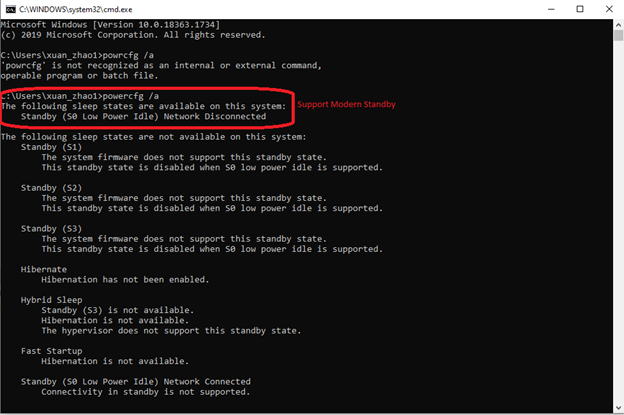
Figure 1: Example of Supported Modern Standby
Cause
The computer does not support modern standby mode.
Resolution
It is an expected behavior. Wake up the computer using the power button.
Affected Products
Latitude 5290, Latitude 7290, Latitude 7390, Latitude 3490, Latitude 5490, Latitude 7490, Latitude 3590, Latitude 5590Article Properties
Article Number: 000191327
Article Type: Solution
Last Modified: 05 May 2025
Version: 5
Find answers to your questions from other Dell users
Support Services
Check if your device is covered by Support Services.