VxRail: 설치 및/또는 업그레이드 후 ESXi DCUI IP 주소 0.0.0.0
Summary: 설치 및/또는 업그레이드 후 vSphere DCUI IP 주소가 0.0.0.0으로 표시됩니다.
This article applies to
This article does not apply to
This article is not tied to any specific product.
Not all product versions are identified in this article.
Symptoms
설치 및/또는 업그레이드 후 ESXi DCUI IP 주소는 0.0.0.0.
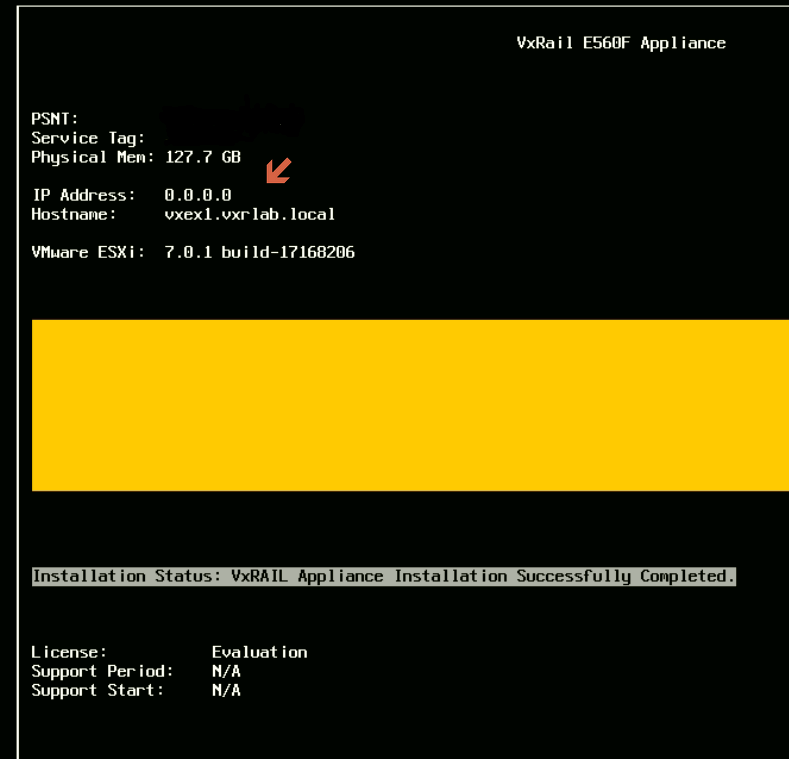
Cause
기본적으로 ESXi 운영 체제는 vmk0에서 정적 IP 주소를 선택합니다.
Resolution
이 문제를 해결하려면 다음 단계를 수행하십시오.
- 영향을 받는 노드를 유지 보수 모드로 전환
- 올바른 VMkernel 인터페이스 및 관리 IP 주소를 설정하고 다음을 실행합니다.
# esxcfg-advcfg --set vmk2 /Net/ManagementIface
# esxcfg-advcfg --set <IP address> /Net/ManagementAddr
- 아래 파일에 올바른 설정이 있는지 확인하십시오.
/etc/vmware/esx.conf > look for line: /adv/Net/ManagementAddr
/bootbank/etc/vmware/esx.conf > look for line: /adv/Net/ManagementAddr
/altbootbank/etc/vmware/esx.conf > look for line: /adv/Net/ManagementAddr
- Windows 업그레이드를 실행하라는 프롬프트에 아래 내용이 표시될 때까지
auto-backup.sh위의 파일에서 동일한 설정을 확인합니다. - 호스트 재부팅
- 문제를 다시 확인하십시오.
Affected Products
Converged Infrastructure, Converged Systems, Hybrid Cloud Platforms, Hyper-converged SystemsArticle Properties
Article Number: 000193940
Article Type: Solution
Last Modified: 05 Sep 2025
Version: 5
Find answers to your questions from other Dell users
Support Services
Check if your device is covered by Support Services.