How to Run and Use Windows Process Monitor (ProcMon)
Summary: Steps to run process monitor.
This article applies to
This article does not apply to
This article is not tied to any specific product.
Not all product versions are identified in this article.
Instructions
Follow the steps below to run the Windows Process Monitor (ProcMon) tool.
- Download the ProcMon tool from here
and Extract the ProcessMonitor.zip file
- Run the Procmon64 executable (Procmon64.exe)
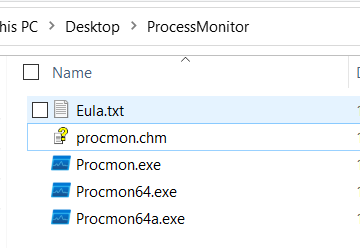
3. Accept or agree to the License Agreement to proceed.
4. The following window is seen.

5. Reproduce the issue and save the log file.
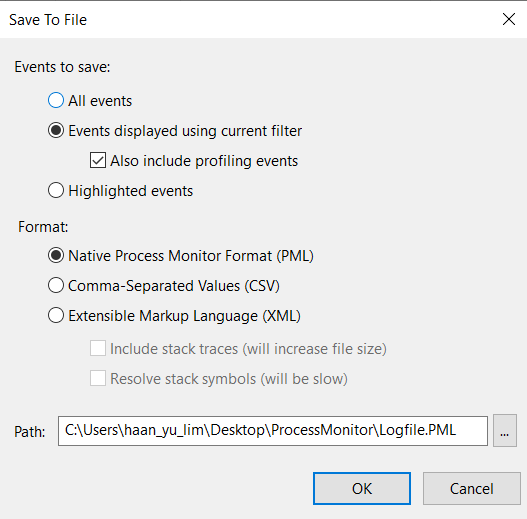
6. To save the log output, click File > Save which will bring up the following window:-
7. Choose the format of the file to save along with the path.
7. Capture and send the saved file for investigations/review.
For more information about the Process Monitor, see the Microsoft documentation below.
Process Monitor - Windows Sysinternals | Microsoft Docs
Affected Products
Microsoft Windows Server 2016, Microsoft Windows Server 2019, Microsoft Windows Server 2022, PowerEdge R570, PowerEdge R640, PowerEdge R6415, PowerEdge R650, PowerEdge R650xs, PowerEdge R6515, PowerEdge R6525, PowerEdge R660, PowerEdge R660xs
, PowerEdge R6615, PowerEdge R6625, PowerEdge R670, PowerEdge R740, PowerEdge R740XD, PowerEdge R740XD2, PowerEdge R7415, PowerEdge R7425, PowerEdge R750, PowerEdge R750XA, PowerEdge R750xs, PowerEdge R7515, PowerEdge R7525, PowerEdge R760, PowerEdge R760XA, PowerEdge R760xd2, PowerEdge R760xs, PowerEdge R7615, PowerEdge R7625, PowerEdge R770, PowerEdge R7715, PowerEdge R7725, PowerEdge R840, PowerEdge R860, PowerEdge R940, PowerEdge R940xa, PowerEdge R960, PowerEdge T330, PowerEdge T340, PowerEdge T350, PowerEdge T360, PowerEdge T440, PowerEdge T550, PowerEdge T560, PowerEdge T630, PowerEdge T640
...
Article Properties
Article Number: 000193986
Article Type: How To
Last Modified: 07 May 2025
Version: 2
Find answers to your questions from other Dell users
Support Services
Check if your device is covered by Support Services.