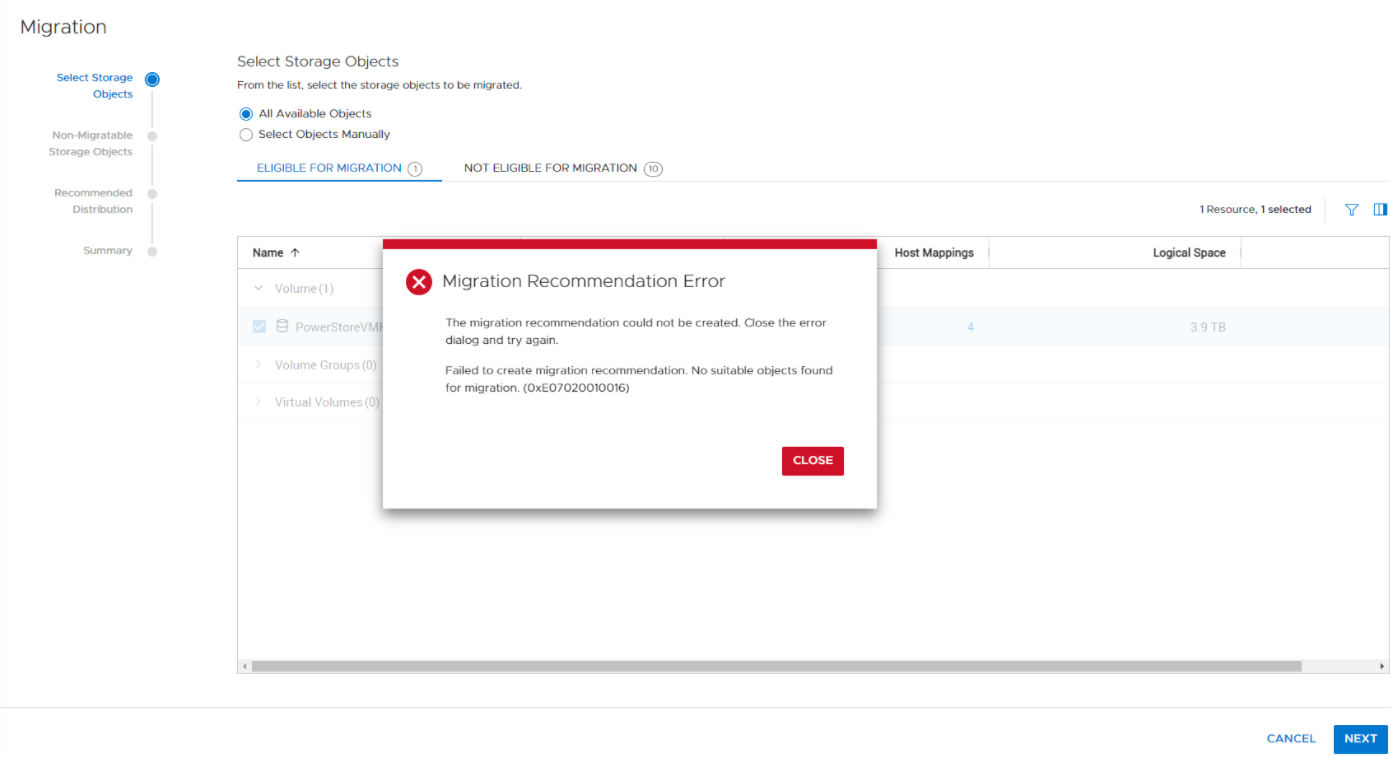
PowerStore:VMFS 顯示符合遷移資格,但遷移無法啟動。
Summary: 遷移無法開始,錯誤代碼為 0xE07020010016。
This article applies to
This article does not apply to
This article is not tied to any specific product.
Not all product versions are identified in this article.
Symptoms
啟動遷移時遇到以下錯誤:

Cause
裝置遷移精靈會根據使用者選取的所有物件或特定物件來建立遷移建議。失敗可能是由於裝置層級的問題或所選物件所導致。如果遷移建議失敗 - CP 傳回未指定實際問題的一般錯誤,因此使用者將不知道如何繼續。
Resolution
解決方案是變更 GUI 中說明有兩個層級錯誤 (裝置 & 物件) 的訊息,在裝置層級指定錯誤 (僅少數),並具有 KB 文章的連結,以列出物件層級的潛在錯誤。
物件等級中可能出現的相關錯誤:
物件等級中可能出現的相關錯誤:
- 0xE02010090011[validation_error]= 具有 ID 的磁碟區群組:{0}已在現有的遷移工作階段{1}。
- 0xE0201009001C[validation_error]= 磁碟區不允許遷移工作階段:{0}volume_group。
- 0xE0201009001F[validation_error]= 無法刪除遷移工作階段,因為將刪除類型為 {1} 的資源{0}。刪除資源後重試該操作。
- 0xE02010090023[validation_error]= 磁碟區群組系列不允許遷移工作階段:使用讀取寫入快照{0}。
- 0xE02010090030[validation_error]=卷的所有同級克隆{0}必須屬於其自己的卷組{1},它們不能與其父克隆或主卷混合使用。
- 0xE02010090031[validation_error]=族{1}的成員{0}正在導入中。
- 0xE02010090032[validation_error]=參與卷組的主卷或克隆不能具有卷組外部的父卷(克隆或主卷)或克隆。
- 0xE02010090033[validation_error]=克隆{0}及其父{1}不能屬於用於遷移族{3}的同一卷組{2}。
- 0xE02010090051[validation_error]= 無法執行此操作,因為資源系列中的一個或多個成員處於離線狀態。
Affected Products
PowerStoreArticle Properties
Article Number: 000195704
Article Type: Solution
Last Modified: 20 Jul 2022
Version: 1
Find answers to your questions from other Dell users
Support Services
Check if your device is covered by Support Services.