NetWorker: NMC Login Fails for AD or LDAP user with "You do not have privileges to use NMC"
Summary: NetWorker Management Console (NMC) authentication with an Active Directory (AD) or Lightweight Directory Access Protocol (LDAP) user fails. A message appears stating "You do not have privileges to use NetWorker Management Console." The console is accessible from using the NetWorker Administrator or other local NMC account. ...
This article applies to
This article does not apply to
This article is not tied to any specific product.
Not all product versions are identified in this article.
Symptoms
- The following error appears when attempting to log in to the NMC as an external (AD or LDAP) user:
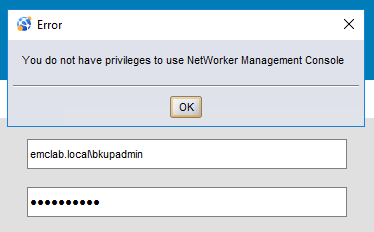
- This same AD user can log in using the
nsrlogincommand-line option. - Authentication succeeds for the default NetWorker Administrator account.
- In some situations, this error may only impact specific users.
nsrlogin
On the NetWorker server, open a command prompt (or SSH session) and run the following command syntax:
nsrlogin -t tenant_name -t domain -u username
nsrlogout
- Tenant_name: In most configurations, this value is default; otherwise, it is the tenant name configured by the NetWorker Administrator.
- Domain: The domain prefix value used when logging into the NMC
- Username: AD or LDAP username without domain prefix

Cause
The AD or LDAP user is visible to the authentication server, but the user (or their group) lacks permissions to log in to the NMC.
Resolution
- Log in to the NetWorker Management Console (NMC) as the default NetWorker Administrator account.
- Go to Setup > Users and Roles > NMC Roles.
- Review the Console Users and Application Administrators roles. The External Roles roles fields should contain the Distinguished Name (DN)
(full path) of an AD group the user belongs to; optionally, the path of a single user can be set.
For example:
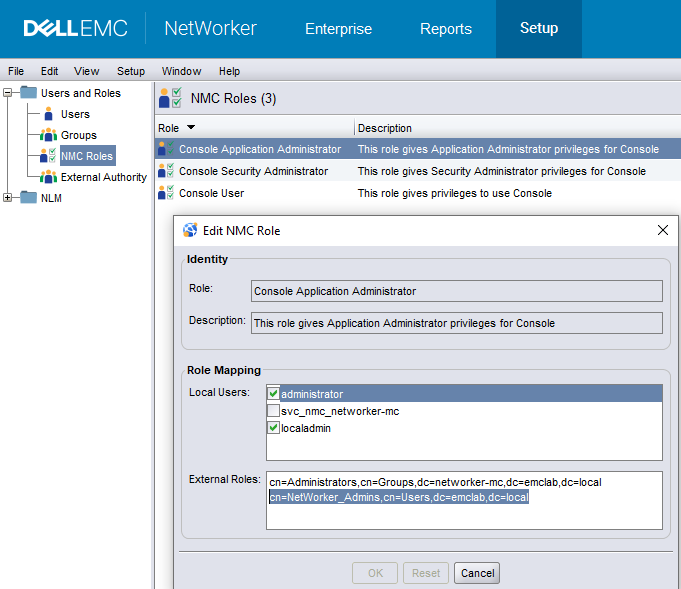
- After adding the AD group DN to the appropriate NMC Roles for the user, test logging into the NMC with that AD user.

Additional Information
If the issue persists, you can verify the AD or LDAP group membership with the following options:
Windows Powershell:
From a windows system on the same domain, run the following Powershell command:
Get-ADPrincipalGroupMembership -Identity USERNAME
Example:
PS C:\Users\Administrator.EMCLAB> Get-ADPrincipalGroupMembership -Identity bkupadmin

...
...

distinguishedName : CN=NetWorker_Admins,CN=Users,DC=emclab,DC=local
GroupCategory     : Security
GroupScope        : Global
name              : NetWorker_Admins
objectClass       : group
objectGUID        : 058495c7-71c7-42c6-be92-2d8f96a5c2aa
SamAccountName    : NetWorker_Admins
SID               : S-1-5-21-4085282181-485696706-820049737-1104
The distinguishedName outputted by the command can be used in NetWorker to grant the AD user access to the NMC.
For more information about this command, see Microsoft article Get-ADPrincipalGroupMembership
NetWorker authc_mgmt Command:
You can use the authc_mgmt command to query AD or LDAP user or group membership. On the NetWorker server, open a command prompt (or SSH session) and run the following command syntax:
authc_mgmt -u Administrator -e query-ldap-groups-for-user -D query-tenant=TENANT_NAME -D query-domain=DOMAIN_NAME -D user-name=USER_NAME
NOTE: You are prompted to enter the NetWorker Administrator account password.
For example:
PS C:\> authc_mgmt -u Administrator -e query-ldap-groups-for-user -D query-tenant=default -D query-domain=emclab.local -D user-name=bkupadmin
Enter password:
The query returns 2 records.
Group Name           Full Dn Name
Remote Desktop Users CN=Remote Desktop Users,CN=Builtin,dc=emclab,dc=local
NetWorker_Admins     CN=NetWorker_Admins,CN=Users,dc=emclab,dc=local
The Full Dn Name of one of the groups can be used to grant this AD user access to the NMC.
The configuration and values that are needed for authc_mgmt commands can be collected by running:
authc_config -u Administrator -e find-all-configs
authc_config -u Administrator -e find-config -D config-id=CONFIG_ID
authc_config -u Administrator -e find-all-tenants
Affected Products
NetWorker, NetWorker Management ConsoleProducts
NetWorker Family, NetWorker SeriesArticle Properties
Article Number: 000196070
Article Type: Solution
Last Modified: 02 May 2025
Version: 7
Find answers to your questions from other Dell users
Support Services
Check if your device is covered by Support Services.