On First Boot When A Dell Inspiron or Vostro is in an Environment Under 2°c (35.6 °f) It Will Receive Error Code: 2000-0151
Summary: When certain Dell Inspiron's or Vostro's are placed in an environment under 2°c (35.6°f), it receives an Error Code: 2000-0151 on the first boot
This article applies to
This article does not apply to
This article is not tied to any specific product.
Not all product versions are identified in this article.
Symptoms
Affected Products:
- Inspiron 3525
- Inspiron 3520
- Inspiron 3510
- Vostro 3425
- Vostro 3420
- Vostro 3525
If the computer is turned on in an environment where the temperature is under 2°c (35.6 °f), it may encounter a ePSA Warning message with the error code 2000-0151.
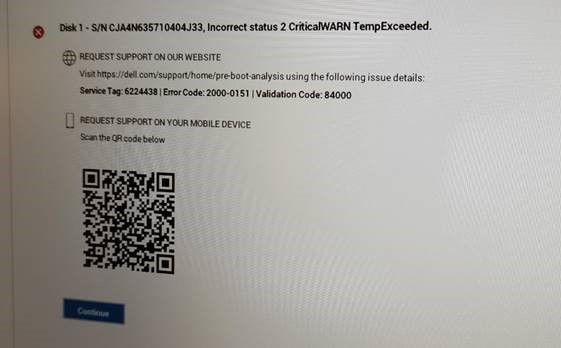
Steps to Reproduce
- Shutdown the computer
- Put the computer into a 2°c (35.6 °f) environment for more than one hour.
- When the computer is first turned on, it displays the ePSA warning message with error code 2000-0151.
Cause
SSDs detected the temperature lower than zero degrees and reports a critical warning message.
ePSA reports the critical warning error code when detecting the message.
Resolution
If the end user encounters this warning in an environment that is under 2°c (35.6 °f), reboot the computer.
The warning message is a notice when the SSD detects an abnormal temperature and causes no functionality errors to the drive.
Affected Products
Inspiron 15 3510, Inspiron 3520 (End of Life), Inspiron 15 3525, Vostro 3425, Vostro 3525Article Properties
Article Number: 000197097
Article Type: Solution
Last Modified: 24 Apr 2025
Version: 8
Find answers to your questions from other Dell users
Support Services
Check if your device is covered by Support Services.