Third-party Devices May Not Charge Wirelessly on the HD22Q Dell Dual Charge Dock
Summary: The following article provides information about the wireless charging available on the Dell Dual Charge Dock (HD22Q).
This article applies to
This article does not apply to
This article is not tied to any specific product.
Not all product versions are identified in this article.
Symptoms
Dell Dual Charge HD22Q dock owners may experience trouble when charging some devices. Some third-party devices do not wirelessly charge when placed on the HD22Q dock.
Third-party devices include but are not limited to these items:
- Air Pods 2
- Air Pods Pro
- Samsung Galaxy Buds
Cause
This is because of the improper alignment of the device with the dock charging coils.
The wireless charging area on your device depends on the location of the charging coil. Your device may not charge in all positions.
Resolution
Note: The dock and wireless charging are working as designed.
Adjusting or rotating your third-party device on the charging stand affects how it charges.
The Dell Dual Charge Dock HD22Q has a three-coil design that supports wireless charging on mobile devices of different sizes.
For Example: You can change the orientation of a device such as ear buds. Rotate the ear bud case 90 degrees counterclockwise and check the LED to ensure it is charging. This can change based on the devices size and charging preference.
- Portrait Mode charging on larger phones.
- Portrait Mode charging on smaller phones.
- Landscape Mode charging.
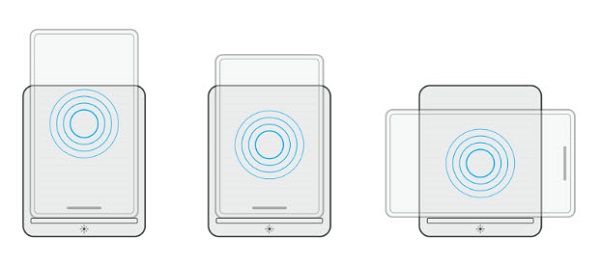
The charging coils are spread out to ensure that devices of all sizes have no difficulty charging when placed on the dock wireless charging pad.
The Quick charging LED helps identify the charging status on the docking station.

| 1 | LED on Power Button |
Affected Products
Dell Dual Charge Dock HD22QArticle Properties
Article Number: 000199030
Article Type: Solution
Last Modified: 16 Apr 2025
Version: 4
Find answers to your questions from other Dell users
Support Services
Check if your device is covered by Support Services.