播放 HDCP 電影的電腦顯示 Cyberlink PowerDVD 錯誤代碼 0012 或 0103
Summary: 下列文章提供透過 Dell 擴充基座上的 DisplayPort 在外部顯示器上播放 HDCP 電影時,Cyberlink PowerDVD 錯誤的相關資訊。
This article applies to
This article does not apply to
This article is not tied to any specific product.
Not all product versions are identified in this article.
Symptoms
CyberLink PowerDVD 在播放 HDCP 電影時顯示 0012 和 0103 錯誤
如果您的筆記型電腦使用 AMD 圖形驅動程式,則播放 High-Bandwidth Digital Content Protection (HDCP) 電影可能會產生錯誤,例如 0012 (請參閱圖 1) 或 0103。(請參閱圖 2) 您會在外部顯示器上透過擴充基座使用 DisplayPort (DP) 觀看電影時看到這些。

(圖 1 CyberLink PowerDVD 警告錯誤 0012)
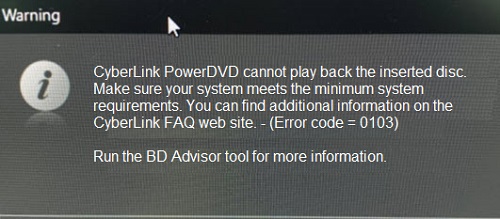
(圖 2 CyberLink PowerDVD 警告錯誤 0103)
Cause
注意:什麼是 HDCP 播放?
HDCP 是一種電子檔的保護形式。HDCP 的用途是在數位版權內容從裝置傳送到螢幕時提供保護。
HDCP 是一種電子檔的保護形式。HDCP 的用途是在數位版權內容從裝置傳送到螢幕時提供保護。
這是預期的行為。AMD 圖形驅動程式不支援 DP 的 HDCP 輸出。因此,計算機遵循Microsoft輸出保護管理器體系結構。
Resolution
您應在 Dell 擴充基座上使用不同的視訊輸出,以避免這種情況發生。您可以使用 High-Definition Multimedia Interface (HDMI) 連接埠或通用序列匯流排 (USB) Type-C 連接埠,視擴充基座背面提供的項目而定。(請參閱圖 3)
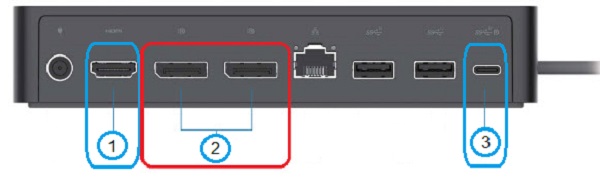
(圖 3 例如,Dell 通用擴充基座 UD22 的背面連接埠)
| 1 |  |
HDMI | 2 |  |
DisplayPort x 2 |
| 3 |  |
USB Type-C |
Affected Products
Dell Dual Charge Dock HD22Q, Dell Thunderbolt Dock TB15, Dell Thunderbolt Dock TB16, Dell Precision Dual USB-C Thunderbolt Dock - TB18DC, Dell Universal Dock UD22, Dell Dock WD19, Dell Performance Dock - WD19DC, Dell Performance Dock – WD19DCS
, Dell Dock – WD19S, Dell Thunderbolt Dock - WD19TB, Dell Thunderbolt Dock – WD19TBS
...
Products
Dell Universal Dock UD22, Dell Wireless Docking Station WLD15, Dell Thunderbolt Dock – WD22TB4Article Properties
Article Number: 000199314
Article Type: Solution
Last Modified: 22 Apr 2025
Version: 3
Find answers to your questions from other Dell users
Support Services
Check if your device is covered by Support Services.