播放 HDCP 电影的计算机显示 Cyberlink PowerDVD 错误代码 0012 或 0103
Summary: 以下文章提供有关通过戴尔坞站上的 DisplayPort 在外接显示器上播放 HDCP 电影时的 Cyberlink PowerDVD 错误的信息。
This article applies to
This article does not apply to
This article is not tied to any specific product.
Not all product versions are identified in this article.
Symptoms
播放 HDCP 电影时 CyberLink PowerDVD 显示 0012 和 0103 错误
如果您的笔记本电脑使用 AMD 显卡驱动程序,则播放高清数字内容保护 (HDCP) 电影可能会生成错误,例如 0012(请参见图 1)或 0103。(请参见图 2)当您使用 DisplayPort (DP) 通过坞站在外接显示器上观看电影时,可能会看到这些错误。
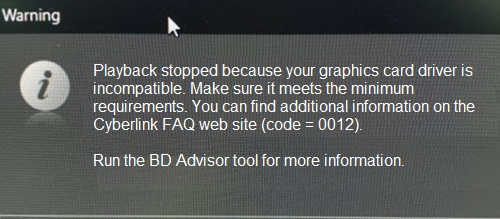
(图 1 CyberLink PowerDVD 警告错误 0012)
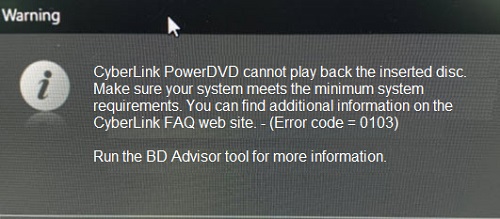
(图 2 CyberLink PowerDVD 警告错误 0103)
Cause
提醒:什么是 HDCP 播放?
HDCP 是一种数字拷贝保护形式。HDCP 的目的是在受数字版权保护的内容从设备传输到屏幕时保护这些内容。
HDCP 是一种数字拷贝保护形式。HDCP 的目的是在受数字版权保护的内容从设备传输到屏幕时保护这些内容。
这是预期的行为。AMD 显卡驱动程序不支持 DP 的 HDCP 输出。因此,计算机遵循 Microsoft 输出保护管理器体系结构。
Resolution
您应该使用戴尔坞站上的其他视频输出以避免这种情况。您可以使用高清多媒体接口 (HDMI) 端口或通用串行总线 (USB) Type-C 端口,具体取决于坞站背面的端口。(请参见图 3)
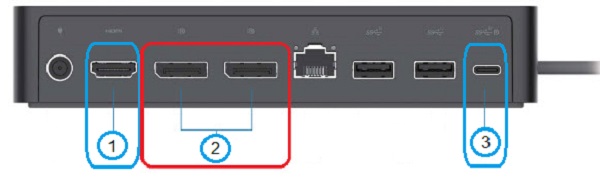
(图 3 例如,戴尔通用坞站 UD22 的背面端口)
| 1 |  |
HDMI | 2 |  |
DisplayPort x 2 |
| 3 |  |
USB Type-C |
Affected Products
Dell Dual Charge Dock HD22Q, Dell Thunderbolt Dock TB15, Dell Thunderbolt Dock TB16, Dell Precision Dual USB-C Thunderbolt Dock - TB18DC, Dell Universal Dock UD22, Dell Dock WD19, Dell Performance Dock - WD19DC, Dell Performance Dock – WD19DCS
, Dell Dock – WD19S, Dell Thunderbolt Dock - WD19TB, Dell Thunderbolt Dock – WD19TBS
...
Products
Dell Universal Dock UD22, Dell Wireless Docking Station WLD15, Dell Thunderbolt Dock – WD22TB4Article Properties
Article Number: 000199314
Article Type: Solution
Last Modified: 22 Apr 2025
Version: 3
Find answers to your questions from other Dell users
Support Services
Check if your device is covered by Support Services.