Data Protection Advisor - Fout 400 voor pre- of postscripts
Summary: Een fout 400 krijgen bij het uitvoeren van een rapport waaraan een script is gekoppeld.
This article applies to
This article does not apply to
This article is not tied to any specific product.
Not all product versions are identified in this article.
Symptoms
De fout wordt waargenomen bij het uitvoeren van een rapport met een gekoppeld script.
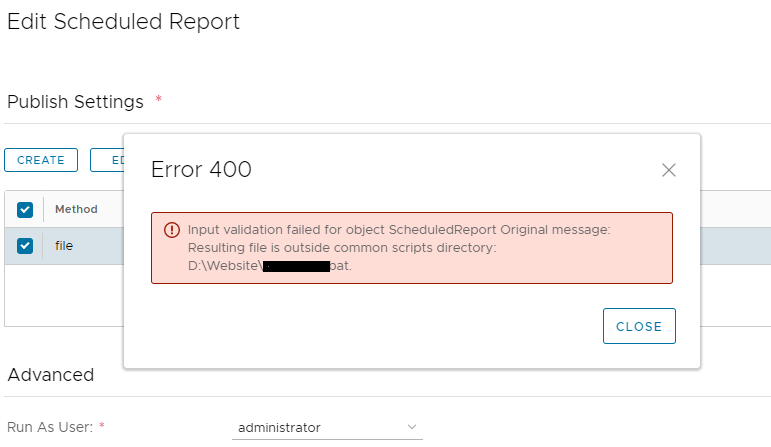
Opmerkingen uit het serverlogboek (applicatieserver: <install dir>\emc\dpa\services\logs\server):
Error 400:
Resulting file is outside common scripts directory
Opmerkingen uit het serverlogboek (applicatieserver: <install dir>\emc\dpa\services\logs\server):
2021-01-22 11:24:10,556 ERROR [com.emc.dpa.restapi.util.DPAExceptionMapper] (http-/0.0.0.0:9002-3) Exception caught. Building error response. Exception was...: javax.ejb.EJBTransactionRolledbackException: Input validation failed for object ScheduledReport Original message: Resulting file is outside common scripts directory: <Path to customer defined script> (exception.input_validation_error)
.
Caused by: com.emc.dpa.common.exception.DPAException: Input validation failed for object ScheduledReport Original message: Resulting file is outside common scripts directory: <Path to customer defined script> (exception.input_validation_error)
Cause
De reden voor deze fout is dat DPA verwacht dat de scripts zich in een specifieke directory bevinden.
Scripts worden niet verwerkt als ze buiten het ontworpen mappad worden geplaatst.
Scripts worden niet verwerkt als ze buiten het ontworpen mappad worden geplaatst.
Resolution
Volgens de beheerdershandleiding:
U moet scripts plaatsen in de <install-dir>/services/shared/commands
Door het script op de bovenstaande locatie te plaatsen, wordt het probleem opgelost.
U moet scripts plaatsen in de <install-dir>/services/shared/commands
Door het script op de bovenstaande locatie te plaatsen, wordt het probleem opgelost.
Affected Products
Data Protection AdvisorArticle Properties
Article Number: 000200217
Article Type: Solution
Last Modified: 10 Nov 2022
Version: 4
Find answers to your questions from other Dell users
Support Services
Check if your device is covered by Support Services.