AppSync:使用 LDAP 组用户登录时,无法在 AppSync GUI 上看到拷贝。
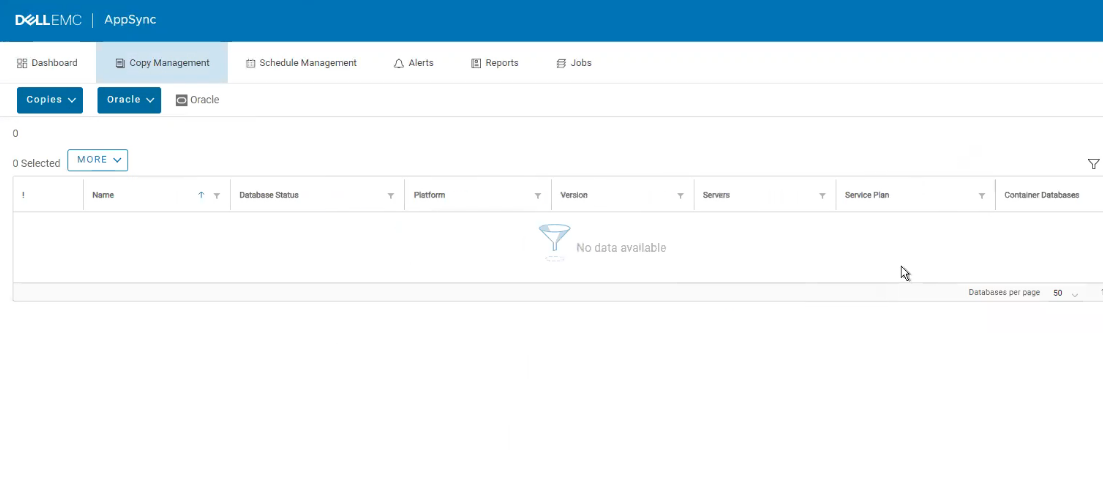
Summary: 当我们将 LDAP 组添加到 AppSync UI 并使用属于组的 LDAP 用户登录 UI 时,我们无法从 UI 的“Copy Management > Copies > any Applications”中列出拷贝。
This article applies to
This article does not apply to
This article is not tied to any specific product.
Not all product versions are identified in this article.
Symptoms
下面是 AppSync GUI 的屏幕截图,其中我们可以看到副本未显示:

Cause
根据工程团队的说法,在 4.4.0 和 4.4.1 中将组添加到 AppSync 时,组属性中缺少“canchangepermits”密钥。
Resolution
解决方法 1
解决方法 2
解决方案:
解决此问题需要修补程序。
请联系戴尔支持,并参考此知识库文章编号。
请参阅高于 4.4.0 和 4.4.0.1 的 AppSync 版本的发行说明,以确定本机包含修复程序的版本。
- 从 AppSync 中删除 LDAP 组。
- 将 LDAP 组添加到 AppSync,确保选中“Enable ACL Management”复选框。
- 现在取消选中 AppSync 中 LDAP 组的“Enable ACL Management”复选框。
解决方法 2
使用内部 AppSync 用户。
解决方案:
解决此问题需要修补程序。
请联系戴尔支持,并参考此知识库文章编号。
请参阅高于 4.4.0 和 4.4.0.1 的 AppSync 版本的发行说明,以确定本机包含修复程序的版本。
Article Properties
Article Number: 000201484
Article Type: Solution
Last Modified: 18 Sep 2025
Version: 4
Find answers to your questions from other Dell users
Support Services
Check if your device is covered by Support Services.