Wyse 5470 All-In-One with TOSHIBA (KIOXIA) SSD may display 'No bootable devices found' when restarting the operating system
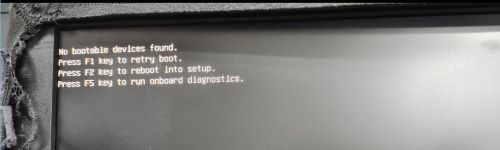
Summary: This article discusses the Wyse 5470 All-in-One (AIO) displaying the error message "No bootable devices found" when restarting the computer and the operating systems does not load.
This article applies to
This article does not apply to
This article is not tied to any specific product.
Not all product versions are identified in this article.
Symptoms
Affected Platforms:
- Wyse 5470 All-in-One
Affected Operating System:
- Windows 10 Enterprise 2019 LTSC-MR2 64-bit Unified Build image
Affected configuration
- Wyse 5470 AIO platform
- The system BIOS is 1.15.0.
- TOSHIBA (KIOXIA) SSD, 128 GB NVMe, Dell Part Number: 9946M
- Windows 10 Enterprise 2019 LTSC-MR2 64-bit Unified Build image
Steps to reproduce
- Boot into Windows.
- Restart the computer.
- Issue occurs during restart, a message is displayed No bootable devices found.
Cause
There is a compatibility problem. The solid state drive (storage) involved needs more time to respond when engaged by BIOS.
Resolution
- Press and hold the power button to shut the computer off.
- Press the power button to turn on the computer.
- Flash BIOS to previous version 1.14.1 or 1.16.1 and later using recommended method that is found on support download pages:
Affected Products
Wyse 5470 All-In-OneArticle Properties
Article Number: 000202514
Article Type: Solution
Last Modified: 24 Apr 2025
Version: 7
Find answers to your questions from other Dell users
Support Services
Check if your device is covered by Support Services.