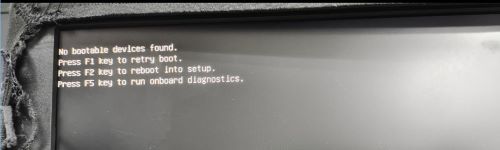
装有 TOSHIBA (KIOXIA) SSD 的 Wyse 5470 一体机在重新启动操作系统时可能会显示“No bootable devices found”(找不到可引导的设备)
Summary: 本文讨论 Wyse 5470 一体机 (AIO) 在重新启动计算机时显示错误消息“No bootable devices found”(找不到可引导的设备),并且操作系统无法加载。
This article applies to
This article does not apply to
This article is not tied to any specific product.
Not all product versions are identified in this article.
Symptoms
受影响的平台:
- Wyse 5470 一体机
受影响的操作系统:
- Windows 10 企业版 2019 LTSC-MR2 64 位统一构建映像
受影响的配置
- Wyse 5470 AIO 平台
- 系统 BIOS 为 1.15.0。
- TOSHIBA (KIOXIA) SSD、128 GB NVMe、戴尔部件编号:9946米
- Windows 10 企业版 2019 LTSC-MR2 64 位统一构建映像
重现步骤
- 启动至 Windows。
- 重新启动计算机。
- 重新启动期间出现问题,显示消息 No bootable devices found。
Cause
存在兼容性问题。当使用 BIOS 时,涉及的固态硬盘(存储)需要更多时间来响应。
Resolution
- 按住 电源按钮 以 关闭计算机。
- 按电源按钮以打开计算机。
- 使用支持下载页面上的推荐方法,将 BIOS 刷新至更低版本 1.14.1 或 1.16.1 及更高版本:
Affected Products
Wyse 5470 All-In-OneArticle Properties
Article Number: 000202514
Article Type: Solution
Last Modified: 24 Apr 2025
Version: 7
Find answers to your questions from other Dell users
Support Services
Check if your device is covered by Support Services.