VxRail: Identification Procedure for SFP, Transceiver, Cable
Summary: This article details how to find one or more part numbers and type of a VxRail node's SFP transceivers. It can help with determining whether the attached network cables are Direct Attach Copper (DAC). The article provides examples of how to find the information during a live support session or within logs. ...
This article applies to
This article does not apply to
This article is not tied to any specific product.
Not all product versions are identified in this article.
Instructions
How to determine the type, vendor, and part number of a network transceiver using the iDRAC (and its logs - TSR):
Method 1: iDRAC UI
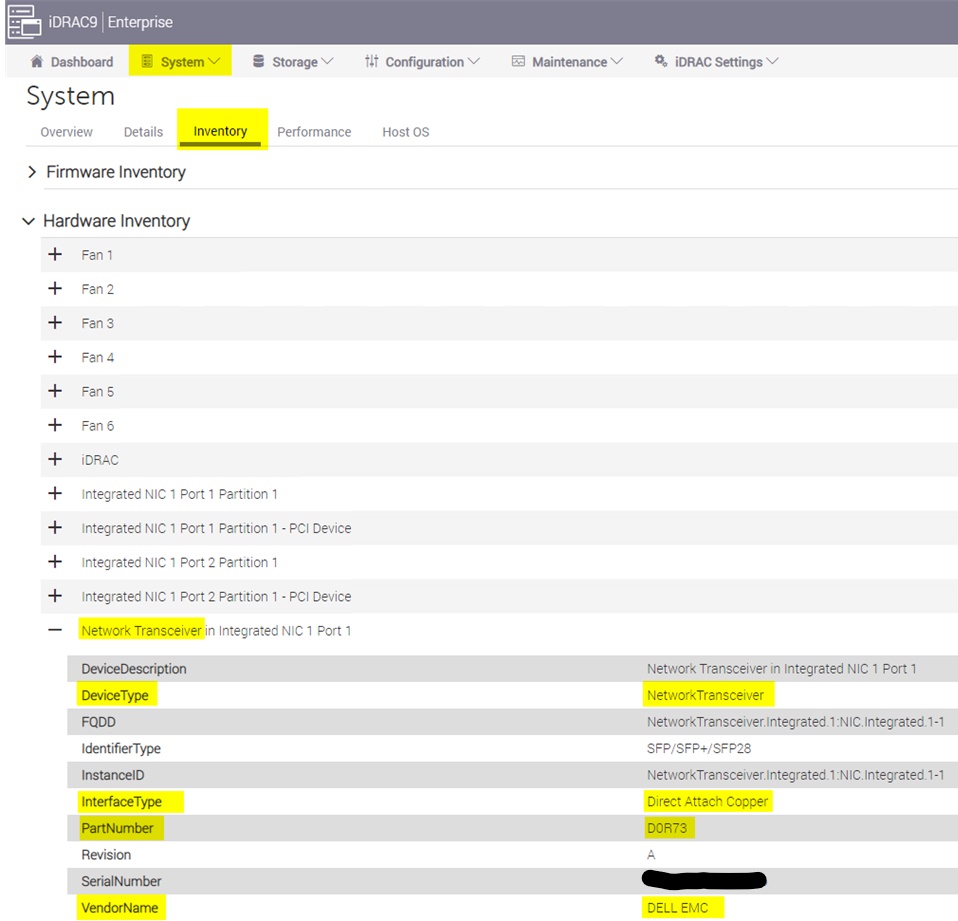
- Log in to the node's iDRAC UI and go to System > Inventory > Hardware Inventory > Network Transceiver
- From here, view the InterfaceType, PartNumber, VendorName, and so on.
Example:
Method 2: iDRAC CLI - racadm:
- SSH directly to the iDRAC's IP address or from a VxRail node's CLI with the command:
ssh root@169.254.0.1
- From the racadm CLI, run the command:
racadm hwinventory
- Search the output for the keyword Transceiver
- From here, view the InterfaceType, PartNumber, VendorName, and so on.
Example:
racadm>>racadm hwinventory
…
[InstanceID: NetworkTransceiver.Integrated.1:NIC.Integrated.1-1]
Device Type = NetworkTransceiver
DeviceDescription = Network Transceiver in Integrated NIC 1 Port 1
FQDD = NetworkTransceiver.Integrated.1:NIC.Integrated.1-1
IdentifierType = SFP/SFP+/SFP28
InstanceID = NetworkTransceiver.Integrated.1:NIC.Integrated.1-1
InterfaceType = Direct Attach Copper
PartNumber = D0R73
Revision = A
SerialNumber = XXXXXXXX
VendorName = DELL EMC
Method 3: iDRAC log bundle (SupportAssist - TSR):
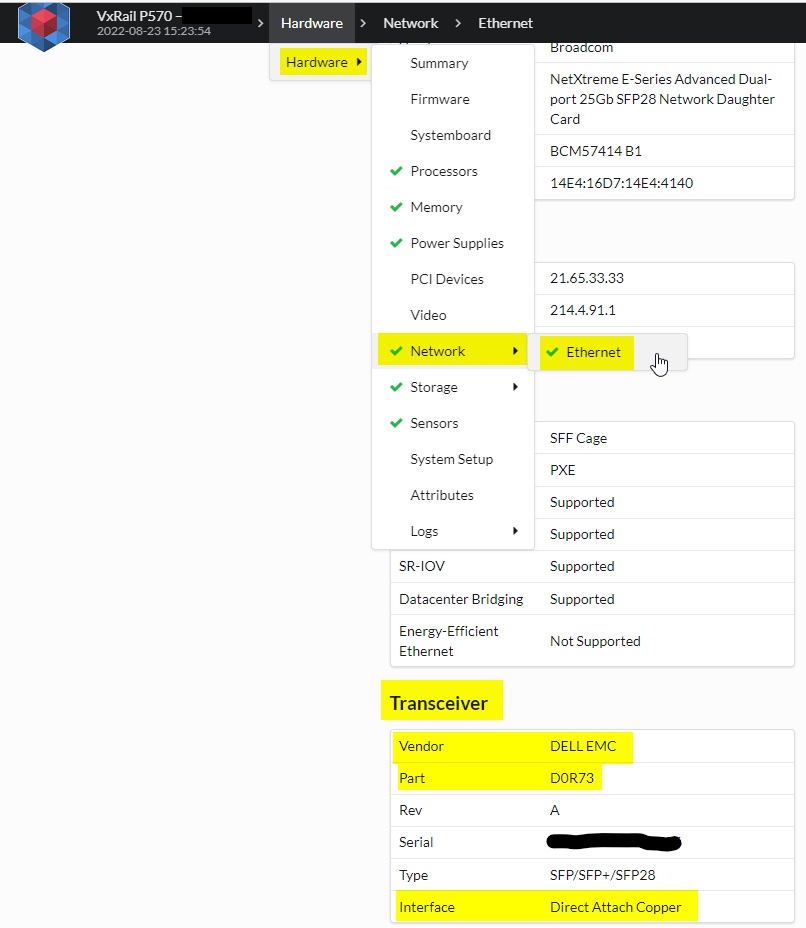
- After parsing the TSR with Tesseract, browse the resulting UI's Hardware > Network > Ethernet page and look for the Transceiver section.
- From here, view the InterfaceType, PartNumber, VendorName, and so forth.
Example:
How to determine the type of network transceiver using ESXi (and its logs):
Method 1: ESXi CLI
- SSH to the node
- Run the following command to create a
.txtfile in the node's/tmpdirectory
/usr/lib/vmware/vm-support/bin/nicinfo.sh > /tmp/nicinfo.sh.txt
- Search the
/tmp/nicinfo.sh.txtfile for the keywords Cable Type
Note: DA = DAC, FIBRE = optic cable, Twisted Pair = copper/ethernet
Example 1:
NIC:  vmnic1

NICInfo:
   Advertised Auto Negotiation: true
   Advertised Link Modes: Auto, 10000BaseT/Full
   Auto Negotiation: true
   Cable Type: DA
...
Example 2:
NIC:  vmnic0

NICInfo:
   Advertised Auto Negotiation: true
   Advertised Link Modes: Auto, 1000BaseSR/Full, 10000BaseSR/Full
   Auto Negotiation: true
   Cable Type: FIBRE
  ...
Example 3:
NIC:  vmnic0

NICInfo:
   Advertised Auto Negotiation: true
   Advertised Link Modes: Auto, 1000BaseT/Full, 100BaseT/Full, 100BaseT/Half, 10BaseT/Full, 10BaseT/Half
   Auto Negotiation: true
   Cable Type: Twisted Pair
 ...
Method 2: ESXi log bundle - vm-support
- The same outputs that are detailed above in Method 1 are found in a log bundle's
/commands/nicinfo.sh.txtfile.
How to determine the Type or Form-Factor of a network transceiver (and if "Dell Qualified) using CLI of a physical Dell switch:
- SSH into the switch as the admin user
- Run the command:
show inventory media
(This command works in both operating system 9 and operating system 10)
Example 1:
Top_TOR>show inventory media
Slot   Port     Type        Media               Serial Number        Dell Qualified
------------------------------------------------------------------------------------
   1      1     SFP+        10GBASE-CU3M          16127xxxx            Yes
   1      2              Media not present or accessible
   1      3     SFP+        10GBASE-CU3M          16144xxxx            Yes
   1      4              Media not present or accessible
...
Example 2:
VCF-Bottom-TOR# show inventory media
-----------------------------------------------------------------------------------------------------------------
                                  System Inventory Media
-----------------------------------------------------------------------------------------------------------------
Node/Slot/Port      Form-Factor              Media                    Serial-Number            Qualified
-----------------------------------------------------------------------------------------------------------------
1/1/1               SFP+           SFP+ 10GBASE-CR-2.0M                    CN05CWK60xxxxxC          true
1/1/2               Not Present
...
1/1/17              SFP28          SFP28 25GBASE-CR-2.0M                   CN0LXD000xxxxx5          true
1/1/18              Not Present
...
1/1/53              QSFP28         QSFP28 100GBASE-CR4-0.5M                CN0APX00xxxxxxH          true
1/1/54              Not Present
How to determine the part number of a network transceiver using the CLI of a Cisco Nexus switch:
- SSH into the switch as the admin user
- Run the command:
show interface Ethernet X/X transceiver details
Example:
switch# show interface ethernet 1/1 transceiver details
Ethernet1/1
     transceiver is present
     type is 10Gbase-SR
     name is CISCO-SOMETHING
     part number is SPP5100SR-C1
...
Affected Products
VxRail, VxRail 460 and 470 Nodes, VxRail Appliance Series, VxRail D Series Nodes, VxRail D560, VxRail D560F, VxRail E Series Nodes, VxRail E460, VxRail E560, VxRail E560FProducts
VxRail G Series Nodes, VxRail E560N, VxRail E660, VxRail E660F, VxRail E660N, VxRail E665, VxRail E665F, VxRail E665N, VxRail G560, VxRail G560F, VxRail P Series Nodes, VxRail P470, VxRail P570, VxRail P570F, VxRail P580N, VxRail P670F, VxRail P670N
, VxRail P675F, VxRail P675N, VxRail S Series Nodes, VxRail S470, VxRail S570, VxRail S670, VxRail Software, VxRail V Series Nodes, VxRail V470, VxRail V570, VxRail V570F, VXRAIL V670F, VxRail VD-4510C, VxRail VD-4520C, VxRail VD Series Nodes, VxRail VE-660, VxRail VE-6615, VxRail VP-760, VxRail VP-7625, VxRail VS-760
...
Article Properties
Article Number: 000202677
Article Type: How To
Last Modified: 15 May 2026
Version: 9
Find answers to your questions from other Dell users
Support Services
Check if your device is covered by Support Services.