Log Collector Example Script
Summary: This article provides an example log collector script for the Windows operating system.
This article applies to
This article does not apply to
This article is not tied to any specific product.
Not all product versions are identified in this article.
Instructions
IT professionals may have to pull log files from one or more computers to diagnose an issue. This is best done through remote management tools but can be done through scripting. The Attachments section of this article includes example log collector that can be run or modified to meet most needs.
Script Details:
- Only uses Windows Command Line and PowerShell commands
- Does not install software
- Does not change registry values
- Stores files in a temp folder until the creation of a .zip file with all logs
C:\Users\<Current User>\AppData\Roaming\- Temp folder deleted upon creation of the .zip file
- Open Source
Note: Dell technical support cannot assist with or modify this script for customers. This script is provided as an example of what can be achieved using Command Line and PowerShell for customers who are unable to install management tools in their environment.
- Download the log collector
- Download the log collector file of your choice.
- Go to the Attachments section of this article to download the file.
- To ensure the integrity of your download, users can verify the checksum value:
- MD5:
9af4c403c997dcebdba49b6251565a5c - SHA1:
3a8bb6d3a75ebe14ffc631fe68dcfa308eaf3691 - SHA-256:
4917c7f2e0d8d6111159cfe18b8dc9ca6cf04ff4467166d65435e3b8e07a5e2b
- MD5:
- Download the log collector file of your choice.
- Extract the log collector to an accessible location
- Close all unnecessary applications.
- Closing applications reduces the additional data in logs that may have to be filtered through.
- Replicate the issue being investigated.
- Users should document the date and time of the issue or error replicated.
- Run the log collector.
- The log collector should be run as admin when possible.
- The log file is added to the folder that it was run from when the collection is complete
- The file name is in the format Model#_ServiceTag_Date_Time.zip.
- Review the logs
- Using the date and time that is recorded, review the relevant logs to help isolate the cause of the issue.
- Users can learn more about the various logs using Microsoft’s Windows documentation.
- How does the collector work?
- The log collector uses Windows command line and PowerShell commands to create log files and store them in a temporary folder. This folder is then compressed into a .zip file, and the temporary file is deleted.
- Can I use this Log Collector for my company’s needs?
- Yes, this script is considered open source.
- Will Dell help me customize this collector to meet my needs?
- No. This collector is being provided as an example. Customers who want to customize this for their environment should review Microsoft documentation and learn to modify this file or create their own.
- Can I decide what data I share with Dell?
- Yes, the log collector does not transmit any data to Dell or other party automatically. Users can delete any logs in the .zip file they do not want to share with Dell before upload/email. A full list can be found in the Log Reference section of this documentation.
-
Note: Users should be careful not to delete any files Dell may need to investigate their issue.
- How long does the log collector take to run?
- The collector takes anywhere from 5-15 minutes on average to run. This time varies greatly based on the size of the logs and the speed of the CPU, memory, and hard drive (HDD) or solid state drive (SSD).
- Can I use this Log Collector on non-Dell computers?
- The log collector runs on non-Dell computers but may have empty files or missing fields for Dell-specific applications and settings.
- Does Dell have any other diagnostic or management tools they can provide?
- Yes, customers can use Dell SupportAssist and the Dell Client Command Suite to manage their computers and collect diagnostic data. Customers can learn How to Run a Dell Online Diagnostic Test.
- What is Dell's data privacy policy for handling my data?
- See the Location Specific Privacy Statement.
- What happened to the Lite and Advanced versions?
- As of version 2.3 release the Lite version’s contents were the same as running the Advanced without admin so we are now only releasing a single version.
- When I extract the files, the
.cmdfile shows as a notepad icon and opens as notepad when double-clicking- IT administrators may change the default application for running
.cmdand other script files. - It is recommended that users run the file from the command line where it runs as a script.
- Why can I not run it as a
.batfile instead?- Windows uses two different interpreters for
.cmdand.batfiles which include context and security differences. - The log collector has undergone thorough testing using
.cmd. - The log collector has NOT been tested for
.bat.
- Windows uses two different interpreters for
- IT administrators may change the default application for running
- What does the OS_Refresh_Upgrade
.txtfile contain?- This file contains a listing of all Windows OS upgrades and refreshes made to the system.
- System resets are full data wipes and will clear this data.
| Log Collected | ZIP Log Path | Command Used | Requires Admin | Command Type | Microsoft / Dell Reference URL | 2.3 Change |
|---|---|---|---|---|---|---|
| Application Event Logs | \Logs\OperatingSystem\Event Logs\application_eventlog.evtx |
wevtutil epl Application /q:"*[System[(Level<=5)]]" application_eventlog.evtx |
No | Command Line | https://learn.microsoft.com/windows/win32/wes/windows-event-log  |
0 |
| Appx Package List | \Logs\Application\installed_appx.txt |
Get-AppxPackage | Select PackageFullName | Sort PackageFullName |
Yes | PowerShell | https://learn.microsoft.com/powershell/module/appx/get-appxpackage?view=windowsserver2022-ps |
0 |
| Available Sleep States List | \Logs\Power\available_sleepstates.txt |
powercfg /a |
No | Command Line | https://learn.microsoft.com/windows-hardware/design/device-experiences/powercfg-command-line-options |
0 |
| Battery Report | \Logs\Power\Battery_Report.html |
powercfg /batteryreport /output Battery_Report.html /duration 14 |
Yes | Command Line | https://learn.microsoft.com/windows-hardware/design/device-experiences/powercfg-command-line-options |
0 |
| BCD Information | \Logs\OperatingSystem\bcd.txt |
bcdedit |
Yes | Command Line | https://learn.microsoft.com/windows-server/administration/windows-commands/bcdedit |
0 |
| Bitlocker Protector List | \Logs\Security\bitlocker_PCRs.txt |
manage-bde %SYSTEMDRIVE% -protectors -get -type TPM |
Yes | PowerShell | https://learn.microsoft.com/windows-server/administration/windows-commands/manage-bde |
0 |
| Bitlocker Status | \Logs\Security\bitlocker_status.txt |
manage-bde -status |
Yes | PowerShell | https://learn.microsoft.com/windows-server/administration/windows-commands/manage-bde |
0 |
| Broadband Adapter List | \Logs\Network\broadband_adapter.txt |
netsh mbn show interfaces |
No | Command Line | https://learn.microsoft.com/windows-server/networking/technologies/netsh/netsh-contexts |
0 |
| Configured Wake Timer List | \Logs\Power\waketimers.txt |
powercfg /waketimers |
Yes | Command Line | https://learn.microsoft.com/windows-hardware/design/device-experiences/powercfg-command-line-options |
0 |
| Dell Command Update log | \Logs\Dell\Dell_Command_Update\Activity.log |
XCOPY /s /y /q /F %SYSTEMDRIVE%\ProgramData\Dell\UpdateService\Log |
Yes | Command Line | Dell Command | Update | 0 |
| Dell Data Migrate Logs (Destination) | \Logs\Dell\Dell_Data_Migrate_Destination\(Various files) |
XCOPY /s /I /y /q /F %SYSTEMDRIVE%\ProgramData\Dell\SupportAssist\CDM\Logs . |
Yes | Command Line | https://www.dell.com/support/manuals/data-assistant/migrate_1.0_ug/ | 0 |
| Dell Data Migrate Logs (Source) | \Logs\Dell\Dell_Data_Migrate_Source\(Various Files) |
XCOPY /s /y /q /F %SYSTEMDRIVE%\ProgramData\DDA\logs\ . |
Yes | Command Line | https://www.dell.com/support/manuals/data-assistant/migrate_1.0_ug/introduction?guid=guid-28c0bb91-e84d-4118-99ee-e5500769b170& | 0 |
| Dell Digital Delivery logs | \Logs\Dell\Dell_Digital_Delivery\ |
XCOPY /s /y /q /F %SYSTEMDRIVE%\ProgramData\dell\D3\Resources\Logs\ |
Yes | Command Line | https://www.dell.com/support/contents/article/product-support/self-support-knowledgebase/software-and-downloads/download-center/dell-digital-delivery | 0 |
| Dell Factory Load Information | \Logs\Dell\FactoryLoad\dell.sdr |
XCOPY /y /q /F %SYSTEMDRIVE%\dell.sdr |
No | Command Line | https://learn.microsoft.com/windows-server/administration/windows-commands/xcopy |
0 |
| Dell Optimizer Logs | \Logs\Dell\Dell_Optimizer\* |
*XCOPY command copies multiple AppData files specific to Dell Optimizer* |
No | Command Line | https://learn.microsoft.com/windows-server/administration/windows-commands/xcopy |
1 |
| Dell Update Package Logs | \Logs\Dell\Dell_Update_Package\* |
XCOPY /s /y /q /F %SYSTEMDRIVE%\ProgramData\Dell\UpdatePackage\Log . |
No | Command Line | Dell Command | Update | 0 |
| Detailed Driver Report | \Logs\Driver\driver_details.txt |
Get-WmiObject Win32_PnPSignedDriver | select * |
No | PowerShell | https://learn.microsoft.com/previous-versions/windows/desktop/legacy/aa394354(v=vs.85) |
0 |
| DirectX Diagnostics Log | \Logs\Graphics\DXdiag.txt |
dxdiag.exe /t DXdiag.txt |
No | Command Line | https://support.microsoft.com/windows/open-and-run-dxdiag-exe-dad7792c-2ad5-f6cd-5a37-bf92228dfd85 |
0 |
| Driver List | \Logs\Driver\driver_list.txt |
Get-WmiObject Win32_PnPSignedDriver| select devicename, driverversion, driverdate | Sort-Object devicename |
No | PowerShell | https://learn.microsoft.com/previous-versions/windows/desktop/legacy/aa394354(v=vs.85) |
0 |
| Driver Store List | \Logs\Driver\driver_store.txt |
dism /online /get-drivers /all /format:table |
Yes | Command Line | https://learn.microsoft.com/windows-hardware/manufacture/desktop/what-is-dism?view=windows-11 |
0 |
| Drivers In Error State | \Logs\Driver\error_state_drivers.txt |
Pnputil /enum-devices /problem /ids |
No | Command Line | https://learn.microsoft.com/windows-hardware/drivers/devtest/pnputil |
1 |
| Energy Report | \Logs\Power\energy.html |
powercfg /energy /output energy.html |
Yes | Command Line | https://learn.microsoft.com/windows-hardware/design/device-experiences/powercfg-command-line-options |
0 |
| Group Policy Objects | \Logs\OperatingSystem\GPO_List.html |
start /min gpresult /H GPO_List.html |
No | Command Line | https://learn.microsoft.com/windows-server/administration/windows-commands/gpresult |
0 |
| Installed Application List | \Logs\Application\installed_apps.txt |
Get-ItemProperty HKLM:\Software\Microsoft\Windows\CurrentVersion\Uninstall\* | Select-Object DisplayName, DisplayVersion, Publisher, InstallDate | Sort-Object InstallDate |
No | PowerShell | https://learn.microsoft.com/powershell/module/microsoft.powershell.management/get-itemproperty?view=powershell-7.3 |
0 |
| IP Configuration | \Logs\Network\ipconfig_all.txt |
ipconfig /all |
No | Command Line | https://learn.microsoft.com/windows-server/administration/windows-commands/ipconfig |
0 |
| Last Wake Trigger | \Logs\Power\lastwake.txt |
powercfg /lastwake |
No | Command Line | https://learn.microsoft.com/windows-hardware/design/device-experiences/powercfg-command-line-options |
0 |
| Memory Dump (Full Kernel) | \Logs\MemoryDumps\memory.dmp |
XCOPY /y /q /F %SYSTEMROOT%\memory.dmp |
No | Command Line | https://learn.microsoft.com/en-us/windows-server/administration/windows-commands/xcopy |
0 |
| Memory Dump (Minidump) | \Logs\MemoryDumps\*.dmp |
XCOPY /s /I /y /q /F %SYSTEMROOT%\minidump\*.dmp |
Yes | Command Line | https://learn.microsoft.com/windows-server/administration/windows-commands/xcopy |
0 |
| Memory Dump (Status/Details) | \Logs\Operating System\DumpStatus.txt |
IF EXIST %SYSTEMROOT%\memory.dmp |
Yes | Command Line | https://learn.microsoft.com/windows-server/administration/windows-commands/if |
0 |
| Memory Management Status | \Logs\System\MemoryManagement.html |
Get-mmagent | Out-File MemoryManagement.html |
Yes | PowerShell | https://learn.microsoft.com/powershell/module/mmagent/get-mmagent?view=windowsserver2022-ps |
1 |
| Microsoft System Information (MSinfo32) | \Logs\OperatingSystem\msinfo32.nfo |
start msinfo32 /nfo msinfo32.nfo |
No | Command Line | https://support.microsoft.com/topic/description-of-microsoft-system-information-msinfo32-exe-tool-10d335d8-5834-90b4-8452-42c58e61f9fc |
0 |
| Monitor Information | \Logs\Graphics\monitor.txt |
Get-CimInstance -Namespace root\wmi -ClassName WmiMonitorID | ForEach-Object {if ($_.UserFriendlyNameLength -gt 0) {($_.ManufacturerName -ne 0 | foreach {[char]$_}) + [char] 10 + 'InstanceName: ' + ($_.InstanceName) + [char] 10 + ($_.UserFriendlyName -ne 0 | foreach {[char]$_}) + [char] 10 + 'Serial: ' + ($_.SerialNumberID -ne 0 | foreach {[char]$_}) + [char] 10 + 'ProdCodeID: ' + ($_.ProductCodeID -ne 0 | foreach {[char]$_}) + [char] 10 + 'WeekOfManufacture:' + $_.WeekOfManufacture + [char] 10 + 'YearOfManufacture:' + $_.YearOfManufacture + [char] 10 + 'DisplayActive:' + $_.Active + [char] 10 -join ''} else{($_.ManufacturerName -ne 0 | foreach {[char]$_}) + [char] 10 + 'InstanceName: ' + ($_.InstanceName) + [char] 10 + ('No Model (Likely Internal LCD)') + [char] 10 + 'Serial: ' + ($_.SerialNumberID -ne 0 | foreach {[char]$_}) + [char] 10 + 'ProdCodeID: ' + ($_.ProductCodeID -ne 0 | foreach {[char]$_}) + [char] 10 + 'WeekOfManufacture:' + $_.WeekOfManufacture + [char] 10 + 'YearOfManufacture:' + $_.YearOfManufacture + [char] 10 + 'DisplayActive:' + $_.Active + [char] 10 -join ''}} |
No | No | https://learn.microsoft.com/windows/win32/wmicoreprov/wmimonitorid |
0 |
| Network Adapter Advanced Properties Log | \Logs\Network\net_adapter_adv_properties.txt |
Get-NetAdapterAdvancedProperty |
No | PowerShell | https://learn.microsoft.com/powershell/module/netadapter/get-netadapteradvancedproperty?view=windowsserver2022-ps |
0 |
| OS Version & Install Date | \Logs\LogCollectorStatus.txt |
(Get-WMIObject -class Win32_ComputerSystem | Select-Object Model| Format-List | Out-string).Trim(); (Get-WMIObject -class Win32_OperatingSystem | Select-Object Caption, Version| Format-List| Out-string).Trim(); (Write-Output 'OS Install Date:').Trim(); ((Get-Item 'C:\Windows\system.ini').CreationTime | Out-String).Trim() |
No | PowerShell | https://learn.microsoft.com/windows/win32/cimwin32prov/win32-operatingsystem |
0 |
| PnP Device List | \Logs\Operating System\pnp_devices.txt |
Get-CimInstance Win32_PnPEntity |
No | PowerShell | https://learn.microsoft.com/windows/win32/cimwin32prov/win32-pnpentity |
0 |
| Power Requests | \Logs\Power\power_requests.txt |
powercfg /requests |
Yes | Command Line | https://learn.microsoft.com/windows-hardware/design/device-experiences/powercfg-command-line-options |
0 |
| Power Scheme Details | \Logs\Power\powerschemes.txt |
powercfg /query |
No | Command Line | https://learn.microsoft.com/windows-hardware/design/device-experiences/powercfg-command-line-options |
0 |
| Power Scheme List | \Logs\Power\power_schemes.html |
powercfg /list |
No | Command Line | https://learn.microsoft.com/windows-hardware/design/device-experiences/powercfg-command-line-options |
0 |
| Processes List | \Logs\OperatingSystem\ processes.txt |
Get-WmiObject -Class Win32_Service | Select-Object -Property Name, ProcessID |
No | PowerShell | https://learn.microsoft.com/powershell/module/scheduledtasks/get-scheduledtask?view=windowsserver2022-ps |
0 |
| Provisioning Packages | \Logs\Application\installed_provisioning_packages.txt |
Get-ProvisioningPackage |
No | PowerShell | https://learn.microsoft.com/powershell/module/provisioning/get-provisioningpackage?view=windowsserver2022-ps |
0 |
| Scheduled Task List | \Logs\OperatingSystem\taskscheduler.txt |
Get-ScheduledTask | Where State -ne "Disabled" | Get-ScheduledTaskInfo |
No | PowerShell | https://learn.microsoft.com/powershell/module/scheduledtasks/get-scheduledtask?view=windowsserver2022-ps |
0 |
| Service Tag | Part of File Name |
Get-CimInstance -ClassName Win32_BIOS -Property SerialNumber | Select-Object -ExpandProperty SerialNumber |
No | PowerShell | https://learn.microsoft.com/windows/win32/cimwin32prov/win32-bios |
0 |
| Service Tag and Baseboard ID | \Logs\System\System_Board.txt |
Get-CimInstance -ClassName Win32_BaseBoard | Format-List |
No | PowerShell | https://www.dell.com/support/manuals/data-assistant/migrate_1.0_ug/introduction?guid=guid-28c0bb91-e84d-4118-99ee-e5500769b170 | 1 |
| Services List | \Logs\OperatingSystem\services.txt |
Get-Service | Sort Status |
No | PowerShell | https://learn.microsoft.com/powershell/module/microsoft.powershell.management/get-service?view=powershell-7.3 |
0 |
| Sleep study report | \Logs\Power\sleepstudy.html |
powercfg /sleepstudy /output sleepstudy.html |
Yes | Command Line | https://learn.microsoft.com/windows-hardware/design/device-experiences/powercfg-command-line-options |
0 |
| Startup Processes List | \Logs\Application\startup_processes.txt |
Get-CimInstance Win32_StartupCommand | Select-Object Name, command, Location, User | Format-List |
No | PowerShell | https://learn.microsoft.com/windows/win32/cimwin32prov/win32-startupcommand |
0 |
| Storage Device List | \Logs\Storage\Disk_Drives.txt |
Get-CimInstance -ClassName Win32_DiskDrive | select * | Format-List |
No | PowerShell | https://learn.microsoft.com/windows/win32/cimwin32prov/win32-diskdrive |
0 |
| Storage Volumes | \Logs\Storage\Disk_Volumes.txt |
Get-CimInstance -ClassName Win32_DiskPartition | Format-List |
No | PowerShell | https://learn.microsoft.com/windows/win32/cimwin32prov/Win32-DiskPartition |
0 |
| System Model | Part of File Name |
Get-WMIObject -class Win32_ComputerSystem | Select-Object -ExpandProperty Model |
No | PowerShell | https://learn.microsoft.com/windows/win32/cimwin32prov/win32-computersystem |
0 |
| TPM Information | \Logs\Security\tpm.txt |
get-tpm |
Yes | PowerShell | https://learn.microsoft.com/powershell/module/trustedplatformmodule/get-tpm?view=windowsserver2022-ps |
0 |
| USB Device List | \Logs\USB\usb_devices.txt |
gwmi Win32_USBControllerDevice |%%{[wmi]($_.Dependent)} | Sort Manufacturer,Name,Description,DeviceID | Ft -GroupBy Manufacturer Name,Description,Service,DeviceID |
No | PowerShell | https://learn.microsoft.com/windows/win32/cimwin32prov/win32-usbcontrollerdevice |
0 |
| Video Adapter Details | \Logs\Graphics\video.txt |
Get-WmiObject win32_videocontroller | select * |
No | PowerShell | https://learn.microsoft.com/windows/win32/cimwin32prov/win32-videocontroller |
0 |
| Video Resolution Details | \Logs\Graphics\video.txt |
Get-WmiObject win32_videocontroller | select caption, CurrentHorizontalResolution, CurrentVerticalResolution, CurrentRefreshRate, DriverVersion |
No | PowerShell | https://learn.microsoft.com/windows/win32/cimwin32prov/win32-videocontroller |
0 |
| Waked Device List | \Logs\Power\device_wake_armed.html |
powercfg -devicequery wake_armed |
No | Command Line | https://learn.microsoft.com/windows-hardware/design/device-experiences/powercfg-command-line-options |
0 |
| Windows System Event Logs | \Logs\OperatingSystem\Event Logs\system_eventlog.evtx |
wevtutil epl System /q:"*[System[(Level<=5)]]" system_eventlog.evtx |
No | Command Line | https://learn.microsoft.com/windows/win32/wes/windows-event-log |
0 |
| Windows Systeminfo Log | \Logs\LogCollectorStatus.txt |
Systeminfo |
No | Command Line | https://learn.microsoft.com/windows-server/administration/windows-commands/systeminfo |
0 |
| Windows Update List | \Logs\OperatingSystem\WindowsUpdateLog.txt |
Get-WindowsUpdateLog |
No | PowerShell | https://learn.microsoft.com/powershell/module/windowsupdate/get-windowsupdatelog?view=windowsserver2022-ps |
0 |
| Windows Update Log | \Logs\OperatingSystem\hotfixes.txt |
Get-hotfix |
No | PowerShell | https://learn.microsoft.com/powershell/module/microsoft.powershell.management/get-hotfix?view=powershell-7.3 |
0 |
| Wired Network List | \Logs\Network\current_wired_network_interfaces.txt |
netsh lan show interfaces |
No | Command Line | https://learn.microsoft.com/windows-server/networking/technologies/netsh/netsh-contexts |
0 |
| Wired Network Profiles | \Logs\Network\wired_profiles.txt |
netsh lan show profiles |
No | Command Line | https://learn.microsoft.com/windows-server/networking/technologies/netsh/netsh-contexts |
0 |
| Wired Network Settings | \Logs\Network\wired_settings.txt |
netsh lan show settings |
No | Command Line | https://learn.microsoft.com/windows-server/networking/technologies/netsh/netsh-contexts |
0 |
| Wireless Reports | \Logs\Network\wlan-report-latest.html |
netsh wlan show wlanreport duration=30 && copy /y %ProgramData%\microsoft\windows\wlanreport\wlan-report-latest.html . && copy /y %ProgramData%\Microsoft\Windows\wlanreport\wlan-report-latest.cab . |
Yes | Command Line | https://learn.microsoft.com/windows-server/networking/technologies/netsh/netsh-contexts |
0 |
| Windows Upgrade / Refresh | \Logs\OperatingSystem\windows_upgrade_history |
get-itemproperty -path 'HKLM:\SYSTEM\Setup\Source OS*' | SELECT PSChildName, Productname, ReleaseId, DisplayVersion, CurrentBuild |
PowerShell | https://learn.microsoft.com/powershell/module/microsoft.powershell.management/get-itemproperty?view=powershell-7.4 |
1 | |
| Display Stream Compression | Logs\Graphics\Display_Stream_Compression_status.txt |
REG QUERY HKLM\SYSTEM\CurrentControlSet\Control\Class /s /v DPMstDscDisable > Display_Stream_Compression_status.txt |
No | PowerShell | https://learn.microsoft.com/windows-server/administration/windows-commands/reg-query |
1 |
| PCIe device Generation and link speed | \Logs\System\PCIe_Device_Info.txt |
(Get-WMIObject Win32_Bus -Filter 'DeviceID like "PCI%%"').GetRelated('Win32_PnPEntity') | foreach { [pscustomobject][ordered]@{Name = $_.Name; ExpressSpecVersion=$_.GetDeviceProperties('DEVPKEY_PciDevice_ExpressSpecVersion').deviceProperties.data;MaxLinkSpeed=$_.GetDeviceProperties('DEVPKEY_PciDevice_MaxLinkSpeed').deviceProperties.data; MaxLinkWidth=$_.GetDeviceProperties('DEVPKEY_PciDevice_MaxLinkWidth').deviceProperties.data; CurrentLinkSpeed=$_.GetDeviceProperties('DEVPKEY_PciDevice_CurrentLinkSpeed').deviceProperties.data; CurrentLinkWidth=$_.GetDeviceProperties('DEVPKEY_PciDevice_CurrentLinkWidth' ).deviceProperties.data} | Where MaxLinkSpeed } | Format-Table -AutoSize; |
No | PowerShell | https://learn.microsoft.com/powershell/module/microsoft.powershell.management/get-wmiobject?view=powershell-5.1 |
1 |
| BIOS Settings | \Logs\System\BIOS_Settings.txt |
Get-CimInstance -Namespace root\dcim\sysman\biosattributes -ClassName EnumerationAttribute | Select-Object AttributeName, CurrentValue, Defaultvalue, PossibleValue |
Yes | PowerShell | https://learn.microsoft.com/powershell/module/cimcmdlets/get-ciminstance?view=powershell-7.4 |
1 |
| Dell Command Ignore List | \Logs\Dell\Dell_Command_Update\Update_Ignore_List.txt |
REG QUERY HKLM\SOFTWARE\DELL\UpdateService\Service\IgnoreList /s /v InstalledUpdateJson |
No | PowerShell | https://learn.microsoft.com/windows-server/administration/windows-commands/reg-query |
1 |
| Dell Optimizer Settings | \Logs\Dell\Dell_Optimizer\user_settings.txt |
do-cli /get |
No | Command Line | https://www.dell.com/support/manuals/dell-optimizer/dell-optimizer-4.0_ug/command-line-interface-for-dell-optimizer?guid=guid-a82481c9-8abf-4a15-9f2b-6011e36c6b19& |
1 |
- Log Files Not Created After Running Collector
- Cause:
- Log Collector is being run from inside .zip file
- Solution:
- Always extract the Log Collector script from the .zip file before running
- Cause:
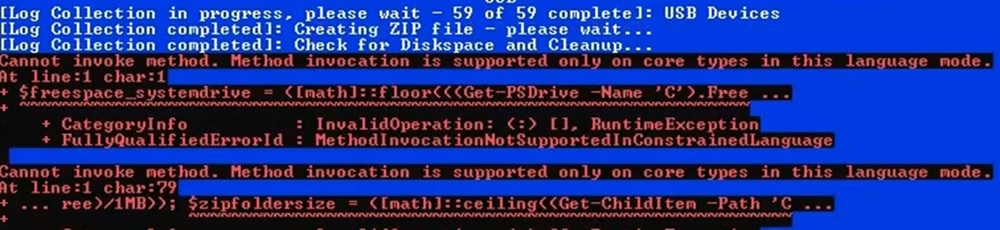
- Errors Found During ZIP Process
- Users may experience the below errors during the .zip process. This can occur if Windows Powershell is set to run in constrained mode
- Workarounds:
- Users can stop the log collector during the error message and collect the logs from %appdata%\ServiceTag
- Users can change the mode from ConstrainedLanguage to FullLanguage temporarily to run the Log Collector
- A long-term workaround and notification are planned for the next release of the log collector for this issue.
- Example Error:
- Users may experience the below errors during the .zip process. This can occur if Windows Powershell is set to run in constrained mode
- Windows Defender throws a SmartScreen warning/error
- Cause:
- Windows Defender and other security applications are designed to identify unidentified scripts as suspicious.
- Solution:
- Run the Log Collector as administrator
- Adjust defender settings to allow the Log Collector to run
- Windows SmartScreen Documentation
- Cause:
- Windows Defender/Security Software identified as Trojan
- Cause:
- Windows Defender and other security applications are designed to identify unidentified scripts as suspicious.
- Solution:
- Run the Log Collector as administrator
- Adjust security settings to allow the Log Collector to run
- Cause:
- Unable to stop GPResult log creation by pressing ‘N'
- Cause:
- Administrator access is required to stop a running process
- Solution:
- Run the Log Collector by right-clicking and running as administrator
- Cause:
Affected Products
Dell All-in-One, Dell Pro Max Micro, Dell Pro Max Slim, Dell Pro Max Tower, Dell Pro Micro, Inspiron, OptiPlex, Vostro, XPS, Dell Monitors, Dell Plus Monitors, Dell Plus, Dell Pro, Dell Pro Max, Inspiron, Latitude, Vostro, XPS, Fixed Workstations
, Mobile Workstations
...
Products
Dell Pro Slim, Dell Pro Tower, Dell Slim, Dell Tower, Dell Pro Plus Monitors, Dell Pro Plus, Dell Pro Premium, Dell Pro RuggedAttachments
Article Properties
Article Number: 000203831
Article Type: How To
Last Modified: 16 May 2025
Version: 23
Find answers to your questions from other Dell users
Support Services
Check if your device is covered by Support Services.