Dell Unity: Answers to Common Unity Upgrade Related Questions (User Correctable)
Summary: Answers to common Dell Unity Non-Disruptive Upgrade (NDU) related questions
This article applies to
This article does not apply to
This article is not tied to any specific product.
Not all product versions are identified in this article.
Symptoms
Looking for answers to common Dell Unity NDU-Related Questions:
- Current target code version
- Dell recommended code version
- Number of hops required from current code to new code
- Compatibility between Dell Unity OE and other OS
- Location of release notes
- Location of upgrade documentation or procedure
Cause
Preparing for a Dell Unity Non-Disruptive Upgrade (NDU).
Resolution
Answers to common Dell Unity NDU-Related Questions:
- Current target code version
- Dell recommended code version
- Number of hops required from current code to new code
- Compatibility between Dell Unity OE and other OS
- Location of release notes
- Location of upgrade documentation or procedure
- Results of not following the upgrade path
What is the current target code version?
The Dell Unity OE revision matrix includes the current target version.
Dell Unity OE Revision Matrix - Dell Unity OE Revision Matrix
What is the Dell recommended code version?
Our target code is a highly trusted and recommended release that is evaluated against criteria including runtime time in the field, number of installations, quality metrics, and so on. Target Code and Newest Code Released can both be the same revision level if the right criteria have been met. Dell Technologies recommends upgrading to target or newer code based on customer requirements.
What is the number of hops required from current code to new code?
Unity arrays running a Pre 5.1 OE (SLES12SP1-based) must upgrade to the 5.4.1 OE (SLES15SP0-based) as a bridge code before upgrading to the 5.5 OE. This is due to changes in support for TLS, KMIP, and encryption keys between the Pre 5.1 OE and the 5.5 OE. See the New Features section of the Unity OE 5.4.1 release notes and Unity OE 5.5.0 release notes for details.
You can upgrade directly from Unity OE 5.1.x and greater to Unity OE 5.4.x and 5.5.0.x in a single step. There are no requirements for a multi-step upgrade.
There is a requirement to disable TLS 1.0/1.1 and enable TLS 1.2 before performing an upgrade to Unity OE 5.5. See Dell articles Dell Unity: Alert 14:b20080 TLSv1.0 and TLSv1.1 are not secure. It is recommended that you use TLSv1.2 and Dell Unity: How to Disable TLS 1.0 and 1.1 on Unity Array for details.
An issue also exists when upgrading to 5.5 code related to NFSv4.2, which auto-negotiates if both the server and the client agree. If not configured correctly before the upgrade, it could cause data to become unavailable following the upgrade. See Dell article Dell Unity: Files or Folders in NFS Export Cannot be Accessed after Unity Upgrade to 5.5 for more information.
Where to determine Dell Unity OE code compatibility?
Go to E-lab Navigator main page.
Select Storage from the Simple Support Matrices pull down menu.
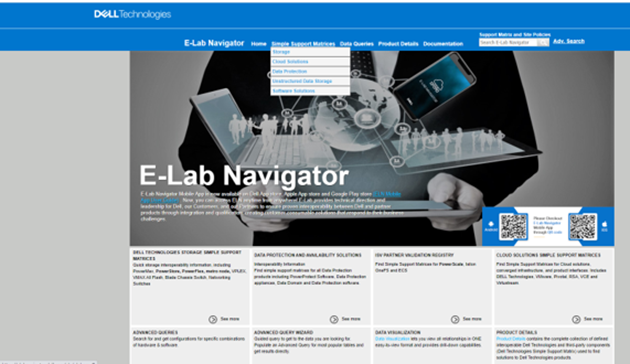
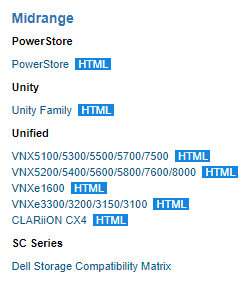
Open the Unity Family html doc to view Dell E-Lab qualified versions for Dell Unity.
What is the location for the Dell Unity OE release notes?
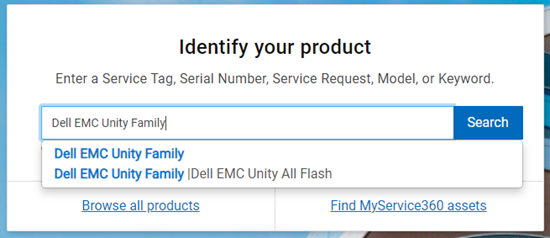
Release notes are available on the Dell Support product support site.
Enter Unity Family in the Identify Your Product window.
Click the Documentation tab.
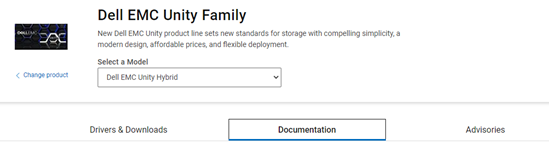
Enter Release Notes in the Search Support Information field.

Location of Unity Upgrade related knowledge articles and procedures?
Drive Firmware Upgrade Instructions and Information
Dell Unity: Drive Firmware Upgrade Instructions and Information (User Correctable).
NOTE: You must be logged in to dell.com/support with a valid customer account in order to access the links included below.
Dell Technologies SolVe Online - SolVe is a customer portal to get step-by-step procedures on specific Dell Technologies products.
Dell SolVe Online
Unity-Upgrade ---Customer-Preparation-Guide
RPS General Procedure: Unity-Upgrade ---Customer-Preparation-Guide (Login as a registered Dell Support user is required to view this document.)
How to download and install SolVe Desktop.
How to download and install SolVe Desktop? (Login as a registered Dell Support user is required to view this document.)
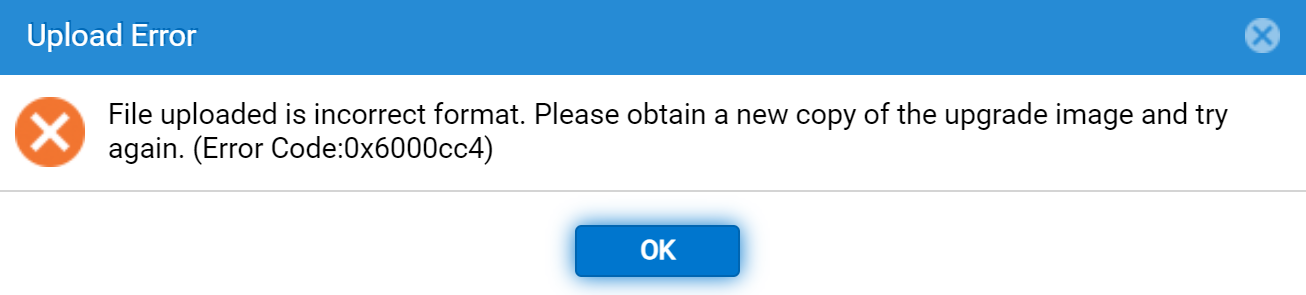
What happens when trying to upgrade to a version which is not allowed?
If you try to upgrade to a version which does not follow the approved upgrade path (that is you attempt to upgrade from 5.0 code directly to 5.5 code), the upgrader cannot be decrypted, and you see an error message:
Affected Products
Dell EMC Unity, Dell EMC Unity Family |Dell EMC Unity All Flash, Dell EMC Unity FamilyArticle Properties
Article Number: 000204308
Article Type: Solution
Last Modified: 23 Sep 2025
Version: 13
Find answers to your questions from other Dell users
Support Services
Check if your device is covered by Support Services.