The second Monitor Does Not Display After Unplug or Plug the DP Cable in Daisy Chain Mode
Summary: This article provides information about the display issue in Daisy Chain Mode.
This article applies to
This article does not apply to
This article is not tied to any specific product.
Not all product versions are identified in this article.
Symptoms
The monitor occasionally does not light up with video after unplugging or unplugging the DP cable that is connected to Dock.
Cause
Time communication issue between Dock and monitor.
Resolution
- For single Monitor,
- Ensure that the MST option of monitor is set to Off.

Figure.1 MST OFF
- For Multi-Monitor
- Set the MST option of each monitor to "Off" (same as above)
- Connect each monitor directly to the Dock’s DP port or HDMI port.

Figure.2 Multi-Monitor Connection
If the customer still prefers to daisy chain second monitor to first monitor (MST = On), set Monitor1 "Auto Select" to Off.
Figure.3 two monitor connection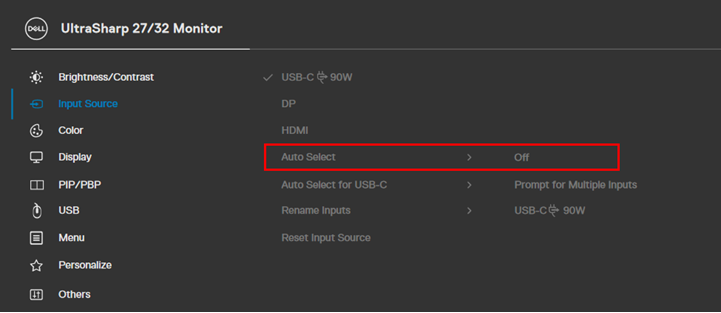
Figure.4 Auto select off.
Affected Products
Dell 24 Video Conferencing Monitor C2422HE, Dell P2422HE, Dell P2223HC, Dell P2423DE, Dell P2723DE, Dell P3223DE, Dell U2723QE, Dell U3223QZ, Dell Thunderbolt Dock – WD22TB4Article Properties
Article Number: 000204691
Article Type: Solution
Last Modified: 22 Apr 2025
Version: 5
Find answers to your questions from other Dell users
Support Services
Check if your device is covered by Support Services.