How to verify the SP owner for shared folder server on VNXe
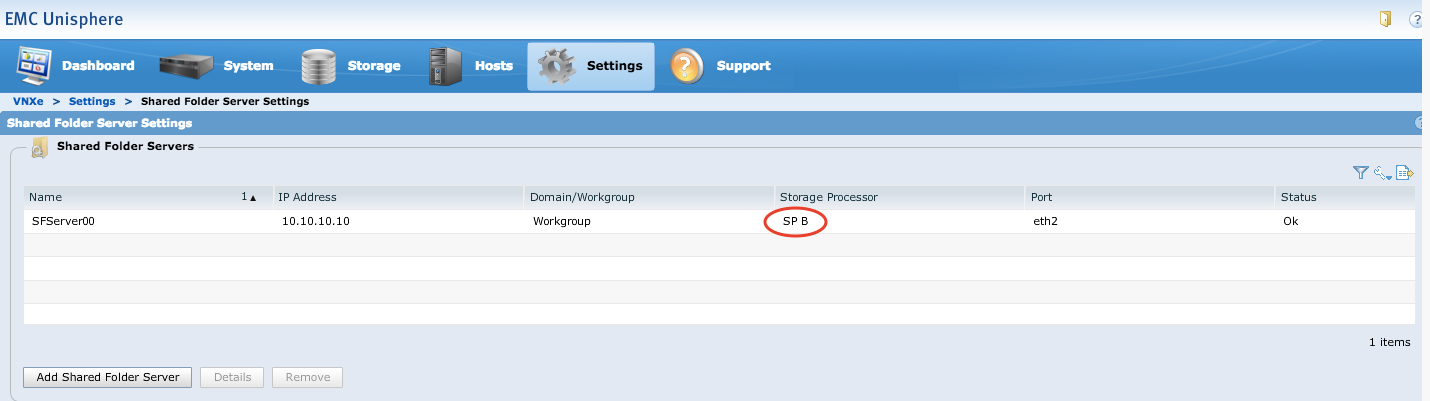
Summary: This article describes how to verify which SP is the owner for a shared folder server (NFS) on VNXe.
This article applies to
This article does not apply to
This article is not tied to any specific product.
Not all product versions are identified in this article.
Instructions
Facts
-
VNXe
-
Unisphere for VNXe
Solution
Log in to EMC Unisphere, click on the Settings tab, then click on Shared Folder Server Settings. The SP owner for a shared folder server (NFS) can be verified under Storage Processor row.
Affected Products
StorageArticle Properties
Article Number: 000205696
Article Type: How To
Last Modified: 23 Nov 2022
Version: 2
Find answers to your questions from other Dell users
Support Services
Check if your device is covered by Support Services.