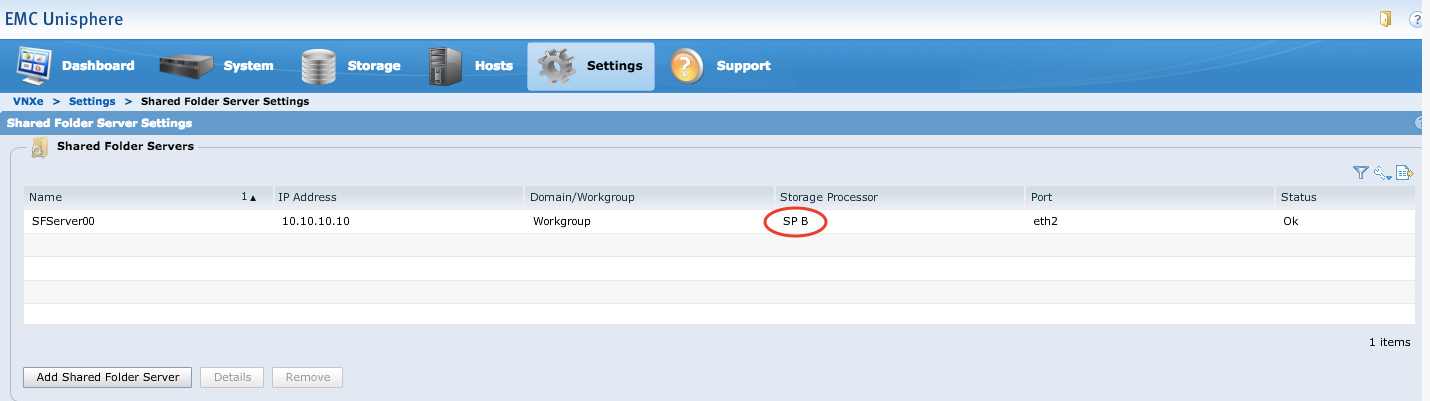
Så här kontrollerar du sp-ägaren för den delade mappservern på VNXe
Summary: I den här artikeln beskrivs hur du kontrollerar vilken SP som är ägare till en delad mappserver (NFS) på VNXe.
This article applies to
This article does not apply to
This article is not tied to any specific product.
Not all product versions are identified in this article.
Instructions
Fakta
-
VNXe
-
Unisphere för VNXe
Lösning
Logga in på EMC Unisphere, klicka på fliken Settings och klicka sedan på Shared Folder Server Settings. SP-ägaren för en delad mappserver (NFS) kan verifieras på lagringsprocessorraden .
Affected Products
StorageArticle Properties
Article Number: 000205696
Article Type: How To
Last Modified: 23 Nov 2022
Version: 2
Find answers to your questions from other Dell users
Support Services
Check if your device is covered by Support Services.