Auto On Time BIOS Setting Issue on Dell Desktops
Summary: This article provides information about Auto On Time issue on Inspiron, Vostro, ChengMing, Precision, OptiPlex Desktop and All-in-One's (AIO).
This article applies to
This article does not apply to
This article is not tied to any specific product.
Not all product versions are identified in this article.
Symptoms
Affected Platforms:
- Inspiron 3891
- Inspiron 3910
- Inspiron 5410
- Inspiron 7710
- OptiPlex 3000 Micro
- OptiPlex 3000 Thin Client
- OptiPlex 3090 Ultra
- OptiPlex 5000 Micro
- OptiPlex 5090 Tower
- OptiPlex 5400
- OptiPlex 5490 All-in-One
- OptiPlex 7000 Micro
- OptiPlex 7000 OEM MT+
- OptiPlex 7090 Tower
- OptiPlex 7090 Ultra
- OptiPlex 7400
- OptiPlex 7490 All-in-One
- Precision 3450
- Precision 3460 Small
- Precision 3650
- Precision 3660
- Precision Tower 7865
- Vostro 3690
- Vostro 3710
- Vostro 3890
- Vostro 3910
- Vostro 5890
- ChengMing 3900
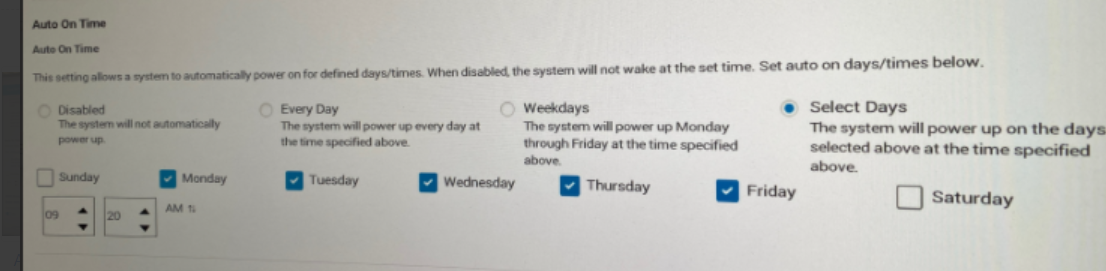
Users may encounter that the computer auto turns on every day when the Select Days are enabled and set any one day in the BIOS Auto On Time setting.
Computer works well when set days by weekday.
Failure mode:
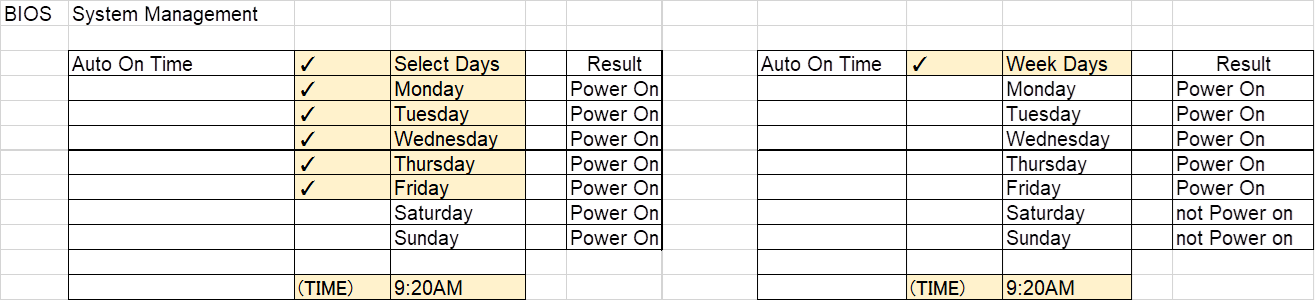
Example:
Computer set auto-on from Monday to Friday, but Computer will auto-on on Saturday and Sunday also.
Cause
BIOS coding issue
Resolution
Dell engineering team is aware of this behavior. Updating the latest BIOS version on the computer helps resolve the issue.
To download and install the latest BIOS:
Note: The web post date and BIOS version might be different based on the validation result.
| Marketing Model Name | Target web post date | Target BIOS Version |
|---|---|---|
| ChengMing 3900 | 02-21-2023 | 1.9.0 |
| Inspiron 3891 | 02-21-2023 | 1.9.0 |
| Inspiron 3910 | 02-21-2023 | 1.9.0 |
| Inspiron 5410 | 01-17-2023 | 1.9.0 |
| Inspiron 7710 | 01-17-2023 | 1.9.0 |
| OptiPlex 3000 MFF | 02-21-2023 | 1.9.0 |
| OptiPlex 3000 TC | 01-17-2023 | 1.9.0 |
| OptiPlex 3090 UFF | 01-17-2023 | 1.9.0 |
| OptiPlex 5000 MFF | 02-21-2023 | 1.9.0 |
| OptiPlex 5090 Tower | 02-21-2023 | 1.9.0 |
| OptiPlex 5400 | 01-17-2023 | 1.9.0 |
| OptiPlex 5490 AIO | 01-17-2023 | 1.9.0 |
| OptiPlex 7000 MFF | 02-21-2023 | 1.9.0 |
| OptiPlex 7000 OEM MT+ | 02-21-2023 | 1.9.0 |
| OptiPlex 7090 Tower | 02-21-2023 | 1.9.0 |
| OptiPlex 7090 UFF | 01-17-2023 | 1.9.0 |
| OptiPlex 7400 | 01-17-2023 | 1.9.0 |
| OptiPlex 7490 AIO | 01-17-2023 | 1.9.0 |
| Precision 3450 | 02-21-2023 | 1.9.0 |
| Precision 3460 SFF | 01-17-2023 | 1.9.0 |
| Precision 3650 MT | 01-17-2023 | 1.9.0 |
| Precision 3660 | 01-17-2023 | 1.9.0 |
| Precision Tower 7865 | 01-17-2023 | 1.9.0 |
| Vostro 3690 | 01-17-2023 | 1.9.0 |
| Vostro 3710 | 02-21-2023 | 1.9.0 |
| Vostro 3890 | 01-17-2023 | 1.9.0 |
| Vostro 3910 | 02-21-2023 | 1.9.0 |
| Vostro 5890 | 02-21-2023 | 1.9.0 |
Warning: Dell Technologies recommends disconnecting devices such as external hard drives, printers, scanners, and so on before updating the BIOS.
Note:
- To learn more about updating the BIOS on a Dell computer, see the Dell knowledge base article Dell BIOS Updates.
- To install the BIOS, your user account must have administrator privileges.
Affected Products
Inspiron 24 5410 All-in-One, Inspiron 27 7710 All-in-One, Inspiron 3891, Inspiron 3910, OptiPlex 3000 Tower, OptiPlex 3000 Micro, OptiPlex 3000 Small Form Factor, OptiPlex 3000 Thin Client, OptiPlex 3090 Tower, OptiPlex 3090 Micro
, OptiPlex 3090 Small Form Factor, OptiPlex 3090 Ultra, Optiplex 5000 Tower, OptiPlex 5000 Micro, OptiPlex 5000 Small Form Factor, OptiPlex 5090 Tower, OptiPlex 5090 Micro, OptiPlex 5090 Small Form Factor, OptiPlex 5400 All-In-One, OptiPlex 5490 All-In-One, OptiPlex 7000 Tower, OptiPlex 7000 Micro, OptiPlex 7000 Small Form Factor, OptiPlex 7090 Tower, OptiPlex 7090 Micro, OptiPlex 7090 Small Form Factor, OptiPlex 7090 Ultra, OptiPlex 7400 All-In-One, OptiPlex 7490 All-In-One, OptiPlex 7000 XE Micro, Precision 3450 Small Form Factor, Precision 3460 Small Form Factor, Precision 3650 Tower, Precision 3660 Tower, Precision 7865 Tower, Vostro 3690, Vostro 3710, Vostro 3890, Vostro 3900, Vostro 3910, Vostro 5890
...
Article Properties
Article Number: 000206660
Article Type: Solution
Last Modified: 18 Apr 2025
Version: 6
Find answers to your questions from other Dell users
Support Services
Check if your device is covered by Support Services.