Problem med BIOS-inställning automatiskt i tid på Dells stationära datorer
Summary: Den här artikeln innehåller information om problem med automatisk på-tid på Inspiron, Vostro, ChengMing, Precision, stationära OptiPlex och allt-i-ett-datorer (AIO).
This article applies to
This article does not apply to
This article is not tied to any specific product.
Not all product versions are identified in this article.
Symptoms
Berörda plattformar:
- Inspiron 3891
- Inspiron 3910
- Inspiron 5410
- Inspiron 7710
- OptiPlex 3000 Micro
- OptiPlex 3000 tunn klient
- OptiPlex 3090 Ultra
- OptiPlex 5000 Micro
- OptiPlex 5090 torn
- OptiPlex 5400
- OptiPlex 5490 allt-i-ett
- OptiPlex 7000 Micro
- OptiPlex 7000 OEM MT+
- OptiPlex 7090 torn
- OptiPlex 7090 Ultra
- OptiPlex 7400
- OptiPlex 7490 allt-i-ett
- Precision 3450
- Precision 3460 liten
- Precision 3650
- Dell Precision 3660
- Precision-torn 7865
- Vostro 3690
- Vostro 3710
- Vostro 3890
- Vostro 3910
- Vostro 5890
- ChengMing 3900
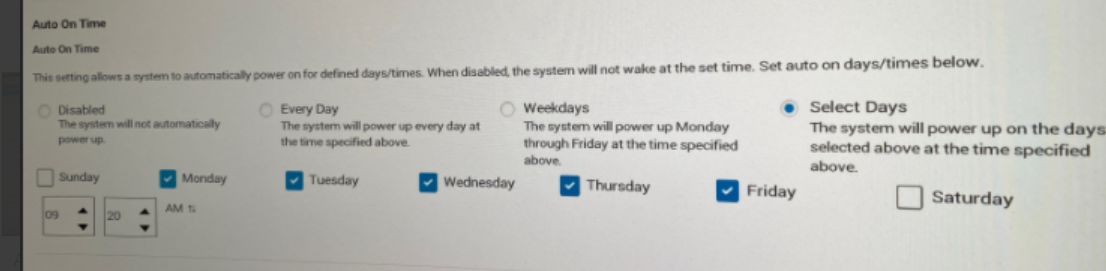
Användare kan uppleva att datorn slås på automatiskt varje dag när Select Days är aktiverade och ställs in som en dag i BIOS Auto On Time-inställningen .
Datorn fungerar bra när den ställs in dagar efter veckodag.
Felläge:
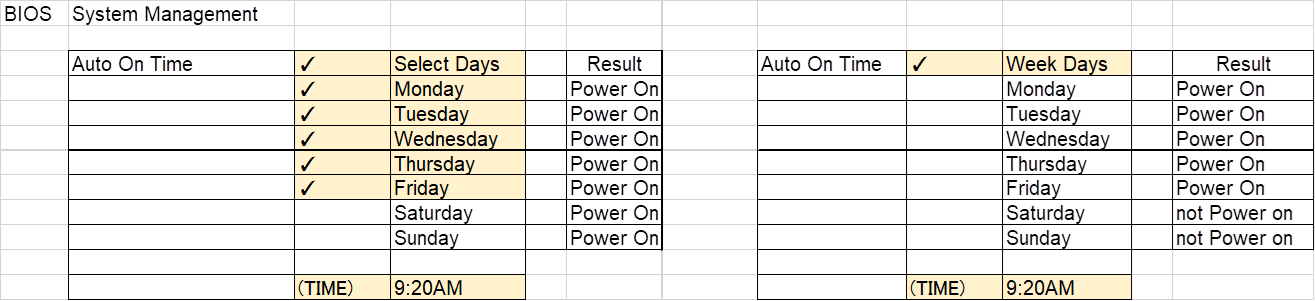
Exempel:
Datorn ställer in automatisk start från måndag till fredag, men datorn startar automatiskt även på lördag och söndag.
Cause
Problem med BIOS-kodning
Resolution
Dells teknikteam är medvetna om det här beteendet. Om du uppdaterar den senaste BIOS-versionen på datorn kan det bidra till att problemet löser sig.
Så här hämtar du och installerar den senaste BIOS-uppdateringen:
Obs! Webbpubliceringsdatum och BIOS-version kan skilja sig åt beroende på valideringsresultatet.
| Namn på marknadsföringsmodell | Måldatum för webbinlägg | Mål-BIOS-version |
|---|---|---|
| ChengMing 3900 | 02-21-2023 | 1.9.0 |
| Inspiron 3891 | 02-21-2023 | 1.9.0 |
| Inspiron 3910 | 02-21-2023 | 1.9.0 |
| Inspiron 5410 | 01-17-2023 | 1.9.0 |
| Inspiron 7710 | 01-17-2023 | 1.9.0 |
| OptiPlex 3000 MFF | 02-21-2023 | 1.9.0 |
| OptiPlex 3000 TC | 01-17-2023 | 1.9.0 |
| OptiPlex 3090 UFF | 01-17-2023 | 1.9.0 |
| OptiPlex 5000 MFF | 02-21-2023 | 1.9.0 |
| OptiPlex 5090 torn | 02-21-2023 | 1.9.0 |
| OptiPlex 5400 | 01-17-2023 | 1.9.0 |
| OptiPlex 5490 AIO | 01-17-2023 | 1.9.0 |
| OptiPlex 7000 MFF | 02-21-2023 | 1.9.0 |
| OptiPlex 7000 OEM MT+ | 02-21-2023 | 1.9.0 |
| OptiPlex 7090 torn | 02-21-2023 | 1.9.0 |
| OptiPlex 7090 UFF | 01-17-2023 | 1.9.0 |
| OptiPlex 7400 | 01-17-2023 | 1.9.0 |
| OptiPlex 7490 AIO | 01-17-2023 | 1.9.0 |
| Precision 3450 | 02-21-2023 | 1.9.0 |
| Precision 3460 SFF | 01-17-2023 | 1.9.0 |
| Precision 3650 MT | 01-17-2023 | 1.9.0 |
| Dell Precision 3660 | 01-17-2023 | 1.9.0 |
| Precision-torn 7865 | 01-17-2023 | 1.9.0 |
| Vostro 3690 | 01-17-2023 | 1.9.0 |
| Vostro 3710 | 02-21-2023 | 1.9.0 |
| Vostro 3890 | 01-17-2023 | 1.9.0 |
| Vostro 3910 | 02-21-2023 | 1.9.0 |
| Vostro 5890 | 02-21-2023 | 1.9.0 |
Varning! Dell Technologies rekommenderar att du kopplar bort enheter som externa hårddiskar, skrivare, skannrar etc. innan du uppdaterar BIOS.
Obs!
- Information om hur du uppdaterar BIOS på en Dell-dator finns i följande artikel i Dells kunskapsdatabas: Dell BIOS-uppdateringar.
- För att kunna installera BIOS måste ditt användarkonto ha administratörsbehörighet.
Affected Products
Inspiron 24 5410 All-in-One, Inspiron 27 7710 All-in-One, Inspiron 3891, Inspiron 3910, OptiPlex 3000 Tower, OptiPlex 3000 Micro, OptiPlex 3000 Small Form Factor, OptiPlex 3000 Thin Client, OptiPlex 3090 Tower, OptiPlex 3090 Micro
, OptiPlex 3090 Small Form Factor, OptiPlex 3090 Ultra, Optiplex 5000 Tower, OptiPlex 5000 Micro, OptiPlex 5000 Small Form Factor, OptiPlex 5090 Tower, OptiPlex 5090 Micro, OptiPlex 5090 Small Form Factor, OptiPlex 5400 All-In-One, OptiPlex 5490 All-In-One, OptiPlex 7000 Tower, OptiPlex 7000 Micro, OptiPlex 7000 Small Form Factor, OptiPlex 7090 Tower, OptiPlex 7090 Micro, OptiPlex 7090 Small Form Factor, OptiPlex 7090 Ultra, OptiPlex 7400 All-In-One, OptiPlex 7490 All-In-One, OptiPlex 7000 XE Micro, Precision 3450 Small Form Factor, Precision 3460 Small Form Factor, Precision 3650 Tower, Precision 3660 Tower, Precision 7865 Tower, Vostro 3690, Vostro 3710, Vostro 3890, Vostro 3900, Vostro 3910, Vostro 5890
...
Article Properties
Article Number: 000206660
Article Type: Solution
Last Modified: 18 Apr 2025
Version: 6
Find answers to your questions from other Dell users
Support Services
Check if your device is covered by Support Services.