Alienware Aurora R15 Power Mode Settings
Summary: Learn about power modes (Best power efficiency, Balanced, and Best performance) that are found in Settings on the Alienware Aurora R15.
This article applies to
This article does not apply to
This article is not tied to any specific product.
Not all product versions are identified in this article.
Symptoms
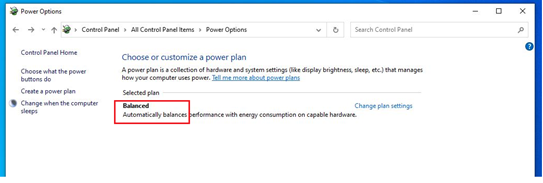
Only one power plan may be found when browsing legacy power plans. Legacy power plans are also known as the Power Options in Control Panel. This is found by going to the Control Panel, then to All Control Panel Items, then Power Options. The available legacy power plan is Balanced.
Affected Platforms:
- Alienware Aurora R15
- Alienware Aurora R15 AMD
Affected Operating Systems:
- Windows 11
Cause
In June 2021, Dell changed to only ship computers with one legacy power plan.
Resolution
Workaround:
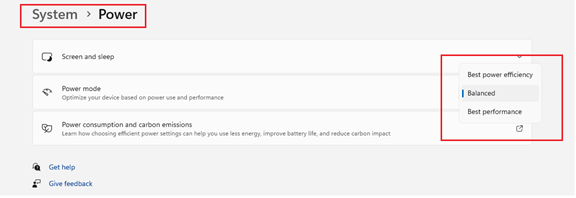
There are three power modes (Best power efficiency, Balanced, and Best performance) in Power mode. Power mode is found by going to Settings, then System, and then to Power. The options are found by following this path.
Affected Products
Alienware Aurora R15 AMD, Alienware Aurora R15Article Properties
Article Number: 000207381
Article Type: Solution
Last Modified: 16 May 2026
Version: 5
Find answers to your questions from other Dell users
Support Services
Check if your device is covered by Support Services.