Alienware Aurora R15 电源模式设置
Summary: 了解 Alienware Aurora R15 上的“设置”中的电源模式(最佳电源效率、平衡和最佳性能)。
This article applies to
This article does not apply to
This article is not tied to any specific product.
Not all product versions are identified in this article.
Symptoms
浏览传统电源计划时,您可能只找到一个电源计划。传统电源计划也称为控制面板中的电源选项。转到 “控制面板”,然后转到 “所有控制面板项目”,然后单击 “电源选项”即可找到。可用的旧式电源计划为 “平衡”。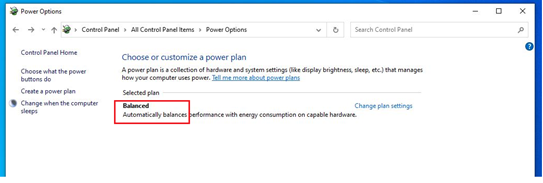
受影响的平台:
- Alienware Aurora R15
- Alienware Aurora R15 AMD
受影响的操作系统:
- Windows 11
Cause
2021 年 6 月,戴尔更改为只发运具有一个传统电源计划的计算机。
Resolution
解决办法:
电源模式中有三种电源模式(最佳电源效率、平衡和最佳性能)。通过依次转到“设置”、“系统”和“电源”来找到电源模式。您可以按照此路径查找选项。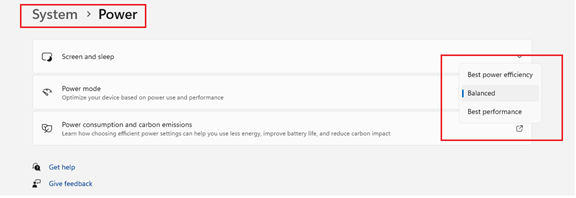
Affected Products
Alienware Aurora R15 AMD, Alienware Aurora R15Article Properties
Article Number: 000207381
Article Type: Solution
Last Modified: 24 Apr 2025
Version: 3
Find answers to your questions from other Dell users
Support Services
Check if your device is covered by Support Services.