How to Use CVAA UI Module TS23
Summary: See the information about using the Dell CVAA UI Module-TS23.
This article applies to
This article does not apply to
This article is not tied to any specific product.
Not all product versions are identified in this article.
Instructions
Table of Contents:
- What is CVAA UI Module-TS23
- Main difference between monitor with or without Menu Voice
- How to enable Menu Voice Function of Dell monitors by using TS23
- Troubleshooting
What is CVAA UI Module-TS23

Figure.1 TS23
Introduction:
TS23 is a Dell Monitor Text to Speech User Interface Module, which is an accessibility device for people who are visually impaired. TS23 is compliant with 21st Century Communications and Video Accessibility Act (CVAA). It is an accessibility device for the visually impaired, which can Broadcast Voice when selecting on-screen text menus.
Function:
Connect TS23 to the USB port marked "CVAA" located at the back of the monitor and select on-screen text menus and commands, which are displayed by the On-Screen Menu function, will be narrated using text-to-speech synthesis to aid accessibility of the visually impaired.
Applicable models:
TS23 is applicable to below monitors sold in North America Region after Jan 25, 2023 only.
| Model | Dell PN | Description |
|---|---|---|
| C2423H | KH9JN | ASSY, BASE, DIS, C2423H, CVAA |
| P2725H | 02FKJ | ASSY, BASE, DIS, P2725H, TAACVAA |
| U4025QW | 39THD | ASS,BASE, DIS, U4025QW |
Note: TS23 UI Module is available upon request through Sales. Navigate to Dell Product Page and select "Contact Us" to contact Sales.
Main difference between monitor with or without Menu Voice
| Monitor with Menu Voice function | Monitor without Menu Voice function |
|---|---|
OSD menu shows "Menu Voice" in "Others" Figure.2 Monitor with Menu Voice function |
No "Menu Voice" in "Others" Figure.3 Monitor without Menu Voice function |
How to enable Menu Voice Function of Dell monitors by using TS23
NOTE: Menu Voice function applies to C2423H sold in North America Region only.
- Power ON the monitor by pressing on the concave button located at the back of the monitor.

Figure.4 Power on Monitor - Connect Dell Monitor Text to Speech User Interface Module - TS23 to the USB port marked "CVAA" located at the back of the monitor.
Upon successful connection to the correct USB port, there will be audible feedback stating "CVAA Connected".

Figure.5 CVAA Connected - Utilize the joystick to activate the On-Screen Display (OSD) menu.
Use the joystick as shown below to navigate through the Easy Initial Setup. Press the joystick to enter.

Figure.6 Navigate Easy Initial Setup - Moving the joystick to highlight menu items and pressing the joystick to enter.
Follow the steps in the Easy Initial Step shown on screen to enable the Menu Voice function.
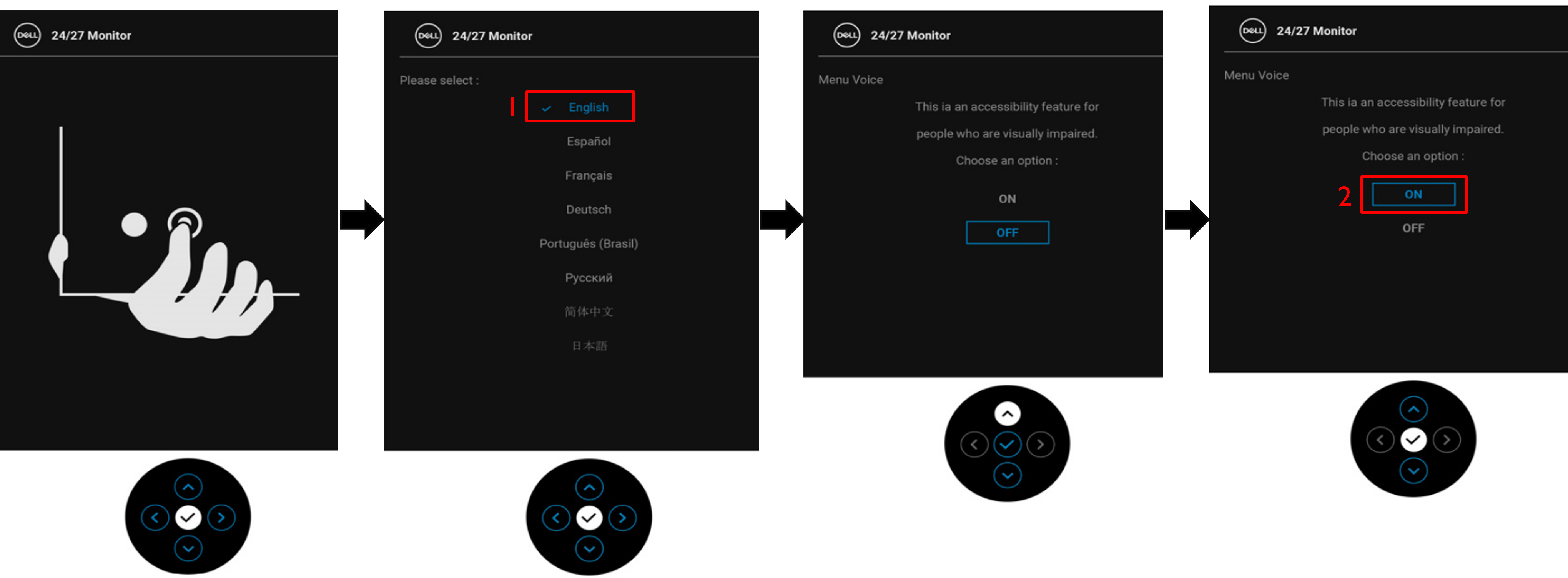
Figure.7 Menu Voice functionNOTE: Menu Voice is only available when the OSD language is set to English. - After "Menu Voice" is set to ON, TS23 will start to broadcast voice when moving Joystick to select OSD menu.
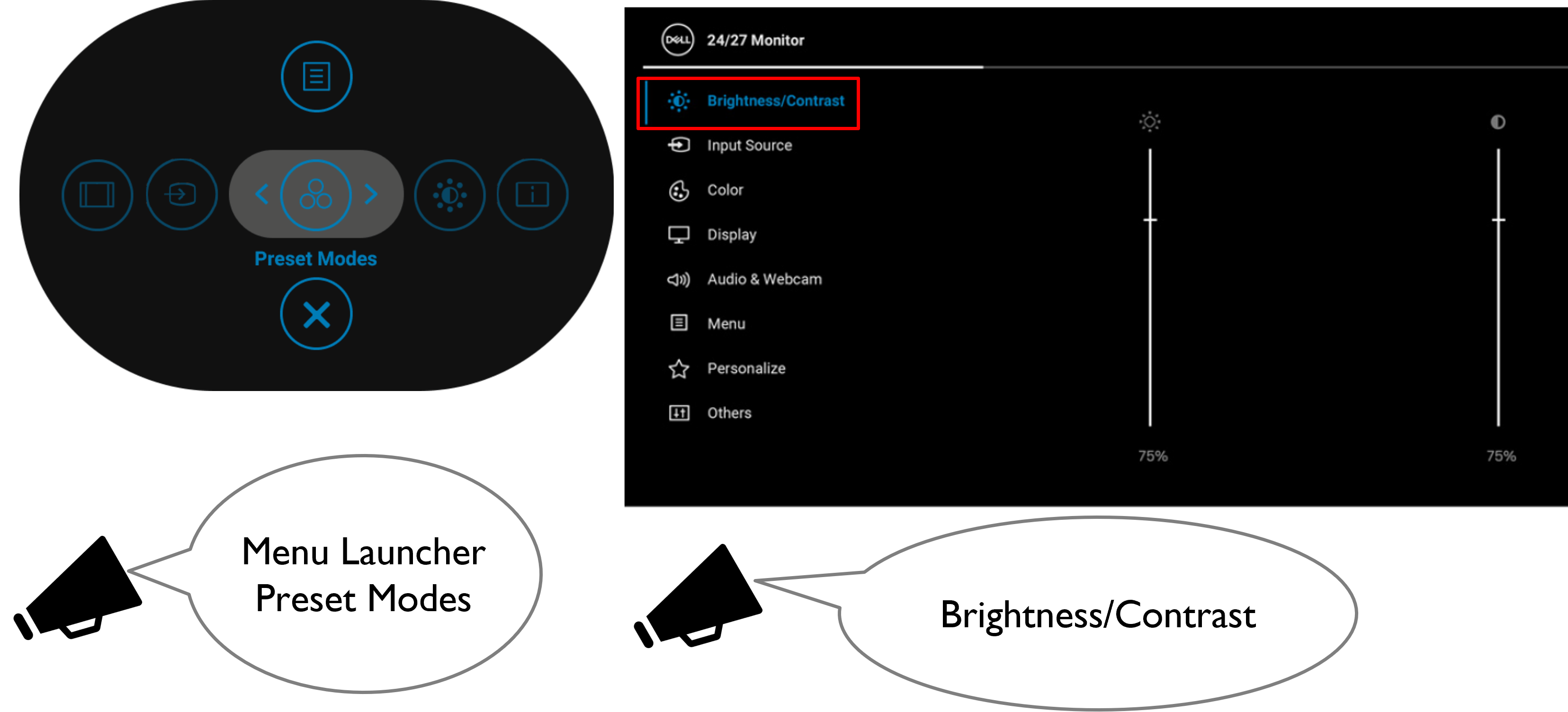
Figure.8 Broadcast voice
NOTE: After setting up, you may deactivate or re-activate the Menu Voice by following two ways.
- Press and hold the joystick for 3 seconds.
- Enter Main Menu, choose " Others"=>"Menu Voice", select "On" or "Off" to enable or disable this feature.

Figure.9 Enable or disable feature
NOTE: Menu Lock or Language function will be disabled when Menu Voice is On.
Troubleshooting
| Common Symptoms | What You Experience | Possible Solutions |
|---|---|---|
| Dell Monitor Text to Speech User Interface Module-TS23 is not detected. | There is no audible feedback stating "CVAA Connected" when connected TS23 to the monitor. |
|
| Menu Voice Function is not working. |
Dell Monitor Text to Speech User Interface Module-TS23 cannot broadcast voice when selecting on-screen text menus and commands, which are displayed by the On-Screen Menu function. |
|
Affected Products
Dell C2423H, Dell P2725H, Dell U4025QWArticle Properties
Article Number: 000207395
Article Type: How To
Last Modified: 27 Mar 2024
Version: 3
Find answers to your questions from other Dell users
Support Services
Check if your device is covered by Support Services.