Dell VxRail: TPM Does Not Show as Present and has an Unknown Type in the Operating System
Summary: The motherboard has lost connectivity to the Trusted Platform Module (TPM). The operating system can no longer see the TPM, and it is presented as Type: '???-NTC' in the BIOS. Do a Power drain (Full Power Cycle using BIOS or physical unplug of power) to resolve. ...
This article applies to
This article does not apply to
This article is not tied to any specific product.
Not all product versions are identified in this article.
Symptoms
Caution: This is a VxRail-specific article referencing the impact of Dell PowerEdge Server: TPM shows as Type '???-NTC'. Review it first for any new updates.
The operating system no longer shows the TPM as present even though it was installed and working fine previously. Further, checking the BIOS either in the iDRAC or directly booting in, shows up as '???-NTC'.
This is verified under both the iDRAC BIOS settings (Configuration > BIOS Settings > System Security) or using the F2 boot (System Setup > BIOS Settings > System Security)

For systems configured with Secure Boot, this can prevent the operation from booting. When it does, it shows a boot error purple screen with the below error:

Unable to restore system configuration. A security violation was detected. https://via.vmw.com/security-violation
Cause
The system board has lost communication with the TPM. This was only seen and reported in the field on 14G based VxRail nodes as of February 2023.
Resolution
A power drain resolves the issue.
You can verify if this is resolved by viewing the TPM Version info:
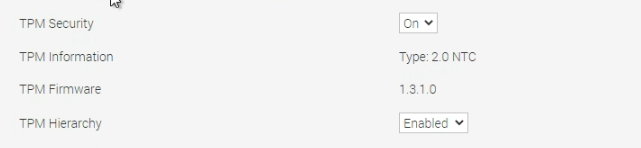
If users continue to have the Security Violation, boot error purple screen after this, then investigate for a different cause.
Review TPM BIOS settings and correct as necessary.
Affected Products
VMWare Cloud on Dell EMC VxRail E560F, VMWare Cloud on Dell EMC VxRail E560N, VxRail D560, VxRail D560F, VxRail E560, VxRail E560 VCF, VxRail E560F, VxRail E560F VCF, VxRail E560N, VxRail E560N VCF, VxRail G560, VxRail G560 VCF, VxRail G560F
, VxRail G560F VCF, VxRail P570, VxRail P570 VCF, VxRail P570F, VxRail P570F VCF, VxRail P580N, VxRail P580N VCF, VxRail S570, VxRail S570 VCF, VxRail V570, VxRail V570 VCF, VxRail V570F, VxRail V570F VCF
...
Article Properties
Article Number: 000208664
Article Type: Solution
Last Modified: 20 Aug 2025
Version: 9
Find answers to your questions from other Dell users
Support Services
Check if your device is covered by Support Services.