Inspiron 7610 Has a Yellow Bang in Device Manager for the HID PCI Minidriver for ISS
Summary: Information about a Windows Device Manager error (Code 10) on the Inspiron 7610 for the HID PCI Minidriver for ISS.
This article applies to
This article does not apply to
This article is not tied to any specific product.
Not all product versions are identified in this article.
Symptoms
Cause
No cause information is available.
Resolution
Device Manager Code 10 Error
To resolve this issue, use the following steps:
- Download the Intel Integrated Sensor Solution Driver (version 3.1.0.4466 or newer) from the Dell Driver Site.
- Launch Device Manager (How to Access Device Manager).
- Double-click "HID PCI Minidriver for ISS" Device > Driver > Uninstall Device > Check "Attempt to remove the driver for this device" > Uninstall.

- Double-click "Intel Integrated Sensor Solution" Device > Driver > Uninstall Device > Check "Attempt to remove the driver for this device" > Uninstall.

- Once the Devices are deleted, do a "Scan for hardware changes."
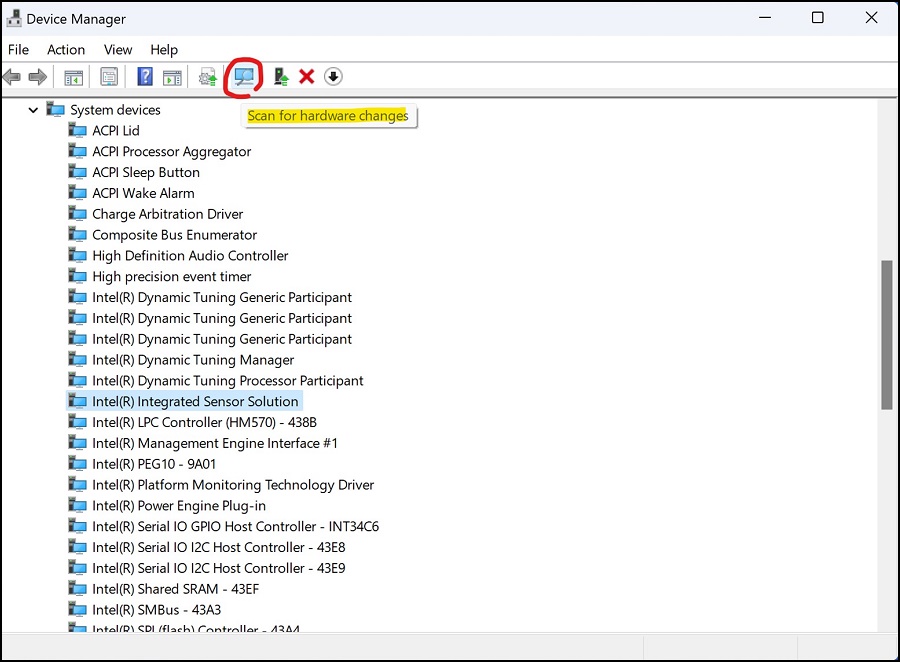
If the "Intel Integrated Sensor Solution" Device persist, repeat step 3 until the Device disappears. - Go to Control Panel > Programs > Programs and Features > find "Intel Integrated Sensor Solution" > Uninstall. The yellow bang should have disappeared.
- Reboot the Latitude then update the Intel Integrated Sensor Solution Driver that was previously downloaded and update the BIOS to the latest version.
Affected Products
Inspiron 16 7610Article Properties
Article Number: 000210950
Article Type: Solution
Last Modified: 19 Jun 2025
Version: 4
Find answers to your questions from other Dell users
Support Services
Check if your device is covered by Support Services.