Isilon PowerScale 9.3 或更高版本 无法修改 Webui 中的角色。“出现问题。无法将 json 解析为角色”
Summary: 在 OneFS 9.3 或更高版本中,尝试修改 webui 中的角色时,您可能会在提交时收到以下错误(最后一步) “出现问题。无法将 json 解析为角色。”
This article applies to
This article does not apply to
This article is not tied to any specific product.
Not all product versions are identified in this article.
Symptoms
尝试“提交”更改时,修改 Webui 中的角色会导致以下错误:“出现问题。无法将 json 解析为角色“
您仍然可以使用 CLI 更改它们,而不会出现任何问题。
通过 CLI 查看角色时,您会看到某些成员仅使用 UID 列出。
下面的示例:
在 papi 日志中,您会看到类似的错误或堆栈:
如果按 UID 检查用户,则它们不存在:
在 webui 中出现错误:
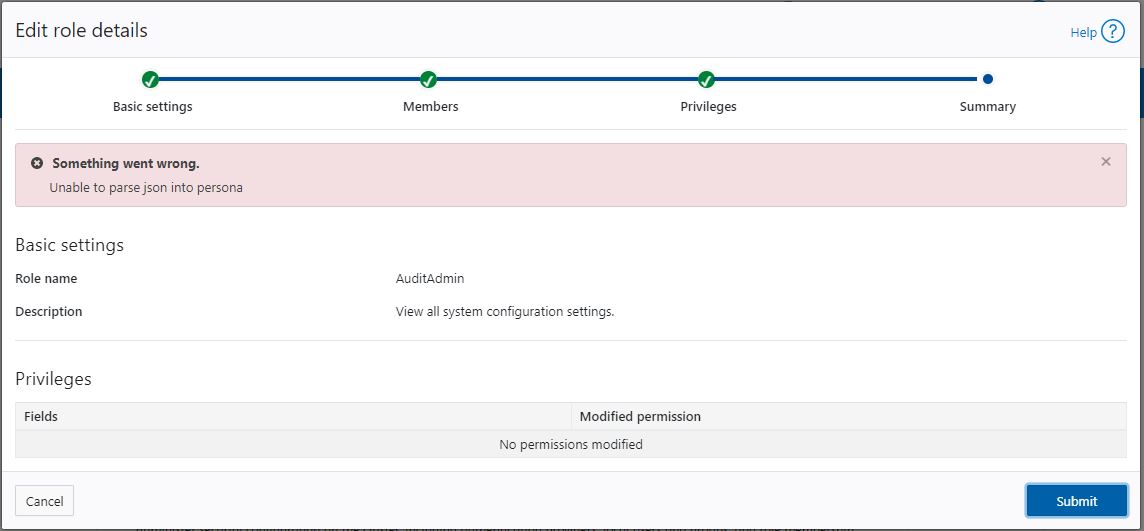
您仍然可以使用 CLI 更改它们,而不会出现任何问题。
通过 CLI 查看角色时,您会看到某些成员仅使用 UID 列出。
下面的示例:
onefs93-1# isi auth roles view AuditAdmin
       Name: AuditAdmin
Description: View all system configuration settings.
    Members: admin
             test1
             test2
             UID:2003
             WINSERVER\test_user
 Privileges
             ID: ISI_PRIV_LOGIN_CONSOLE
     Permission: r
在 papi 日志中,您会看到类似的错误或堆栈:
onefs93-1# isi_for_array -s 'grep 2023-03-24 /var/log/isi_papi_d.log | grep -i "Failed to find user for" | grep UID'
onefs93-1: 2023-03-24T12:38:55.132849-07:00  onefs93-1(id1) isi_papi_d[5511]: STACK Failed to find user for 'UID:2003': No such user     from --- (---:0):      isi_exception::isi_exception(int, char const*, __va_list_tag*) (OFFSET:134)     api_exception::api_exception(api_error_code, char const*, ...) (OFFSET:146)     auth_user_handler::http_get(request const&, response&) (OFFSET:1098)     uri_handler::execute_http_method(request&, response&, bool, bool) (OFFSET:2480)     uri_manager::execute_request(request&, response&, bool, bool, bool, bool, bool) (OFFSET:1550)     std::__1::basic_filebuf >::basic_filebuf(void) (OFFSET:7588)     std::__1::basic_filebuf >::basic_filebuf(void) (OFFSET:9908)     typeinfo name for std::__1::basic_filebuf > (OFFSET:40557)     typeinfo name for std::__1::basic_filebuf > (OFFSET:37691)     ADDRESS (UNKNOWN:2363392)
如果按 UID 检查用户,则它们不存在:
onefs93-1# isi auth users view --uid=2003
Failed to find user for 'UID:2003': No such user
在 webui 中出现错误:
Cause
此问题是由删除之前添加到您尝试修改的角色的用户引起的。
删除用户或用户不会从成员列表中完全删除“UID”,并且无法解析所有成员。
删除用户或用户不会从成员列表中完全删除“UID”,并且无法解析所有成员。
Resolution
如果您尝试修改的角色的成员仅列出具有 UID 的用户,请验证具有 UID 的成员是否不存在。
从您尝试修改的角色中删除不存在的 UID:
示例:
从角色中删除所有不存在的 UID 后,通过 Webui 修改角色。
如果 UID 中列出了多个成员,并且这些用户不存在,则必须删除所有不存在的 UID。
isi auth users view --uid=
从您尝试修改的角色中删除不存在的 UID:
isi auth role modify --remove-uid=
示例:
isi auth role modify AuditAdmin --remove-uid=2003
从角色中删除所有不存在的 UID 后,通过 Webui 修改角色。
如果 UID 中列出了多个成员,并且这些用户不存在,则必须删除所有不存在的 UID。
Affected Products
Isilon, PowerScale OneFSArticle Properties
Article Number: 000211554
Article Type: Solution
Last Modified: 30 Jun 2023
Version: 5
Find answers to your questions from other Dell users
Support Services
Check if your device is covered by Support Services.