PowerScale: S3 Object and Data Timestamp Mismatches Between PowerScale OneFS and S3 Browser
Summary: AWS S3 object and data bucket timestamp displayed in S3 browser is always by default GMT time zone. The file in CIFS share Isilon bucket path listing is showing correct Local time zone. ...
This article applies to
This article does not apply to
This article is not tied to any specific product.
Not all product versions are identified in this article.
Symptoms
Mismatch in timestamp of the S3 Object with PowerScale OneFS
Observation:
Upload a file, for example s3browser-10-8-1.zip to the bucket s3demo-bk01 under test/test01/
PowerScale OneFS:
We see that the timestamp is correct:
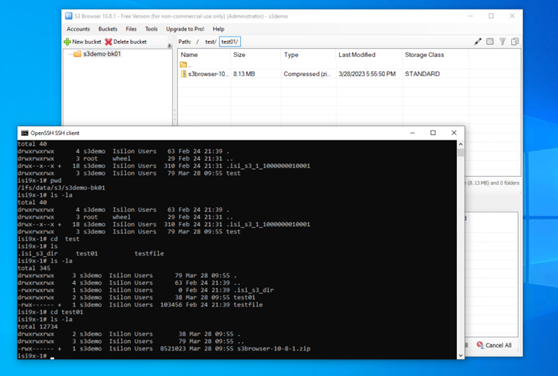
Figure 1: Correct Client File Timestamp
S3 browser or AWS S3 CLI:
The timestamp is not correct.

Figure 2: Incorrect Client File Timestamp
PCAP’s show:
Observation:
Upload a file, for example s3browser-10-8-1.zip to the bucket s3demo-bk01 under test/test01/
PowerScale OneFS:
We see that the timestamp is correct:
isi9x-1# ls -la
total 12734
drwxrwxrwx     2 s3demo  Isilon Users       38 Mar 28 09:55 .
drwxrwxrwx     3 s3demo  Isilon Users       79 Mar 28 09:55 ..
-rwx------ +   1 s3demo  Isilon Users  8521023 Mar 28 09:55 s3browser-10-8-1.zip
isi9x-1#
Figure 1: Correct Client File Timestamp
S3 browser or AWS S3 CLI:
The timestamp is not correct.
PS C:\Users\Administrator> aws s3 ls s3://s3demo-bk01/test/test01/ --endpoint-url http://192.168.1.41:9020
2023-03-28 17:55:50    8521023 s3browser-10-8-1.zip
Figure 2: Incorrect Client File Timestamp
PCAP’s show:
LastModified: 2023-03-28T09:55:50.000Z This indicates GMT time, which is wrong.
Cause
The timestamp mismatch is due to a PowerScale OneFS code issue. Currently, the code only uses GMT.
Resolution
PowerScale Engineering team is working on a code fix which is expected to be released in a future PowerScale OneFS version and patch.
Additional Information
Affected Products
PowerScale OneFSArticle Properties
Article Number: 000211774
Article Type: Solution
Last Modified: 08 Nov 2025
Version: 4
Find answers to your questions from other Dell users
Support Services
Check if your device is covered by Support Services.