PowerScale: Undefined Attribute Auth Failure After Upgrade to OneFS 9.5 or Later for Active Directory Users
Summary: When upgrading to OneFS 9.5.x or later versions from any prior versions, pre-upgrade code checks may identify a NULL/0 value for 'msds-SupportedEncryptionTypes'. If not addressed this can result in authentication failures (DU). ...
This article applies to
This article does not apply to
This article is not tied to any specific product.
Not all product versions are identified in this article.
Symptoms
If a cluster is upgraded to OneFS 9.5 and the value for the machine account attribute msDS-SupportedEncryptionTypes is not set, authentication may fail. The Active Directory provider may appear to be in an unstyled state or may be missing from isi auth status output.
By default, this value is set to 31 (or 0xF1 in hexadecimal) when the cluster first joins the Active Directory. Per the OneFS 9.5 Security Configuration Guide, found on the Dell Support PowerScale OneFS Product Page, we have many supported encryption types for SMB and Kerberos.
Note: Dell Manuals page requires authentication.
If someone wants to modify the attribute for
msDS-SupportedEncryptionTypes, this is acceptable if it does not exclude required encryption types necessary to function. For example, some may want to adjust the value to omit support for RC4.
Example of the attribute from the Properties with Advanced Features enabled:
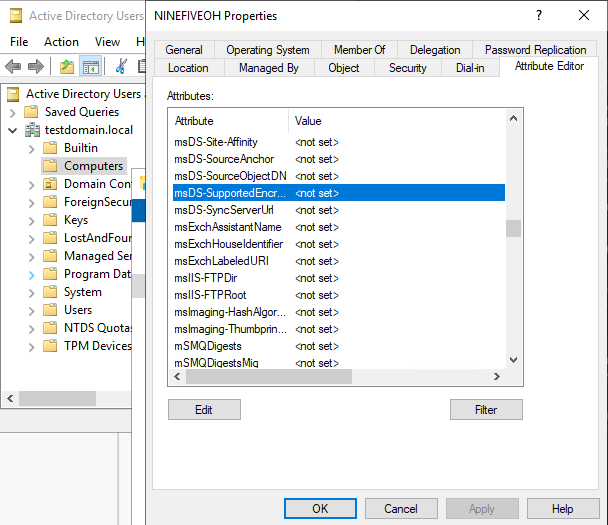
Figure 1: The value for msDS-SupportedEncryptionTypes attribute shows as <not-set>.
Example from Powershell:
DistinguishedName : CN=NINEFIVEOH,CN=Computers,DC=testdomain,DC=local
DNSHostName       : ninefiveoh.testdomain.local
Enabled           : True
Name              : NINEFIVEOH
ObjectClass       : computer
ObjectGUID        : 8dbed342-6a12-41ff-889f-8249cc39b673
SamAccountName    : NINEFIVEOH$
SID               : S-1-5-21-3532647020-1821455699-3245163308-1110
UserPrincipalName :
The above output does not include a field for the attribute msDS-SupportedEncryptionTypes, which would usually report an integer value.
Below is an example from another cluster where we do see that the set value populates for the attribute:
DistinguishedName             : CN=COREBUDDY,CN=Computers,DC=testdomain,DC=local
DNSHostName                   : corebuddy.testdomain.local
Enabled                       : True
msDS-SupportedEncryptionTypes : 31   <<<<<<<<<<<<<<<<
Name                          : COREBUDDY
ObjectClass                   : computer
ObjectGUID                    : e29236a7-cc36-4686-bca9-010ba4143ca3
SamAccountName                : COREBUDDY$
SID                           : S-1-5-21-3532647020-1821455699-3245163308-1104
UserPrincipalName             :
Another symptom is that there are specific messages populating /var/log/lsass.d.log file as shown below:
2023-04-14T02:40:07.877593+00:00 <30.3> ninefiveoh-1(id1) lsass[13628]: [lsass] Failed to read msDS-SupportedEncryptionTypes for account CN=NINEFIVEOH,CN=Computers,DC=testdomain,DC=local
2023-04-14T02:40:07.877656+00:00 <30.3> ninefiveoh-1(id1) lsass[13628]: [lsass] Error 40044 (symbol: LW_ERROR_NO_SUCH_DOMAIN) occurred while putting an LDAP connection back in the domain free list.
2023-04-14T02:40:23.903189+00:00 <30.3> ninefiveoh-1(id1) lsass[13628]: [lsass] Failed to read msDS-SupportedEncryptionTypes for account CN=NINEFIVEOH,CN=Computers,DC=testdomain,DC=local
2023-04-14T02:40:23.903268+00:00 <30.3> ninefiveoh-1(id1) lsass[13628]: [lsass] Error 40044 (symbol: LW_ERROR_NO_SUCH_DOMAIN) occurred while putting an LDAP connection back in the domain free list.
To confirm that this is the issue, the admin must check the machine account object for the cluster within Active Directory. This can be done in one of two ways:
- On a DC, open Active Directories Users and Computers (ADUC).
- In the top ribbon of the window, select View and click Advanced Features.
- Right-click the Object and go to the Attribute Editor tab and scroll to find the
msDS-SupportedEncryptionTypesattribute. - Double-click the Attribute field, and examine the decimal number reported in the new window.
- Use the following Powershell command on a DC with the correct machine account name.
Get-ADComputer -Identity <machine account name> -Properties msDS-SupportedEncryptionTypes
For the above, administrators must use an account in Active Directory with domain-level privileges to resolve the issue.
Cause
Manual deletion of the msDS-SupportedEncryptionTypes attribute on the machine account object of the cluster results in Active Directory reporting a NULL value. This fails the checks in the newer code as part of a suite of enhancements for better security support.
Older clusters that joined Active Directory without setting this value may also be susceptible to this issue. This is because no value is set unless a rejoin to the Active Directory was performed.
Resolution
Workaround:
Change the attribute to a value other than an empty value. A safe option is to choose the default value of 31 or 24, depending on security requirements. This is done through the UI or by Powershell.
A list of values and what encryption types they support are found on the Microsoft Website blog. 
The following command (with the correct machine account name and integer inserted) may be used by an Active Directory administrator on a DC instead of the UI to assign a value to the attribute.
Set-ADComputer -Identity COMPUTERNAME$ -Add @{'msDS-SupportedEncryptionTypes'="<INTEGER>"}
The example below sets the msDS-SupportedEncryptionTypes attribute to the default value 31 for the cluster machine account NINEFIVEOH$:
Set-ADComputer -Identity NINEFIVEOH$ -Add @{'msDS-SupportedEncryptionTypes'="31"}
Once the changes are applied, they must replicate to all domain controllers within the Active Directory environment. An authentication refresh or targeted LSASS restart on the cluster may be necessary to clear the condition after.
Dell Engineering has published code enhancements in OneFS 9.5.0.3 that address this issue. Administrators may still see IOCA upgrade prechecks fail if they do not have a value set before the upgrade. If an administrator has limited the cluster privileges in AD to modify attributes, they MUST manually update the attribute prior to any upgrade activity taking place. Failure to update the attribute prior to upgrade when the cluster does not have sufficient privileges to do so results in data unavailability.
Note: OneFS 9.5 and later requires the attribute
msDS-SupportedEncryptionTypes. Administrators running versions of Windows Server that do not have or support this attribute must upgrade their domain controllers. There is no workaround for this requirement. Failure to have domain controllers on supported versions of Windows Server prior to OneFS upgrade may result in data unavailability.
Additional Information
Here are some recommended resources related to this topic that may be of interest:
Affected Products
PowerScale OneFSArticle Properties
Article Number: 000212387
Article Type: Solution
Last Modified: 25 Aug 2025
Version: 12
Find answers to your questions from other Dell users
Support Services
Check if your device is covered by Support Services.