PowerEdge: How to determine the NVMe SSD Physical slot location from an sosreport
Summary: The procedures outlined below describe how to determine the physical slot mapping for NVMe SSDs on PowerEdge servers installed with Linux Operating System using the obtained SOS report. ...
This article applies to
This article does not apply to
This article is not tied to any specific product.
Not all product versions are identified in this article.
Instructions
According to the TSR report, the corresponding slots (18/19/20/21/22/23) are connected with six quantity NVMe SSD hard drives. 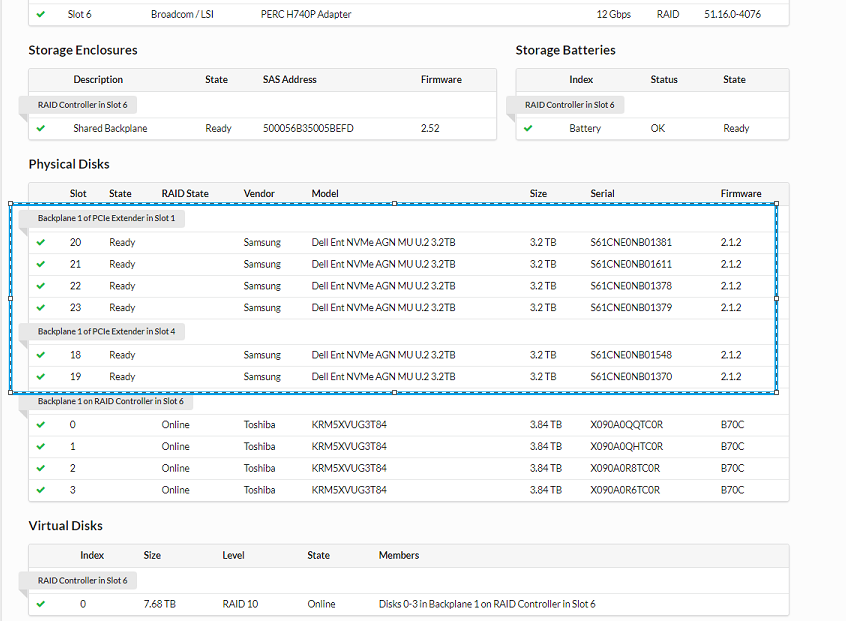
We can find the PCIe Device Bus, Device, and Function number as follows:
We learned that the operating system was identifying the NVMe SSD device name and its PCIe device number as shown below from the dmesg log contained in the SOS report.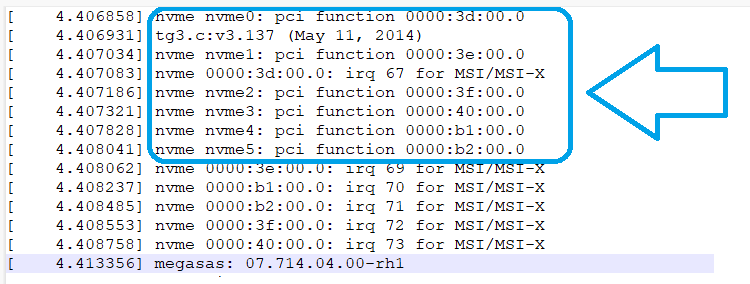
As a result, device nvme0 is the device installed in the PCIe Bus 3d, (Since this number is in hexadecimal, convert it to decimal) is Bus 61 - which corresponds to Physical Slot 22.
On a similar vein, for device nvme1 is the device installed in the PCIe Bus 3e, which after conversion to decimal, is Bus 62 - which corresponds to Physical Slot 23.
Review the PCI Devices list on sos_commands/pci/lspci -v in the SOS report concurrently.
Affected Products
SUSE Linux Enterprise Server 12, Red Hat Enterprise Linux Version 7, Red Hat Enterprise Linux Version 9, Red Hat Enterprise Linux Version 8, SUSE Linux Enterprise Server 15, Ubuntu Server LTSProducts
PowerEdge FC640, PowerEdge M640, PowerEdge M640 (for PE VRTX), PowerEdge MX5016s, PowerEdge MX740C, PowerEdge MX750c, PowerEdge MX760c, PowerEdge MX840C, PowerEdge R240, PowerEdge R250, PowerEdge R260, PowerEdge R340, PowerEdge R350, PowerEdge R360
, PowerEdge R440, PowerEdge R450, PowerEdge R540, PowerEdge R550, PowerEdge R640, PowerEdge R6415, PowerEdge R650, PowerEdge R650xs, PowerEdge R6515, PowerEdge R6525, PowerEdge R660, PowerEdge R660xs, PowerEdge R6615, PowerEdge R6625, PowerEdge R740, PowerEdge R740XD, PowerEdge R740XD2, PowerEdge R7415, PowerEdge R7425, PowerEdge R750, PowerEdge R750XA, PowerEdge R750xs, PowerEdge R7515, PowerEdge R7525, PowerEdge R760, PowerEdge R760XA, PowerEdge R760xd2, PowerEdge R760xs, PowerEdge R7615, PowerEdge R7625, PowerEdge R840, PowerEdge R860, PowerEdge R940, PowerEdge R940xa, PowerEdge R960, PowerEdge T140, PowerEdge T150, PowerEdge T160, PowerEdge T340, PowerEdge T350, PowerEdge T360, PowerEdge T440, PowerEdge T550, PowerEdge T560, PowerEdge T640
...
Article Properties
Article Number: 000212989
Article Type: How To
Last Modified: 20 Aug 2025
Version: 5
Find answers to your questions from other Dell users
Support Services
Check if your device is covered by Support Services.