PowerProtect Data Manager 虚拟机备份失败,代码为 AVB0016 SyncInProgress
Summary: PowerProtect Data Manager 虚拟机 (VM) 备份失败,并出现代码AVB0016。“SyncInProgress” “由于现有活动快照,无法启动完全同步。”
This article applies to
This article does not apply to
This article is not tied to any specific product.
Not all product versions are identified in this article.
Symptoms
PowerProtect Data Manager UI 显示故障的以下消息:
ABV0016: VM Direct engine 'localhost' is unable to back up the virtual machine 'VM1' on vCenter 'vcsa01' because of a vCenter API issue.

The VM Direct engine cannot complete the backup of this virtual machine because a vCenter API operation did not complete successfully.
To troubleshoot this issue:

     *Verify that the vCenter can be reached.
     *If the vCenter is busy, wait for some activities to complete and then retry the operation.
     *Verify that the virtual machine exists on the vCenter.
----
Read Less
The error cannot be retried. Unable to successfully complete SDM Delta Sync operation. Unsuccessful after 'xx' attempts over 5m0.627607105s The vCenter task for 'SDM Snapshot Sync deltaSync' completed with state 'error': DPD Sync in progress
故障 1:
PowerProtect Data Manager vmdm.log 包含以下错误消息:
Result: {
  "sessionId" : "61e7c5f0-bb85-4474-a23f-95c990c917d6",
  "state" : "Failure",
  "logFile" : "/opt/emc/vmdirect/runtime/logs/vpod/BackupJobSessions-61e7c5f0-bb85-4474-a23f-95c990c917d6.log",
  "error" : "The error cannot be retried.  Unable to successfully complete SDM Delta Sync operation.  Unsuccessful after 70 attempts over 5m1.694291645s.  The vCenter task for 'SDM Snapshot Sync deltaSync' completed with state 'error':  DPD Sync in progress (500)",
  "proxyHostName" : "localhost",
  "errorCode" : "ABV0016"
dpd.log(在 ESXi 上)出现以下错误:
dpd.log:YYYY-MM-DDTHH:MM:SSZ error dpd[16520988] [Originator@6876 sub=Task opID=1d0ce776-e77a] Task 'Dp.Task.Sync.475.b2616635-352a-4726-986e-e42be7e94bac-1.52f20afe-9cef-83ec-b147-ce7acd07c2ca' failed with error: (dp.fault.SyncInProgress)
失败 2:
此故障的另一种变体如下所示:
PowerProtect Data Manager vmdm.log:
Result: {
  "sessionId" : "126c6bcf-635f-4579-97d7-8dd831a22048",
  "state" : "Failure",
  "logFile" : "/opt/emc/vmdirect/runtime/logs/vpod/BackupJobSessions-126c6bcf-635f-4579-97d7-8dd831a22048.log",
  "error" : "Unable to successfully complete SDM Full Sync operation.  Unsuccessful after 39 attempts over 10m14.630663716s.  The vCenter task for 'SDM Snapshot Sync fullSync' completed with state 'error':  DPD Sync in progress (500)",
  "proxyHostName" : "localhost",
  "errorCode" : "ABV0016"
dpd.log(ESXi 主机)
YYYY-MM-DDTHH:MM:SSZ error dpd[2216236] [Originator@6876 sub=Snapshot opID=055f891e-8923] StartFullSyncIpc: Failed for disk '2d21e5b0-15a9-469e-1bbf-03d75e771c31': error 'Cannot start full sync due to existing active snapshot'
Cause
VMware 的数据保护守护程序 (DPD) 服务中的问题。
Resolution
解决方法故障 1:
对于故障 1(DPD 返回 SyncInProgress)消息,在受影响的 ESXi 主机上重新启动 DPD 服务,如下所示:
- 从 vSphere UI 中,找到受影响的虚拟机,并 找到虚拟机所在的 ESXi 主机 。
- 重新启动 DPD 服务:
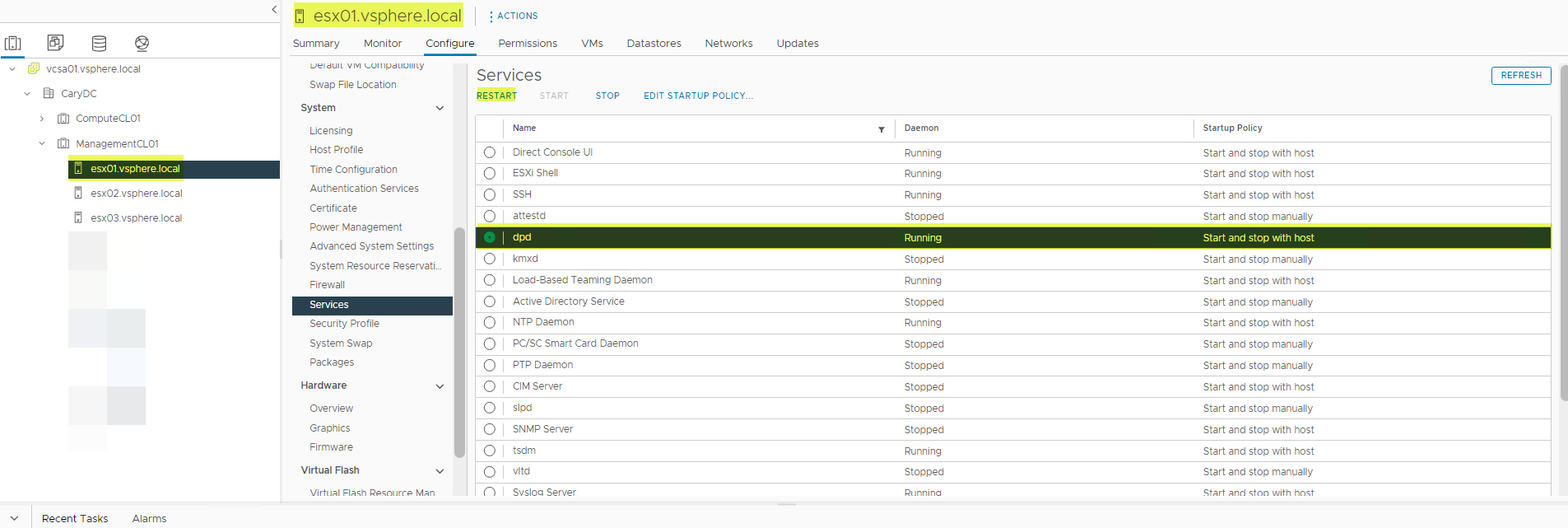
- 重新启动 DPD 服务时,您可能会遇到错误。如果这样做,请先重新启动 TSDM 服务,然后重新启动 DPD 服务。
- 重新启动 TSDM 服务。
- 重试 失败的 备份。
解决方案
受影响的版本:
vSphere 7.0.3(所有)、8.0.0
预计在未来版本的 vSphere 中修复受影响的 vSphere 版本。
故障 2 的解决方法:
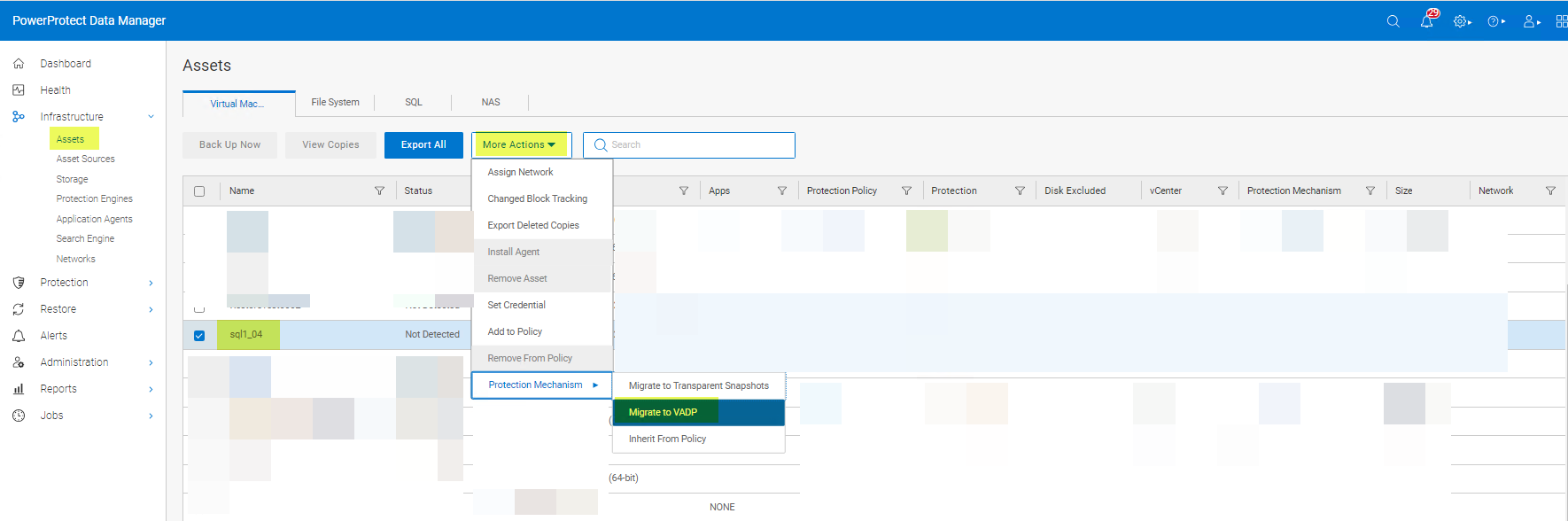
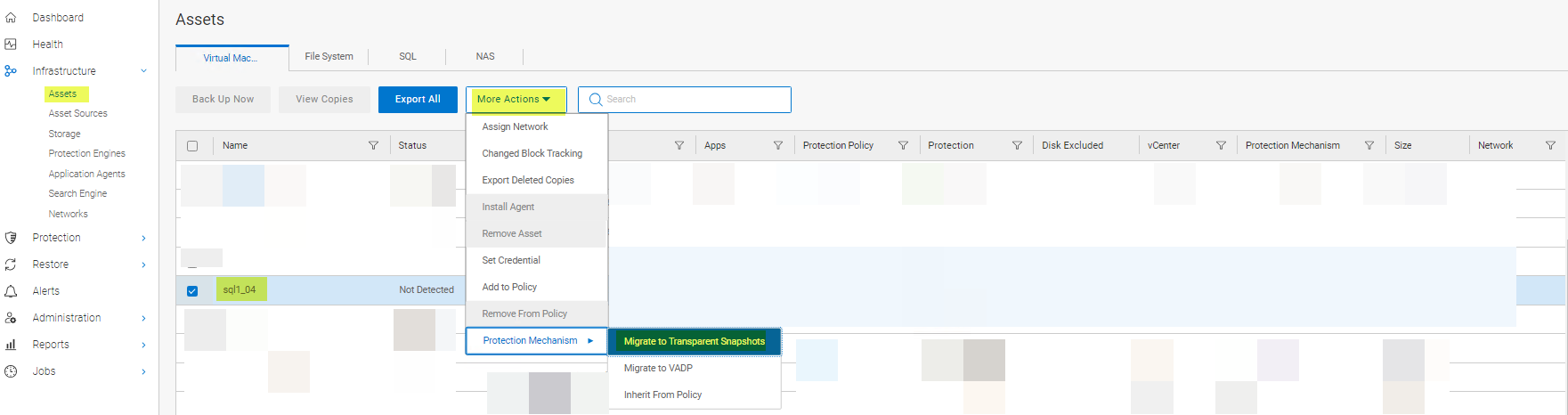
对于故障 2(即 DPD 返回消息“Cannot start full sync due to existing active snapshot'”,解决方法是重置 LWD。LWD 可以按如下方式重置:
方法 1:
-
将虚拟机上的保护机制从 VAPD 更改回 LWD,如下所示:
- 将保护机制更改 回 Transparent Snapshots:
方法 2:
从保护策略中删除虚拟机,然后重新添加。如果 PowerProtect Data Manager 的 vVersion 为 19.12,则使用方法 1 或方法 3。方法 2 不适用于 PowerProtect Data Manager 19.12。
方法 3:
使用 vmconfig 工具禁用然后重新启用 LWD。
解决方案:
受影响的版本:
7.0.3(全部)和8.0.0
VMware 仍在调查此问题的根本原因。
Affected Products
PowerProtect Data ManagerArticle Properties
Article Number: 000217246
Article Type: Solution
Last Modified: 16 Feb 2024
Version: 4
Find answers to your questions from other Dell users
Support Services
Check if your device is covered by Support Services.