PowerProtect Data Manager VM 백업이 실패하고 코드 AVB0016 SyncInProgress 표시
Summary: 코드 AVB0016와 함께 PowerProtect Data Manager VM(Virtual Machine) 백업이 실패합니다. "SyncInProgress": "기존 활성 스냅샷으로 인해 전체 동기화를 시작할 수 없습니다.",
This article applies to
This article does not apply to
This article is not tied to any specific product.
Not all product versions are identified in this article.
Symptoms
PowerProtect Data Manager UI에 장애에 대한 다음 메시지가 표시됩니다.
ABV0016: VM Direct engine 'localhost' is unable to back up the virtual machine 'VM1' on vCenter 'vcsa01' because of a vCenter API issue.

The VM Direct engine cannot complete the backup of this virtual machine because a vCenter API operation did not complete successfully.
To troubleshoot this issue:

     *Verify that the vCenter can be reached.
     *If the vCenter is busy, wait for some activities to complete and then retry the operation.
     *Verify that the virtual machine exists on the vCenter.
----
Read Less
The error cannot be retried. Unable to successfully complete SDM Delta Sync operation. Unsuccessful after 'xx' attempts over 5m0.627607105s The vCenter task for 'SDM Snapshot Sync deltaSync' completed with state 'error': DPD Sync in progress
오류 1:
PowerProtect Data Manager vmdm.log에는 다음과 같은 오류 메시지가 표시됩니다.
Result: {
  "sessionId" : "61e7c5f0-bb85-4474-a23f-95c990c917d6",
  "state" : "Failure",
  "logFile" : "/opt/emc/vmdirect/runtime/logs/vpod/BackupJobSessions-61e7c5f0-bb85-4474-a23f-95c990c917d6.log",
  "error" : "The error cannot be retried.  Unable to successfully complete SDM Delta Sync operation.  Unsuccessful after 70 attempts over 5m1.694291645s.  The vCenter task for 'SDM Snapshot Sync deltaSync' completed with state 'error':  DPD Sync in progress (500)",
  "proxyHostName" : "localhost",
  "errorCode" : "ABV0016"
dpd.log(ESXi)에 다음 오류가 있습니다.
dpd.log:YYYY-MM-DDTHH:MM:SSZ error dpd[16520988] [Originator@6876 sub=Task opID=1d0ce776-e77a] Task 'Dp.Task.Sync.475.b2616635-352a-4726-986e-e42be7e94bac-1.52f20afe-9cef-83ec-b147-ce7acd07c2ca' failed with error: (dp.fault.SyncInProgress)
실패 2:
이 오류의 또 다른 변형은 다음과 같습니다.
PowerProtect Data Manager vmdm.log:
Result: {
  "sessionId" : "126c6bcf-635f-4579-97d7-8dd831a22048",
  "state" : "Failure",
  "logFile" : "/opt/emc/vmdirect/runtime/logs/vpod/BackupJobSessions-126c6bcf-635f-4579-97d7-8dd831a22048.log",
  "error" : "Unable to successfully complete SDM Full Sync operation.  Unsuccessful after 39 attempts over 10m14.630663716s.  The vCenter task for 'SDM Snapshot Sync fullSync' completed with state 'error':  DPD Sync in progress (500)",
  "proxyHostName" : "localhost",
  "errorCode" : "ABV0016"
dpd.log(ESXi 호스트)
YYYY-MM-DDTHH:MM:SSZ error dpd[2216236] [Originator@6876 sub=Snapshot opID=055f891e-8923] StartFullSyncIpc: Failed for disk '2d21e5b0-15a9-469e-1bbf-03d75e771c31': error 'Cannot start full sync due to existing active snapshot'
Cause
VMware의 DPD(Data Protection Daemon) 서비스 문제
Resolution
해결 방법 실패 1:
DPD가 SyncInProgress 메시지를 반환하는 장애 1의 경우 아래와 같이 영향을 받는 ESXi 호스트에서 DPD 서비스를 재시작합니다.
- vSphere UI에서 영향을 받는 VM을 찾고 VM이 상주하는 ESXi 호스트를 찾습니다.
- DPD 서비스를 재시작합니다.
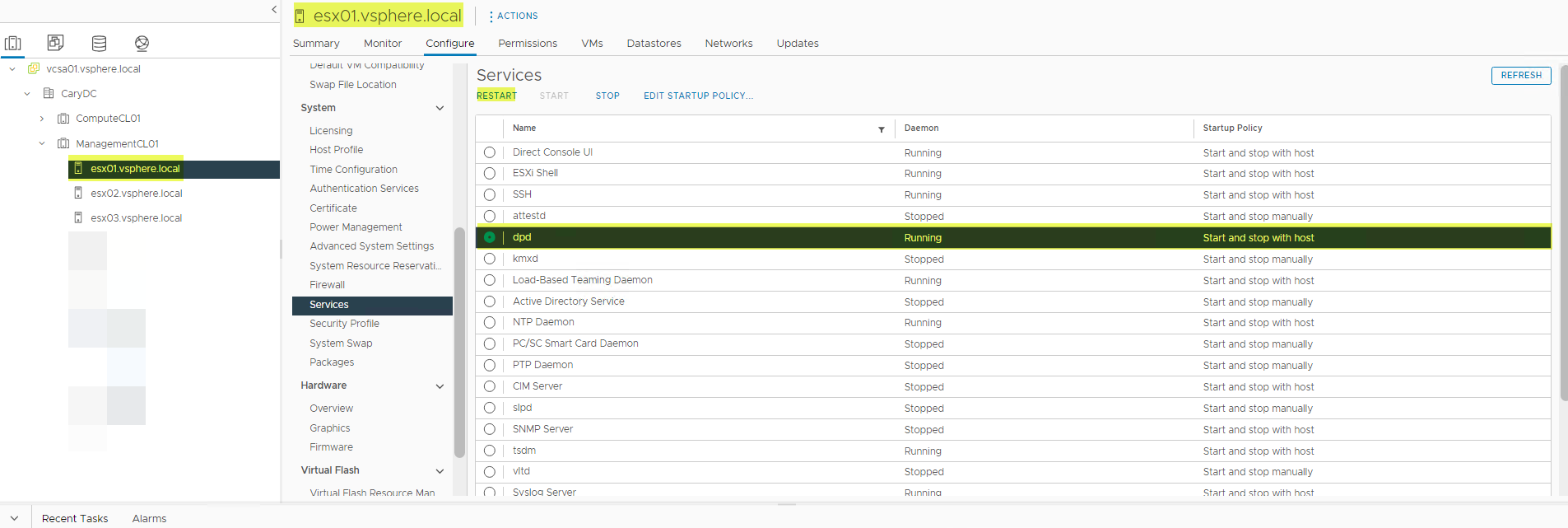
- DPD 서비스를 재시작할 때 오류가 발생할 수 있습니다. 이 경우 먼저 TSDM 서비스를 재시작한 다음 DPD 서비스를 재시작합니다.
- TSDM 서비스를 재시작합니다.
- 실패한 백업을재시도합니다.
해결책
영향을 받는 버전:
vSphere 7.0.3(모두), 8.0.0
영향을 받는 vSphere 버전에 대한 수정은 향후 vSphere 릴리스에서 예정되어 있습니다.
실패 2에 대한 해결 방법:
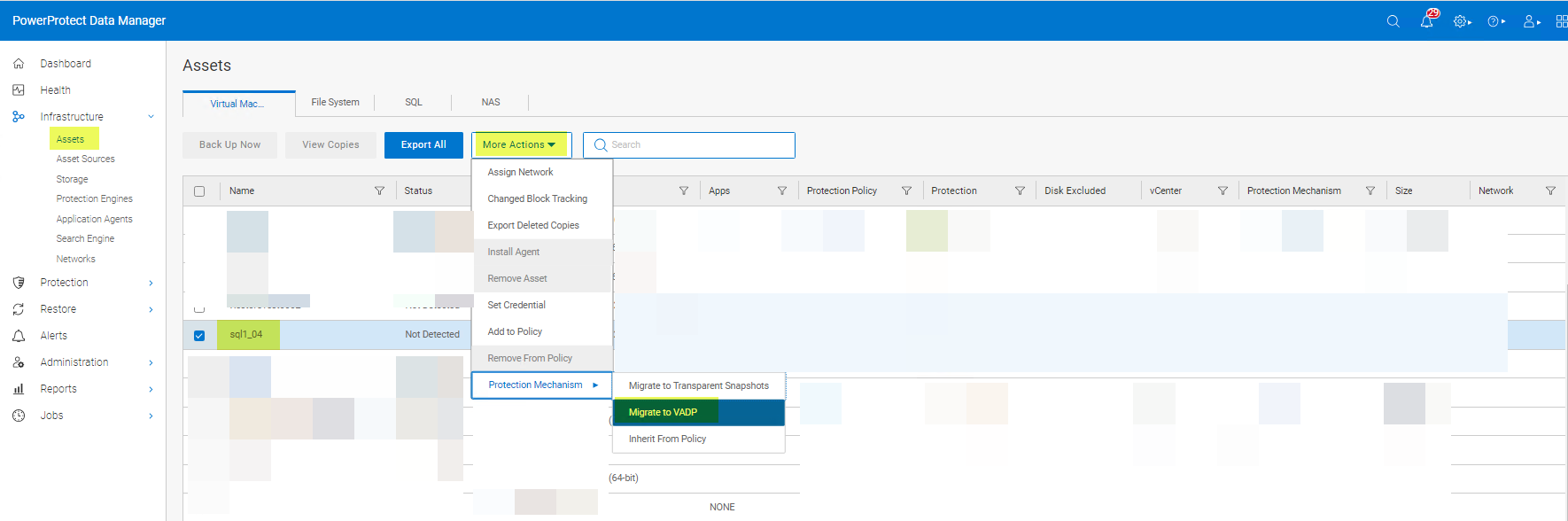
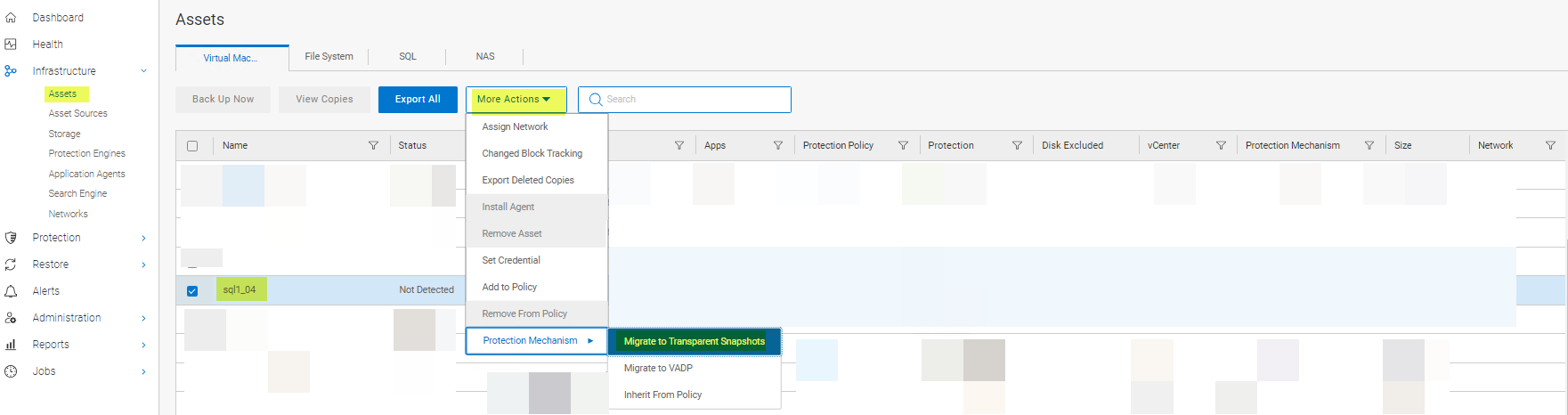
DPD가 "기존 활성 스냅샷으로 인해 전체 동기화를 시작할 수 없습니다"라는 메시지를 반환하는 오류 2의 경우 해결 방법은 LWD를 재설정하는 것입니다. LWD는 다음과 같이 재설정할 수 있습니다.
방법 1:
-
아래와 같이 VM의 보호 메커니즘을 VAPD에서 LWD로 변경합니다.
- 보호 메커니즘을다시 Transparent Snapshots로 변경합니다.
방법 2:
보호 정책에서 VM을 제거하고 다시 추가합니다. PowerProtect Data Manager의 vVersion이 19.12인 경우 방법 1 또는 방법 3을 사용합니다. 방법 2는 PowerProtect Data Manager 19.12에서 작동하지 않습니다.
방법 3:
vmconfig 툴을 사용하여 LWD를 비활성화하고 다시 활성화합니다.
해결 방법:
영향을 받는 버전:
7.0.3(모두) 및 8.0.0
이 문제의 근본 원인은 아직 VMware에서 조사 중입니다.
Affected Products
PowerProtect Data ManagerArticle Properties
Article Number: 000217246
Article Type: Solution
Last Modified: 16 Feb 2024
Version: 4
Find answers to your questions from other Dell users
Support Services
Check if your device is covered by Support Services.