Dell Networking SONiC sFlow configuration
Summary: This article explains about how to configure sFlow in Dell Networking SONiC. This article uses a switch running Dell SONiC 4.1.
This article applies to
This article does not apply to
This article is not tied to any specific product.
Not all product versions are identified in this article.
Instructions
| Prerequisites We are using standard interface naming to demonstrate the Concepts. See the article Dell Networking S-Series: Basic Interface Configuration - SONIC 4.0 for more information regarding interface naming. This article assumes a stable connection between sFlow Collector and Agent. |
Index
What is sFlowSflow Defaults
Configure sFlow
Configuration example
Verify
What is sFlow
sFlow provides a flow-based sampling method to monitor network traffic. Use sFlow to monitor network security in large enterprise data centers, monitor traffic for different tenants in a logical network and on specified interfaces, and for quality of service (QoS) operations.
sFlow monitoring system consists of
- The sFlow agent resides anywhere within the path of the packet. The agent combines the flow samples and interface counters into sFlow datagrams and forwards them to the sFlow collector at regular intervals. The datagrams consist of information about, but not limited to, the packet header, ingress and egress interfaces, sampling parameters, and interface counters. ASICs handle packet sampling.
- The sFlow collector analyses the datagrams that are received from different devices and produces a network-wide view of traffic flows.

sFlow uses two types of sampling:
- Statistical packet-based sampling of switched or routed packet flows.
- Time-based sampling of interface counters.
| Points To remember |
|
sFlow Defaults
Default Values
| sFlow polling interval |
20 seconds |
| sFlow collector port |
6343 |
| sFlow collector VRF |
Default VRF |
sFlow default sampling rates for different Link Speed
| Link Speed |
Packet |
|---|---|
| 1G |
1 packet in 1000 |
| 10G |
1 packet in 10,000 |
| 40G |
1 packet in 40,000 |
| 50G |
1 packet in 50,000 |
| 100G |
1 packet in 100,000 |
*It is recommended not to change the sampling rate.
Configure sFlow
Configure sFlow globally on a switch. By default, the sFlow agent is disabled. You must enable sFlow globally to sample traffic on all data interfaces before you can reconfigure the default settings.
Enable sFlow globally
This enables sFlow on all inbound and outbound interfaces in the switch.
admin@DELLSONiC:~$ sonic-cli
DELLSONiC# configure
DELLSONiC(config)# sflow enable
Disable sFlow in interface
Disable sFlow in single interfaces
admin@DELLSONiC:~$ sonic-cli
DELLSONiC# configure
DELLSONiC(config)# interface Eth <slot/port[/subport]>
DELLSONiC(config-if-Eth1/1)# no sflow enable

Disable sFlow in range of interfaces
DELLSONiC(config)# interface range Eth <slot/port[/subport]-slot/port[/subport]>
DELLSONiC(config-if-range-eth**)# no sflow enable
Enable sFlow in a range of interfaces
Enable sFlow in single interfaces
admin@DELLSONiC:~$ sonic-cli
DELLSONiC# configure
DELLSONiC(config)# interface Eth <slot/port[/subport]>
DELLSONiC(config-if-EthX/X)# sflow enable

Enable sFlow in range of interfaces
DELLSONiC(config)# interface range Eth <slot/port[/subport]-slot/port[/subport]>
DELLSONiC(config-if-range-eth**)# sflow enable
Configure an sFlow collector
Configure the destination collector-port number for sFlow data traffic (0 to 65535; default 6343).
Specify the VRF in which the sFlow collector operates: Management (mgmt) or default. The default VRF on the collector is used by default. You can configure the same collector IP address and/or port number in different VRFs.
Configure sflow collector
DELLSONiC# configure
DELLSONiC(config)# sflow collector {ip-address | ipv6-address} [collector-port-number] [vrf vrf-name]}

Remove sflow collector
DELLSONiC(config)# no sflow collector {ip-address | ipv6-address} [collector-port-number] [vrf vrf-name]}
Configure sFlow polling-interval(Optional)
Configure a nondefault sFlow polling interval and maintain the default sampling rate.
The polling interval is the time (in seconds) when traffic samples or counters are collected (5 to 300; default 20). Enter 0 to disable sFlow traffic polling.
Configure sFlow polling-interval
admin@DELLSONiC:~$ sonic-cli

DELLSONiC# configure

DELLSONiC(config)# sflow polling-interval <seconds>


Restore sFlow polling-interval to default 20 Seconds

DELLSONiC(config)#no sflow polling-interval
Configure an sFlow agent interface
Dell SONiC switch uses the IP address configured on the sFlow agent interface an agent address. This agent address helps the collector to uniquely identify the source of the packets it receives. We have the option to choose Ethernet, Vlan, Loopback, or Management interface as agent interface. By Default sFlow uses IP address of Management interface.
NOTE: Dell Technologies recommends that you configure an sFlow agent interface.
admin@DELLSONiC:~$ sonic-cli

DELLSONiC# configure

DELLSONiC(config)# sflow agent-id <interface-name>


Restore sFlow agent interface to the default

DELLSONiC(config)# no sflow agent-id
For example, consider Eth 1/1 has Ip address 10.0.0.1, and we have configured sFlow agent-id Eth 1/1. In this case, the agent address is 10.0.0.1.
Click here to see a sample packet capture
If Eth 1/1 does not have an IP address. It uses IP address of Management interface.
Configure sFlow sampling rate (Optional - not recommended altering)
The sampling rate collects one packet in the specified number of packets (256 to 8388608).
The default detects a new flow of 10% of the link bandwidth in less than one second and depends on the interface speed. Refer to the sFlow default sampling rates for different Link Speed
NOTE: It is recommended not to change the sFlow sampling rate.
Configure sFlow sampling rate

admin@DELLSONiC:~$ sonic-cli

DELLSONiC# configure

DELLSONiC(config)# interface Eth <slot/port[/subport]>

DELLSONiC(config-if-EthX/X)# sflow sampling-rate <number>


Restore sFlow sampling rate

admin@DELLSONiC:~$ sonic-cli

DELLSONiC# configure

DELLSONiC(config)# interface Eth <slot/port[/subport]>

DELLSONiC(config-if-EthX/X)#no sflow sampling-rate
Configuration example
In this example, an sFlow collector has IP address 10.0.0.100 with these configuration steps:
admin@DELLSONiC:~$ sonic-cli

DELLSONiC# configure

DELLSONiC(config)# sflow enable

DELLSONiC(config)# sflow collector 10.0.0.100

DELLSONiC(config)# sflow agent-id Eth 1/1

DELLSONiC(config)# end
By default all interfaces sFlow is activated when sflow enable is run. Lets exclude Eth 1/2 from this.
admin@DELLSONiC:~$ sonic-cli

DELLSONiC# configure

DELLSONiC(config)# interface Eth 1/2

DELLSONiC(config-if-Eth1/2)# no sflow enable
Verify
Use the show commands to view sFlow configuration and counters.
View global sFlow configuration
Use the command show sflow.
DELLSONiC# show sflow

---------------------------------------------------------

Global sFlow Information

---------------------------------------------------------

        admin state:            up

        polling-interval:       44

        agent-id:               Eth1/1

        configured collectors:  1

             10.0.0.100          6343        default
View sFlow interface status (Out)
Use the command show sflow interface.
DELLSONiC# show sflow interface

-----------------------------------------------------------

sFlow interface configurations

   Interface            Admin State             Sampling Rate

   Eth1/1                up                     25000

   Eth1/2                down                   25000

   Eth1/3                up                     25000

   Eth1/4                up                     25000

   Eth1/5                up                     10000

   Eth1/6                up                     10000

   Eth1/7                up                     10000

   Eth1/8                up                     10000
Sample sFlow Packet
Note that the agent address is 10.0.0.1 which is the IP address of Eth 1/1 (agent id).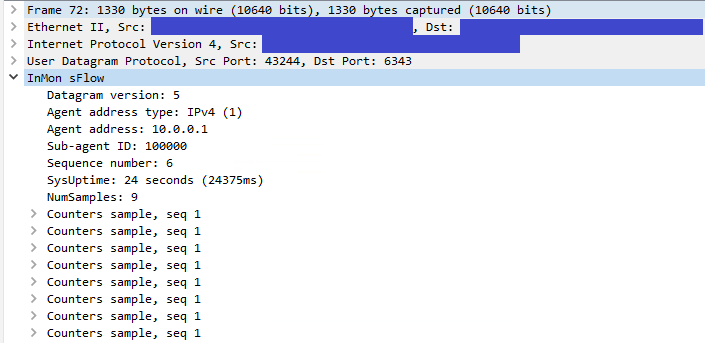
Affected Products
Enterprise SONiC Distribution, PowerSwitch E3200-ON Series, PowerSwitch N3200-ON, PowerSwitch S5212F-ON, PowerSwitch S5224F-ON, PowerSwitch S5232F-ON, PowerSwitch S5248F-ON, PowerSwitch S5296F-ON, PowerSwitch Z9100-ON, PowerSwitch Z9264F-ON
, PowerSwitch Z9332F-ON, PowerSwitch Z9432F-ON
...
Article Properties
Article Number: 000218295
Article Type: How To
Last Modified: 10 Oct 2023
Version: 2
Find answers to your questions from other Dell users
Support Services
Check if your device is covered by Support Services.