PowerEdge: 14G - No memory is detected message when installing new DIMMs
Summary: If you are engaged in a situation where a new memory (upgrade or replacement) is being added to a PowerEdge 14G and the new memory is not being detected, consider to review this article. ...
This article applies to
This article does not apply to
This article is not tied to any specific product.
Not all product versions are identified in this article.
Symptoms
Scenario:
- 14G servers and new memories (upgrade or part replacement) being installed in the system not being detected with a message similar to:
2023-11-11 20:20:52    1959506    PST0128    No memory is detected.
2023-11-11 20:20:51    1959505    PST0128    No memory is detected.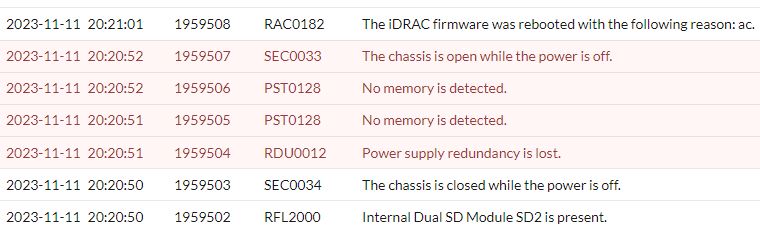
Cause
Ensure that, if different memories are being added (or replaced by), you reviewed the processor family and the new memory specification.
Resolution
As documented, the Skylake processors require 8 GB density memories. So, any 16 GB density memories are not expected to work.
Affected Products
OEMR R240, OEMR R340, OEMR R440, PowerEdge XR2, OEMR R540, OEMR R640, OEMR XL R640, OEMR R740, OEMR XL R740, OEMR R740xd, OEMR XL R740xd, OEMR R740xd2, OEMR R840, OEMR R940, OEMR R940xa, OEMR T140, OEMR T340, OEMR T440, OEMR T640, OEMR XL R240
, OEMR XL R340, Poweredge C4140, PowerEdge C6420, PowerEdge FC640, PowerEdge M640, PowerEdge M640 (for PE VRTX), PowerEdge MX740C, PowerEdge MX840C, PowerEdge R240, PowerEdge R340, PowerEdge R440, PowerEdge R540, PowerEdge R640, PowerEdge R740, PowerEdge R740XD, PowerEdge R740XD2, PowerEdge R840, PowerEdge R940, PowerEdge R940xa, PowerEdge T140, PowerEdge T340, PowerEdge T40, PowerEdge T440, PowerEdge T640, PowerEdge XE2420, PowerEdge XE7100, PowerEdge XE7420, PowerEdge XE7440
...
Article Properties
Article Number: 000219510
Article Type: Solution
Last Modified: 14 Apr 2025
Version: 4
Find answers to your questions from other Dell users
Support Services
Check if your device is covered by Support Services.