NMDA Oracle RMAN backup failing with failed to create sequential file
Summary: NMDA Oracle Recovery Manager (RMAN) backup failing with failed to create a sequential file.
This article applies to
This article does not apply to
This article is not tied to any specific product.
Not all product versions are identified in this article.
Symptoms
NMDA Oracle RMAN backup failing with failed to create a sequential file.
* RMAN log
* RMAN log
rman target /
RMAN>  backup current controlfile;

Starting backup

using target database control file instead of recovery catalog
allocated channel: ORA_SBT_TAPE_1
channel ORA_SBT_TAPE_1: SID=1206 instance=INSTANCE2 device type=SBT_TAPE
channel ORA_SBT_TAPE_1: NMDA Oracle v19.6.1.3
channel ORA_SBT_TAPE_1: starting full datafile backup set
channel ORA_SBT_TAPE_1: specifying datafile(s) in backup set
including current control file in backup set
channel ORA_SBT_TAPE_1: starting piece 1 at 22-DEC-23
RMAN-00571: ===========================================================
RMAN-00569: =============== ERROR MESSAGE STACK FOLLOWS ===============
RMAN-00571: ===========================================================
RMAN-03009: failure of backup command on ORA_SBT_TAPE_1 channel at MM/DD/YYY HH:MM:SS
ORA-19506: failed to create sequential file, name="name_nnnnnnn_1_1", parms=""
ORA-27028: skgfqcre: sbtbackup returned error
ORA-19511: non RMAN, but media manager or vendor specific failure, error text:
   The NMDA error message has been lost. Set NSR_DEBUG_LEVEL to a value greater than 0 and run NMDA.
* RMAN script
CONFIGURE CHANNEL DEVICE TYPE 'SBT_TAPE' PARMS 'ENV=(NSR_SERVER=NetWorker-server,NSR_DATA_VOLUME_POOL=Pool1,NSR_GROUP=Group-name,NSR_CLIENT=Client-name,NSR_DEBUG_LEVEL=9,NSR_DPRINTF=TRUE)';Cause
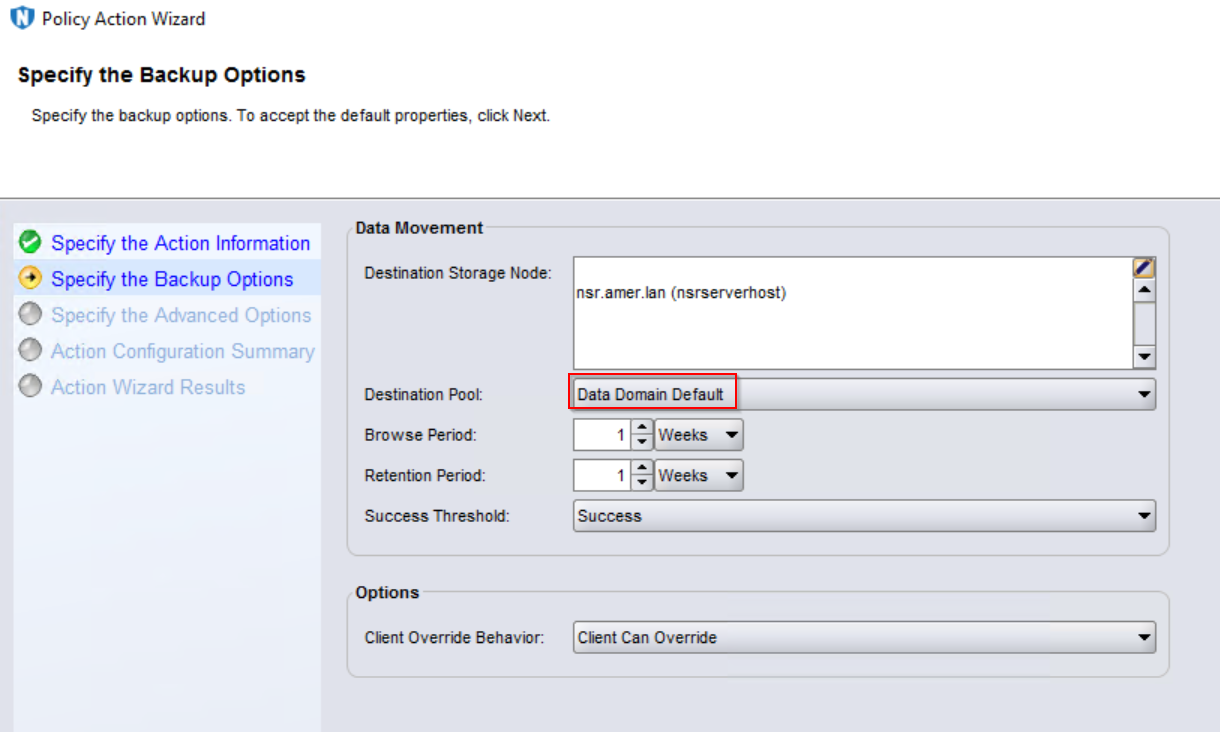
Pool mismatch. The pool defined in the client's workflow/action/pool is different from the pool defined in the NSR_DATA_VOLUME_POOL in the RMAN script.
Resolution
Replace the pool in the backup workflow/action/pool attribute to match the pool defined in the RMAN script. This change can be done from:
- NetWorker Web User Interface (NWUI)

- NetWorker Management Console (NMC)
Additional Information
NOTES:
1) The RMAN script does not have a default location. The script is saved to a location of the Oracle DBA's choosing.
2) By default, the RMAN log is saved to the directory where the RMAN command was run.
Article Properties
Article Number: 000220687
Article Type: Solution
Last Modified: 29 Oct 2024
Version: 1
Find answers to your questions from other Dell users
Support Services
Check if your device is covered by Support Services.