NVP-vProxy:当组中不存在虚拟机时,虚拟机备份状态显示失败
Summary: 空 VMware 组报告备份失败。
This article applies to
This article does not apply to
This article is not tied to any specific product.
Not all product versions are identified in this article.
Symptoms
- NetWorker VMware 保护集成配置了 vProxy Appliance。
- VMware 保护组使用与规则的动态关联进行配置,以确定组中哪些虚拟机和容器是动态的。
- 在动态环境中,标记可能不会返回任何导致空组的虚拟机。备份作状态标记为失败,并显示以下错误:
DD/MM/YYYY HH:MM:SS Getting list of VM work items.
DD/MM/YYYY HH:MM:SS No VM selected as part of static selection.
DD/MM/YYYY HH:MM:SS No excluded VM's are present.
DD/MM/YYYY HH:MM:SS No VMs obtained for Backup. Verify the static and rule based dynamic associations for VM selection.
DD/MM/YYYY HH:MM:SS Action backup vmware-vproxy 'backup' with job id 320010 is exiting with status 'failed', exit code 1
DD/MM/YYYY HH:MM:SS Action has finished with failures.
Cause
此行为是由于设计的代码更改而引入的。此故障的目的是警告备份管理员,配置的备份组不包含要备份的资源。
Resolution
提醒:在 19.9.0.2 中引入了新的更改,以允许将掩蔽此错误或警告标记为成功。NetWorker 19.8 及更低版本的支持期限已终止 (EOSL)。确保 NetWorker 服务器为 19.9.0.2 或更高版本,并执行下面概述的步骤。
必须将以下环境变量设置为忽略空的 VMware 保护组并将其标记为成功。
NSR_VPROXY_SUCCESS_ON_NO_VMS_FOUND=TRUE
Windows:
- 在 NetWorker 服务器上的环境变量> 系统变量下添加一个新变量,如下所示,并指定值 TRUE,如下所示:
NSR_VPROXY_SUCCESS_ON_NO_VMS_FOUND
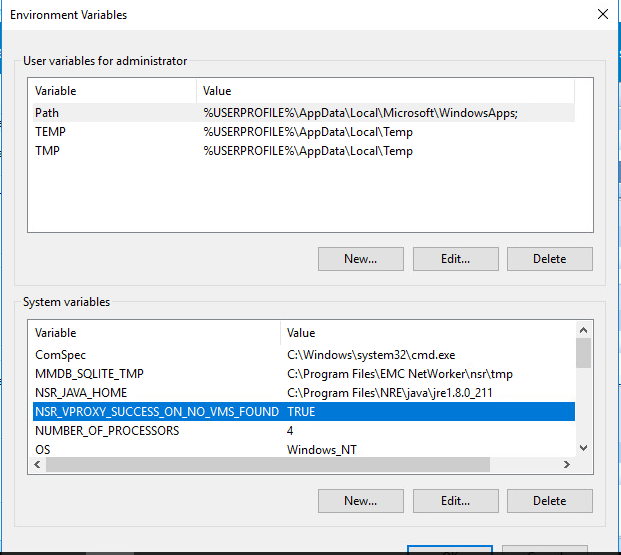
- 重新启动 NetWorker 服务器以使更改生效。
Linux:
- 将 以下行添加到 /nsr/nsrrc 文件:
NSR_VPROXY_SUCCESS_ON_NO_VMS_FOUND=TRUE
export NSR_VPROXY_SUCCESS_ON_NO_VMS_FOUND
- 连接到 nsradmin:
nsradmin -p nsrexec
- 选择 或打印“NSRLA”资源:
p type: nsrla
- 附加 属性:
append environment variable names: NSR_VPROXY_SUCCESS_ON_NO_VMS_FOUND
- 再次选择或打印“NSRLA”资源以验证您的更改:
p type: nsrla
- 重新启动 NetWorker 服务以使更改生效:
systemctl stop networker
systemctl start networker
应用这些更改后,预计空组将具有以下日志记录:
DD/MM/YYYY HH:MM:SS Getting list of VM work items.
DD/MM/YYYY HH:MM:SS No VM selected as part of static selection.
DD/MM/YYYY HH:MM:SS No excluded VM's are present.
DD/MM/YYYY HH:MM:SS No VMs obtained for Backup. Verify the static and rule based dynamic associations for VM selection.
DD/MM/YYYY HH:MM:SS Action backup vmware-vproxy 'backup' with job id 384021 is exiting with status 'did not run', exit code 0
DD/MM/YYYY HH:MM:SS Action has finished successfully.
Additional Information
Affected Products
NetWorkerProducts
NetWorker FamilyArticle Properties
Article Number: 000221209
Article Type: Solution
Last Modified: 03 Dec 2025
Version: 3
Find answers to your questions from other Dell users
Support Services
Check if your device is covered by Support Services.