VxRail: How to change iDRAC user permission using SSH and the RACADM command
Summary: How to change the iDRAC user permissions using SSH and the RACADM command. If the admin rights have been lost, change the permission using the other vxpsvc administrator user through RACADM. ...
This article applies to
This article does not apply to
This article is not tied to any specific product.
Not all product versions are identified in this article.
Instructions
1. Log in to the iDRAC UI with the root user (even without administrator permission) and verify the user ID.
- In this example, we change the test user's permission, ID 5.
- If you do not have permission to log in to the iDRAC using the UI, it can be done by logging in directly using SSH from the host.
- If you have access through the UI, the ID is next to the user in the iDRAC Settings Users tab.

- If you do not have access to the UI, you must SSH log in to the host, and run the command to find the user IDs:
/opt/vxrail/tools/ipmitool user list 1
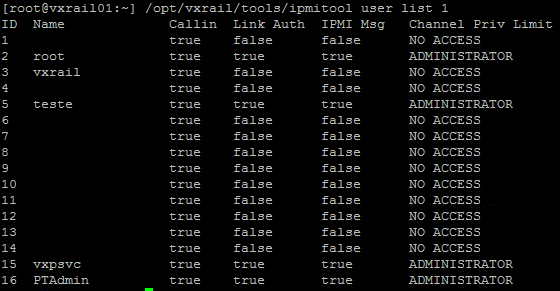
2. After finding the user ID, log in directly on RACADM with the vxpsvc user:
/opt/vxrail/bin/remotecmd -oStrictHostKeyChecking=no -oUserKnownHostsFile=/dev/null -oPubkeyAuthentication=yes -oPasswordAuthentication=no -i /etc/ssh/ssh_host_rsa_key -l vxpsvc 169.254.0.1
3. To change the user role to administrator permission, run the command:
set iDRAC.Users 5 privilege 0x000001ff
- In this case, the permission 0x000001ff is an administrator permission, but there are other permissions that are possible.
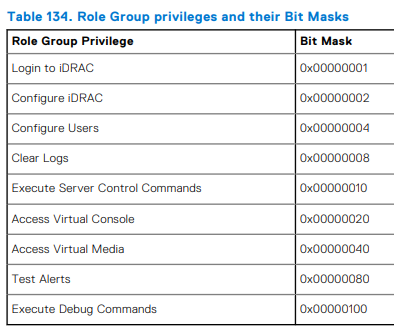
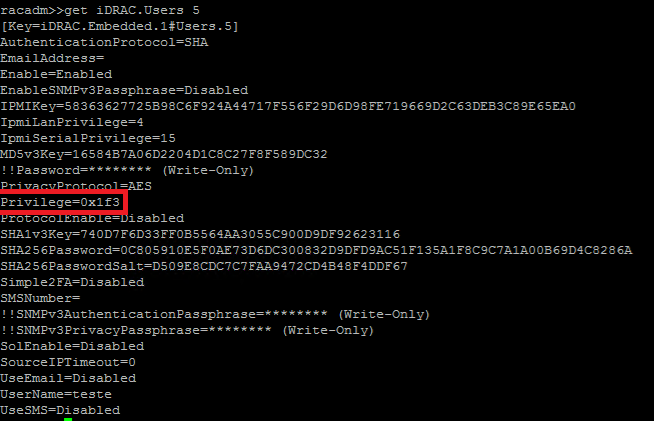
- If you want to compare the permission between the users, run the command:
get iDRAC.Users 5
Affected Products
iDRAC8, iDRAC9Article Properties
Article Number: 000221901
Article Type: How To
Last Modified: 16 Jul 2025
Version: 4
Find answers to your questions from other Dell users
Support Services
Check if your device is covered by Support Services.